

node-red-contrib-git-control
A Node-RED sidebar plugin for Git version control. Manage commits, branches, and remote synchronization directly from the editor without switching to the command line.
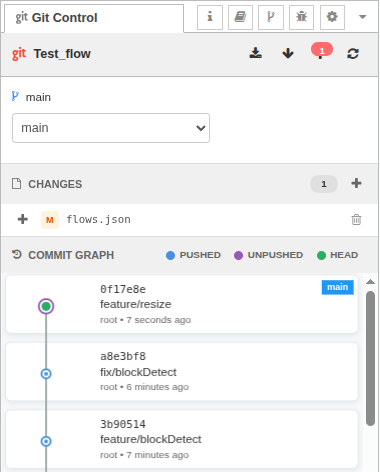
Why you might want it
- Visual commit graph: See your Git history with branch labels, push status, and parent relationships on a canvas-based timeline
- Detached HEAD safety: Automatically creates branches when committing from historical states to prevent orphaned commits
- Flow synchronization: Reloads flows after checkout/reset/pull so your editor stays in sync with disk changes
- Smart error messages: Context-aware suggestions guide you through issues
- Integrated workflow: Uses Node-RED's project system and SSH keys—no separate Git configuration needed
Quick start
Install the plugin in your Node-RED user directory:
bashcd ~/.node-red npm install @rosepetal/node-red-contrib-git-controlRestart Node-RED.
Open the Node-RED editor and look for the Git Control tab in the right sidebar (next to Debug, Config, etc.)
Node-RED 2.0+ with projects enabled is required. The plugin works only with Node-RED project directories that are Git repositories.
Using the sidebar
The Git Control sidebar has several sections:
Toolbar
- Fetch: Download updates from remote without merging
- Pull: Download from remote with merge (reloads flows automatically)
- Push: Upload your commits to remote (auto-sets upstream for new branches)
- Refresh: Reload all data from repository
Sync indicators show how many commits you are ahead/behind the remote.
Branch Selector
Switch between branches using the dropdown. The current branch is highlighted. Remote-only branches (not yet checked out locally) appear in the list.
Changes Panel
- Unstaged changes: Modified, created, or deleted files not yet staged
- Staged changes: Files ready to be committed
Use the + button to stage individual files or stage all at once. Use the - button to unstage. Click the trash icon on unstaged files to discard changes (⚠️ irreversible).
Commit Panel
When you have staged changes:
- Enter a commit message
- Click Commit
If you're in detached HEAD (viewing an old commit), the plugin creates a new branch automatically (named from-<hash>) to preserve your work.
Commit Graph
Visual timeline showing:
- Blue nodes: Commits already pushed to remote
- Purple nodes: Local commits not yet pushed
- Green center: Current HEAD position
- Branch labels: Which branches point to each commit
Click any commit to open a modal with actions:
- Switch to this commit: Checkout the commit (validates no uncommitted/unpushed changes first)
Hover over commits to see tooltips with hash and message.
Detached HEAD Warning
If you check out an old commit, a warning banner appears explaining you're in detached HEAD state. Click Return to Latest to go back to your branch tip.
HTTP API
The plugin exposes admin HTTP endpoints for scripting, testing, or external tools. Full API reference with request/response examples lives in docs/http-api.md.
Key routes:
GET /rosepetal-git/project-info- Project metadata, branch, sync statusPOST /rosepetal-git/log- Commit history with graph dataPOST /rosepetal-git/status- File changes and staging statePOST /rosepetal-git/commit- Create commit (auto-branches in detached HEAD)POST /rosepetal-git/push- Push to remote (auto-sets upstream)
All routes require git-control.read or git-control.write permissions when Node-RED authentication is enabled.