

@rosepetal/node-red-contrib-message-control
A Node-RED runtime plugin that remembers the last messages each node received and sent, with a short timestamped history. It gives you a live “what just happened?” snapshot without wiring extra debug nodes, and it is built so that it can stay enabled on a production runtime.
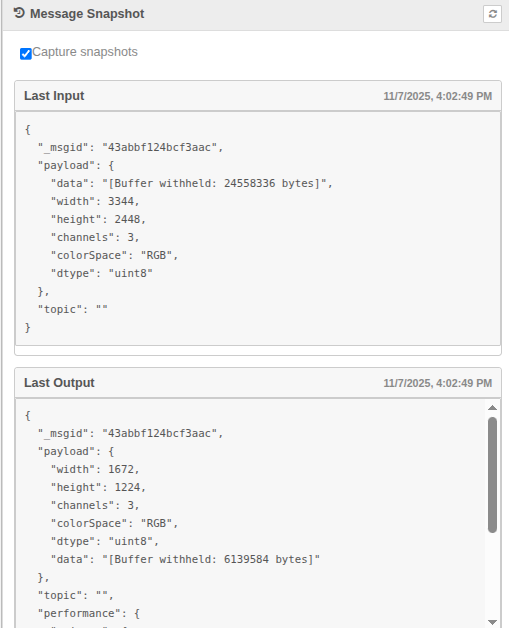
Why you might want it
- See data instantly: select any runtime node in the editor and the latest inbound/outbound payloads appear in the Info sidebar.
- Short history: the last few sampled messages per node and direction (default 10) are kept with their timestamps, under a global memory budget.
- Nothing gets lost on unwired outputs: messages a node sends to an output without wires (which Node-RED silently drops) are recorded too, with the output port.
- Safe on the message path: the hooks are synchronous, allocation-free and cost about 0.1 µs per message; snapshots are bounded, rate limited per node and capped by a global CPU budget. The plugin can never halt, delay or error a message.
- Stay lightweight: snapshots are cleaned (buffers, typed arrays, streams, long strings and base64 blobs become annotated placeholders) so they are safe to ship to the editor.
- Pause when needed: a single toggle removes the hooks from the router entirely; a paused plugin costs exactly nothing.
- Script-friendly: the same data, plus runtime statistics, is available over HTTP for tooling, tests, or dashboards.
- Read installed node code: list, search and read the files of any package installed in the user directory (or the core nodes), read-only — the only place where private packages' code can be seen.
- Send a message to any node: deliver a message to a node's input exactly like a wire would, without adding temporary inject nodes.
- Runtime log at hand: the last lines of Node-RED's log (2000 by default), structured with level and node id/type/name, filterable over HTTP — node construction errors only ever reach the log.
Quick start
- Change into your Node-RED user directory (usually
~/.node-red). - Install the plugin:bash
npm install @rosepetal/node-red-contrib-message-control1 - Optionally tune it inside
settings.js(every key is optional):jsplugins: { '@rosepetal/node-red-contrib-message-control': { captureEnabled: true, // start capturing on boot (default true) captureInterval: 250, // ms between two snapshots of the same node & direction; 0 = every message captureBudget: 5, // ms of snapshot CPU allowed per second across all nodes; 0 = unlimited historySize: 10, // snapshots kept per node and direction (0-100); 0 = only the last one historyMaxBytes: 16777216, // global memory budget of the history (estimated bytes) captureUnwired: true, // also record messages sent to outputs without wires logBufferSize: 2000, // log entries kept for GET /logs (0 = no log buffer) logLevel: 'info', // most verbose level kept: fatal|error|warn|info|debug|trace moduleFiles: true, // read-only access to installed module files (GET /module-files…) sendToNode: true, // POST /send delivers messages to node inputs snapshotLimits: { // hard caps applied to every snapshot maxDepth: 6, maxArrayLength: 50, maxObjectKeys: 60, maxStringLength: 2048, maxValues: 2000, maxChars: 262144 } } }1
2
3
4
5
6
7
8
9
10
11
12
13
14
15
16
17
18 - Restart Node-RED.
Node-RED 3.0+ is required because the plugin relies on the RED.hooks runtime API.
Using the snapshots in the editor
- Open the Info sidebar.
- Click any node on the canvas.
- A Message Snapshot card appears with two sections:
- Last Input: the most recent sampled message the node received.
- Last Output: the most recent sampled message it sent.
- Use the refresh button on the card to re-fetch without changing selection.
Snapshots use a clean format: large payloads are summarised, but every placeholder includes the original length so you can judge the size at a glance. When a node is busier than the capture interval, the card shows how many newer messages went by since the sample was taken. When the last output went to an output without wires, the card says so.
Pausing/resuming capture
At the top of the Message Snapshot card you will find a Capture snapshots switch. Turning it off:
- Removes the runtime hooks from the message router.
- Clears previously stored snapshots.
- Changes the card status to “Snapshots paused. Enable capture to resume.”
Turn it back on whenever you are ready—the view refreshes automatically for the currently selected node.
Inspecting snapshots over HTTP
If you prefer to script or automate, the plugin exposes a small admin API that mirrors the sidebar data (list nodes, inspect a specific node and its history with ?history=N, get/set the capture settings, read runtime statistics). Details and example payloads live in docs/http-api.md.
Runtime tools over HTTP
Besides the snapshots, the plugin offers tools for diagnosing a runtime from outside (e.g. an MCP server), all on the admin API under /rosepetal/message-control (details in docs/http-api.md):
GET /logs— the last lines of Node-RED's log, filtered by level, text, node id, node type and time. The buffer is a fixed ring filled by aRED.loghandler that does O(1) work per line; text filters are plain substrings (never caller-supplied regular expressions, which could stall the runtime).GET /module-files,/module-files/search,/module-files/read— read-only access to the files of a package installed inuserDir/node_modules(ornode-redfor the core nodes). Paths are confined to the package's real directory (symlinks are not followed out of it), binary files are skipped, and listing/searching is bounded in files, bytes, matches and time, with non-blocking file I/O.POST /send— delivers a message to a node's input like a wire (node.receive), on the next turn of the event loop so the request never runs the node's code itself. The node really processes it: whatever it does downstream happens. Answers202 {id, type, name, msgid, at}(at: runtime clock when it was queued — use it assincefor/logs).
How it works
- Hooks into
onSend(outputs) andonReceive(inputs) viaRED.hooks, so every runtime node is observed without patching node prototypes. - The hooks are one-argument synchronous handlers, the cheapest kind Node-RED supports. Per message they update a counter and a timestamp in a
Mapentry and return: no clock reads (Date.now()costs more than 1 µs on some VMs, so a coarse clock refreshed by an unref'd 50 ms timer is used instead), no allocation, no cloning, no serialisation. - Everything runs inside
try/catchand never returns a value: Node-RED treats a hook that throws, or returnsfalse, as a reason to drop the message, so the plugin never does either. Hook errors are counted in the stats and logged at most once per minute. - A snapshot is only taken when the node's capture interval has elapsed (default 250 ms per node and direction), when the global CPU budget for the current second is not spent (default 5 ms per second, i.e. at most 0.5 % of one core), and when the node did not recently produce a slow capture (a capture above 2 ms puts that node on a 10 s backoff).
- The snapshot walker never deep-clones or
JSON.stringifys the message. It reads the message once with hard limits on depth, keys per object, items per array, string length, total values (maxValues) and total characters (maxChars), and it treats buffers, typed arrays, streams, sockets, HTTP request/response objects and promises as opaque placeholders. Its cost is independent of the size of buffers, strings and arrays. - Every snapshot taken is also appended to the node's history for that direction, with its capture time, its sequence number (the message count at that moment, so sampling gaps are visible) and, for outputs, the port and whether it had wires. Each list keeps
historySizeentries; on top of that, all histories share ahistoryMaxBytesbudget (estimated from the characters and values kept) and the oldest snapshots of any node are dropped first. Bookkeeping is O(1) amortised per snapshot. - Node-RED never calls the
onSendhook for a message that goes nowhere: a node without wires gets a no-opsend, and outputs without wires are skipped. To record those, the plugin wrapsNode.prototype.updateWires(called whenever a node is created or rewired) and gives only the nodes that have an output without wires their ownsendwrapper. The wrapper records the unwired part with the same sampling rules and then behaves exactly like Node-RED's ownsend(still a no-op when nothing is wired). Fully wired nodes keep Node-RED'ssenduntouched and pay nothing. Disabling capture, or settingcaptureUnwired: false, restores Node-RED's own functions. - Snapshots, node metadata and timestamps live in memory, keyed by node id, and are pruned on every deploy.
- HTTP responses are bounded too: a history request returns at most about 2 MB of snapshots (newest first), so building the response never stalls the runtime.
Measured overhead
Chain of 7 function nodes on a real Node-RED 4.1.8 runtime (npm run bench, Node 22, best of 3 runs, message with a 50-item detections array plus metadata):
| configuration | p50 latency per message | throughput (burst) | snapshots taken | avg / max snapshot cost |
|---|---|---|---|---|
| no plugin | 177 µs | 5607 msg/s | – | – |
| v1.0.0 (deep clone + stringify per hop) | 3287 µs | 306 msg/s | every hop | – |
| this version, defaults | 184 µs | 5200 msg/s | 24 for 2000 messages | 0.13 ms / 0.56 ms |
this version, captureInterval: 0, captureBudget: 0 (sample every message) | 500 µs | 1905 msg/s | 25478 | 0.03 ms / 5.2 ms |
Adding a 4 MB image buffer to every message does not change the numbers for this version (buffers are never copied or read); the previous version cloned the whole message twice per hop.
Limitations & notes
- Snapshots live only in memory. Restarting Node-RED clears them; a deploy drops the nodes that no longer exist.
- Under sustained load a snapshot is a sample, not necessarily the very last message: check
inputSkipped/outputSkippedandlastInputSeenAt/lastOutputSeenAtin the HTTP API to know how far behind it is. SetcaptureInterval: 0andcaptureBudget: 0while debugging a quiet flow if you need every message. lastInputSeenAt/lastOutputSeenAthave ~50 ms resolution; capture timestamps are exact.- Nodes fed directly through
node.receive()(the inject button,link infed bylink out, catch/status/complete nodes) are observed through theonReceivehook like any other node. - Enumerating the keys of a very large dictionary (tens of thousands of keys in one object) is O(n) in V8 no matter how many keys are kept; such nodes are automatically sampled at most every 10 s.
- The HTTP routes require
flows.read(GET) orflows.write(POST) permissions when admin authentication is enabled. - Only runtime nodes that have processed a message since the plugin was enabled (plus the nodes of the deployed flows) appear.
- Unwired-output capture covers every node created or rewired while capture is on. After re-enabling capture at runtime, nodes inside subflow instances are covered again from the next deploy. A node whose
wiresarray has fewer entries than it has outputs (only possible in hand-written flows) may miss sends to the missing ports.
Development
npm test        # unit tests + end-to-end tests (the latter need a resolvable node-red: local, global, or NODE_RED_PATH)
npm run bench # benchmark against a real Node-RED runtime; --mode none for the baseline, --payload small|medium|big2