

Audit Trail
Rosepetal records every relevant user and system action in a tamper-evident audit trail, providing the traceability and evidence required for audit and regulatory compliance (e.g. 21 CFR Part 11), based on an LDAP/Active Directory authentication architecture and automatic report generation.
1. Executive summary
The architecture is as follows:
- User authentication is performed through an application login against Client LDAP / Active Directory, avoiding the need to maintain individual Windows users on the Panel PC.
- The Panel PC Gateway / Auth Service validates credentials against LDAP/AD, retrieves the user's corporate groups and assigns the Rosepetal roles defined by Client.
- The Rosepetal Controller does not store or validate corporate passwords and does not access LDAP/AD directly.
- The Panel PC acts as the controlled integration point between the Client network and the internal Rosepetal network. The Rosepetal Controller does not access the Client local network, except through the controlled channel with the Panel PC.
- The Audit/Event Store on the Panel PC stores auditable events transactionally for traceability, report generation and retry handling.
- There is no Audit Review Manager with UX. Instead, an Audit & Batch Report Generator Service without a graphical user interface is implemented.
- Reports are generated automatically in PDF and/or CSV and published to a shared directory defined by Client.
- The shared folder is managed by Client infrastructure for backup, retention, availability and document review.
Scope note: the solution provides technical controls supporting 21 CFR Part 11 compliance: individual authentication, role_based authorization, audit trail, batch traceability, report integrity, hashes, retention and generation of readable copies. Electronic signature inside Rosepetal is contemplated.
2. Design decisions
| Area | Decision |
|---|---|
| Authentication | Application login against Client LDAP/Active Directory server. |
| Windows users | No need to create or maintain individual Windows users for each operator on the Panel PC. |
| Service account | Technical access to LDAP/AD may be performed using a service account approved by IT, especially for user, group and attribute searches. |
| Individual user | The individual user identity is obtained from LDAP/AD and recorded in each auditable action. |
| Roles | Profiles are mapped against LDAP/AD groups: Operator, Supervisor, Maintenance/Engineering and Administrator. |
| Audit Review | There is no application with UX for manual audit trail review inside Rosepetal. |
| Reports | Batch, audit, alarm/incidence and model/recipe reports are generated automatically. |
| Format | Readable PDF and, if required by Client, additional CSV for electronic processing. |
| Target folder | Shared GxP directory defined by Client and integrated with corporate backup/retention. |
| Electronic signature | No electronic review signature is implemented inside Rosepetal. |
| AI integrity | Version/hash control of the AI model and the active recipe is incorporated as evidence of non-alteration. |
3. Architecture
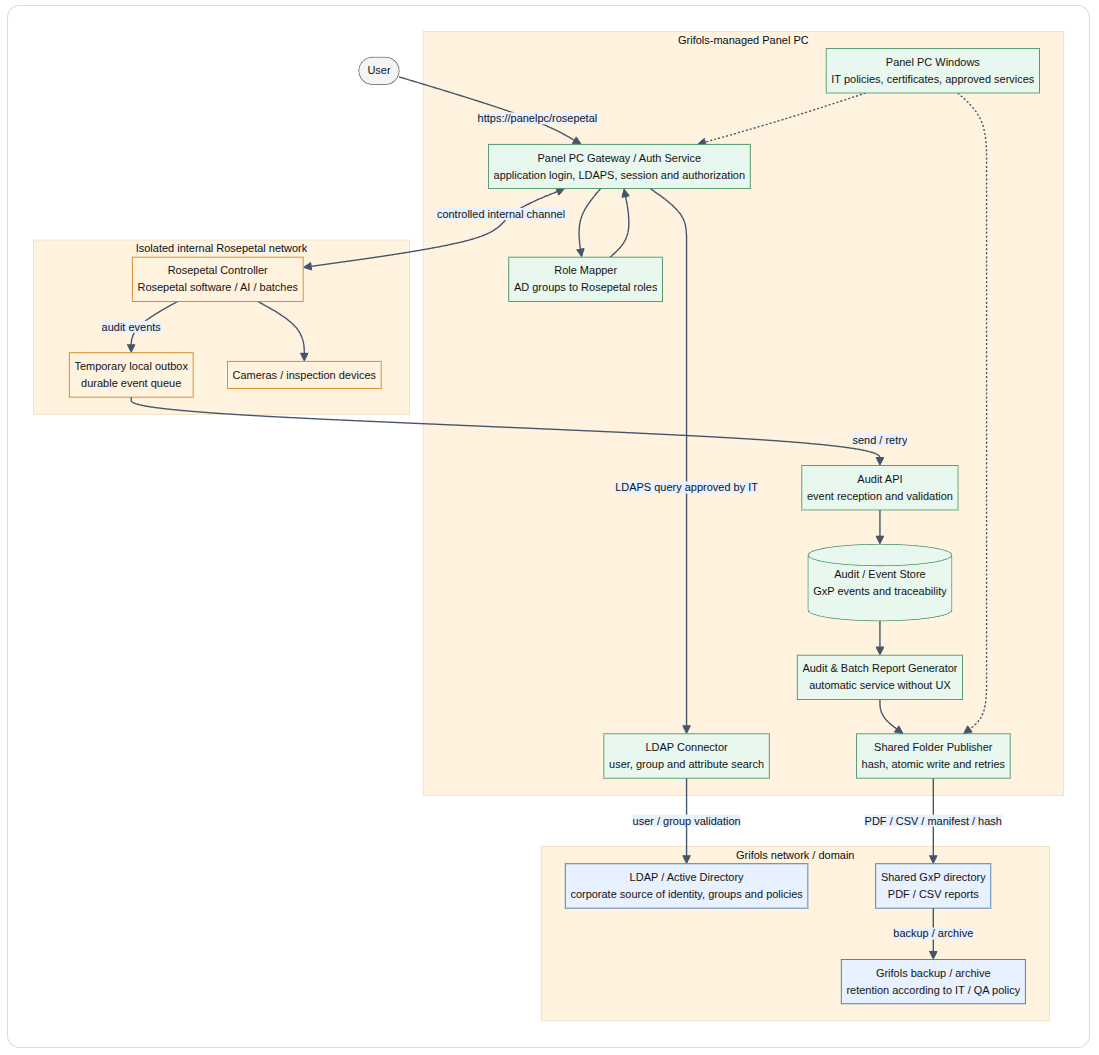
Separation principle
| Element | Responsibility |
|---|---|
| Panel PC | Application authentication, authorization, audit reception, transactional storage, report generation, publication to the folder and integration control. |
| Panel PC Windows | Client-managed equipment under IT policies. Provides secure environment, certificates, network permissions, service execution and controlled access to approved resources. |
| Panel PC Gateway / Auth Service | Manages the application login, validates against LDAP/AD, creates the Rosepetal session, generates access tickets and authorizes access to the controller. |
| LDAP / Active Directory | Corporate source of identity, account status, users, groups, profiles and authentication policies. |
| Role Mapper | Converts LDAP/AD groups approved by Client into functional permissions in Rosepetal. |
| Rosepetal Controller | Runs the Rosepetal software, batches, recipes, AI model and communication with cameras/devices. It does not directly access LDAP/AD. |
| Audit / Event Store | Transactional store of auditable events used for traceability, integrity control, report generation and retries. |
| Audit & Batch Report Generator | Automatic service without UX that generates PDF/CSV reports by batch, inter-batch period, alarms, audit and model/recipe. |
| Shared directory | Final document repository for generated reports, managed by Client for backup, retention, access and review. |
4. Installed components
4.1 On the Panel PC
| Component | Function |
|---|---|
| Panel PC Gateway / Auth Service | Receives https://panelpc/rosepetal, manages the application login, validates against LDAP/AD and authorizes access to the Rosepetal Controller. |
| LDAP Connector | LDAPS connector for user searches, credential validation, group queries and retrieval of attributes approved by IT. |
| Role Mapper | Maps Active Directory groups to Rosepetal functional roles: Operator, Supervisor, Maintenance/Engineering and Administrator. |
| Audit API | Receives audit events sent by the controller; validates origin, session, integrity and format. |
| Audit / Event Store | Protected local database where auditable events, original payload, normalized event, hashes and publication status are stored. |
| Audit & Batch Report Generator Service | Automatic service without graphical interface that generates batch, audit trail, alarm/incidence and model/recipe reports. |
| Shared Folder Publisher | Publishes files to the shared folder using controlled writing, hash, manifest, retries and result logging. |
4.2 On the Rosepetal Controller
| Component | Function |
|---|---|
| Rosepetal Controller Software | Main Rosepetal software for operation, inspection, batch management, recipes, AI and communication with cameras/devices. |
| Session client | Module that exchanges the access ticket against the Panel PC Gateway and receives the already authorized identity/privileges. |
| Audit client | Module that sends audit events to the Panel PC. |
| Temporary local outbox | Durable local queue to prevent event loss if the connection with the Panel PC is temporarily interrupted. |
| Model / Recipe Integrity Client | Module that reports the AI model version/hash, active recipe and relevant changes for inclusion in the audit trail and reports. |
The controller's local outbox is not the official audit repository and does not replace the folder. Its purpose is technical: to retain events pending delivery and resend them to the Panel PC when communication is restored.
5. Main user access flow
The user accesses through the Panel PC, but the individual identity is validated against LDAP/AD from the application. The controller does not authenticate against LDAP and does not receive corporate credentials.
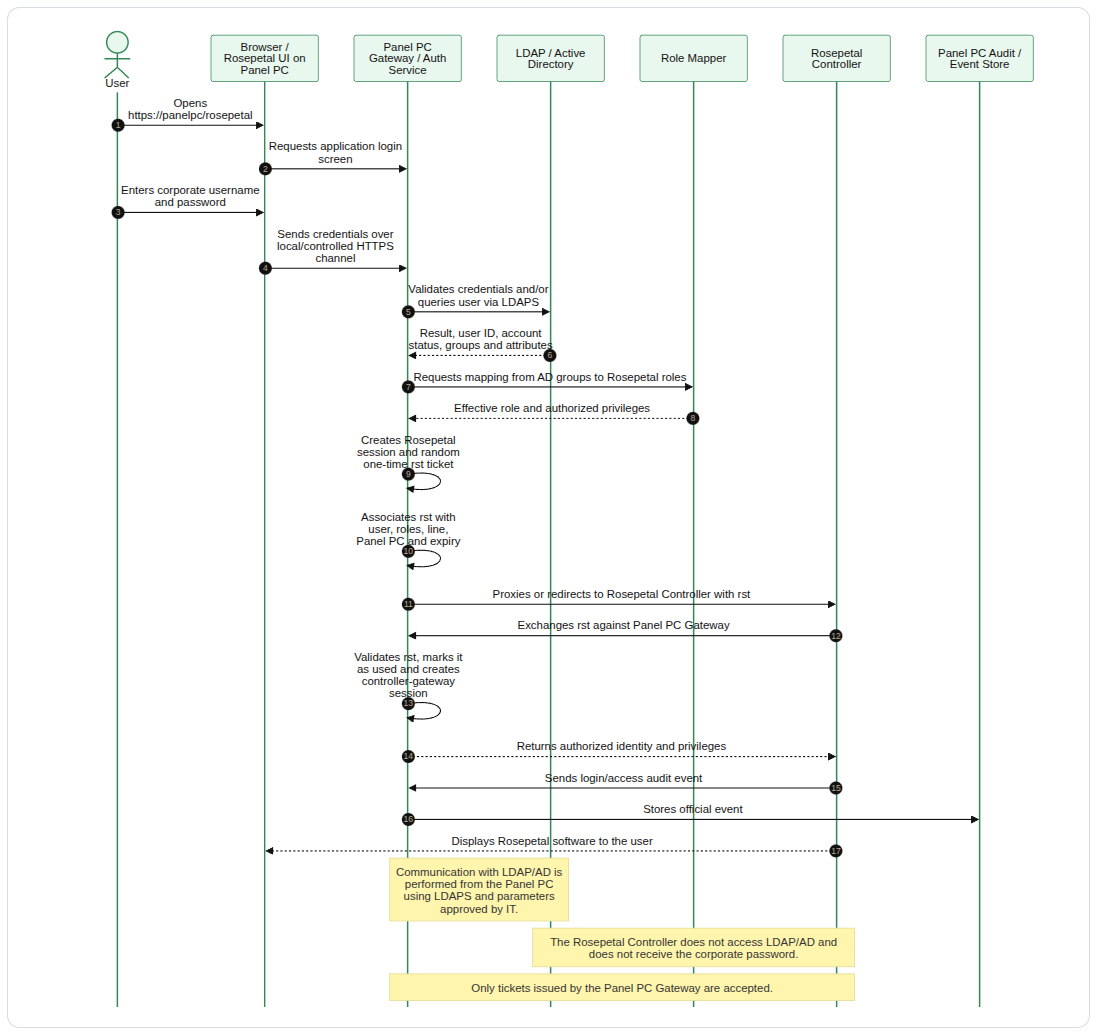
6. Access ticket rst
The rst ticket is the separation mechanism between corporate authentication and the technical controller-gateway session. It is a random, one-time value generated by the Panel PC Gateway after validating the user in LDAP/AD.
| Property | Description |
|---|---|
| Randomness | 128 or 256 cryptographically generated bits. |
| One-time use | Once exchanged by the controller, it is marked as used. |
| Short expiry | Validity: 30 to 120 seconds. |
| Not reusable | A used or expired ticket is rejected. |
| Not a password | The ticket only serves to initiate the controller-gateway session. It does not contain or replace the corporate password. |
| Associated with identity | The gateway associates it with the LDAP/AD user, roles, line, Panel PC, session and expiry. |
| Auditable | Ticket issuance, exchange, expiry or rejection is recorded as auditable technical events. |
7. Audit generation and storage flow
Audit events are generated in the Rosepetal Controller, because that is where the Rosepetal software runs and operational actions occur. Reception, normalization, transactional persistence and report generation are performed on the Panel PC.

Responsibility rule
| Data | Responsible party |
|---|---|
| User identity | Panel PC Gateway / Auth Service, based on LDAP/Active Directory. |
| Effective role | Panel PC Role Mapper, based on LDAP/AD groups approved by Client. |
| Action performed in the Rosepetal software | Rosepetal Controller. |
| Old value / new value | Rosepetal Controller, based on the controlled system state. |
| Reason for change | User, captured by the Rosepetal software where applicable. |
| Transactional record | Panel PC Audit / Event Store. |
| Document report | Panel PC Audit & Batch Report Generator. |
| Final GxP archive | Shared GxP directory managed by Client. |
8. Official audit and report repository
The system uses two layers:
- Panel PC -> Transactional Audit / Event Store
- Panel PC -> Report Generator -> Shared GxP directory
The Panel PC Audit / Event Store keeps audit events as the transactional repository and source for automatic generation. The shared directory keeps the generated reports as documentary evidence available for review, backup and retention under Client infrastructure.
The Rosepetal Controller may have a temporary local queue, but it is not considered the official source or the final document archive.
Rationale:
- The Panel PC is Client-managed and under IT control.
- The Panel PC has controlled access to the corporate identity context through LDAP/AD.
- The Panel PC can be integrated with Client backup/restore/archive mechanisms.
- The audit trail remains available for automatic report generation without directly accessing the controller.
- The reports are published to a shared folder, facilitating backup, retention and review by Client.
- The Rosepetal Controller can remain isolated from the Client network.
9. Audit & Batch Report Generator without UX
The system uses an Audit & Batch Report Generator Service without a graphical user interface.
Main functions:
| Function | Description |
|---|---|
| Automatic generation | Generates reports without manual intervention at batch closure, during inter-batch periods or on configured events. |
| Batch Report | Generates a batch report with batch data, recipe, users, counters, correct units, rejected units, status and critical parameters. |
| Audit Trail Report | Generates a report with auditable events, user, date/time, message, batch, event, result and metadata. |
| Alarm / Incidence Report | Generates a separate report for alarms, incidences, resets, validations and relevant states. |
| Recipe / Model Integrity Report | Generates evidence of active recipe, AI model version, hash and version changes. |
| PDF export | Produces readable copies for human review and audit. |
| Optional CSV export | Produces structured data for analysis, filtering or electronic review if required by Client. |
| Document publication | Writes reports to the shared folder using atomic writing and without overwriting existing files. |
| Retries | If the shared folder is unavailable, keeps the report pending and retries publication. |
| Generation audit | Records successful generation, failure, retry, publication, hash and final location. |
Manual queries, interactive filters, periodic review within a screen and electronic review signature in Rosepetal are not included. Report review is performed outside the Rosepetal UX, based on the files published in the Client folder.
10. Automatic Report Generator flow
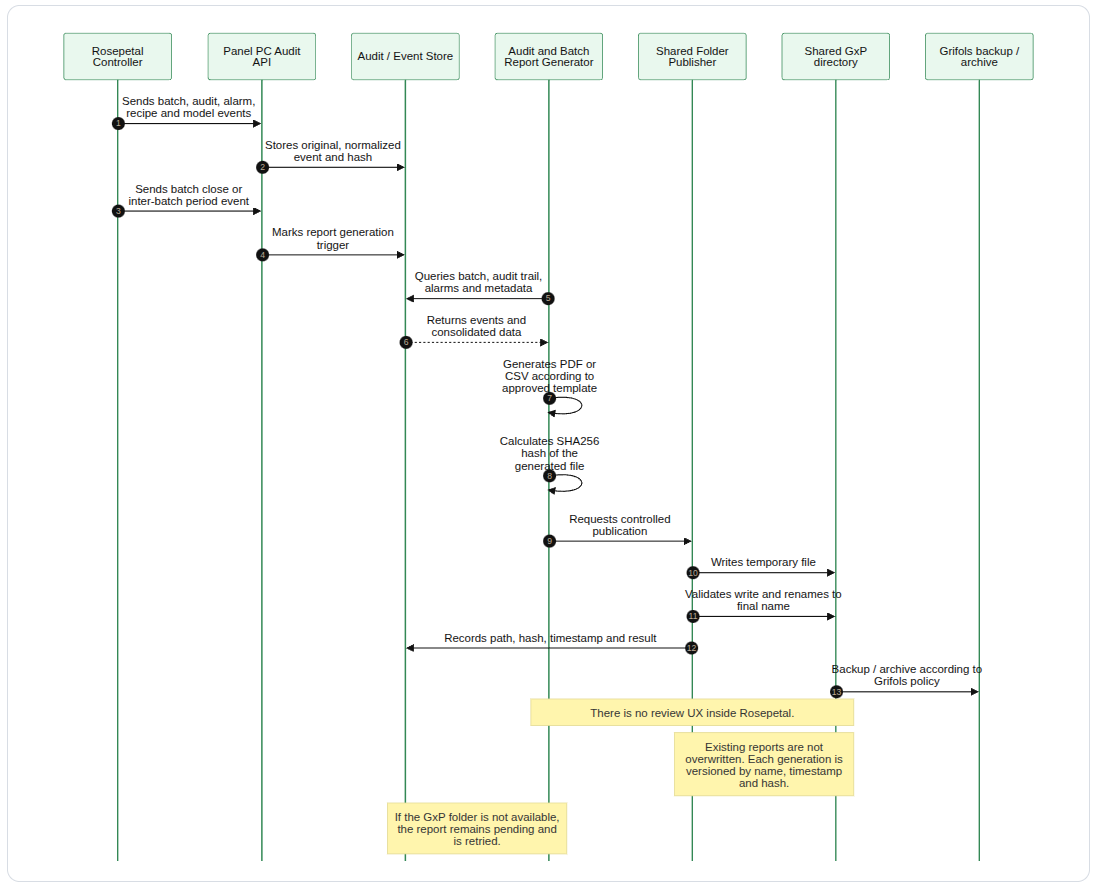
11. Publication flow to folder
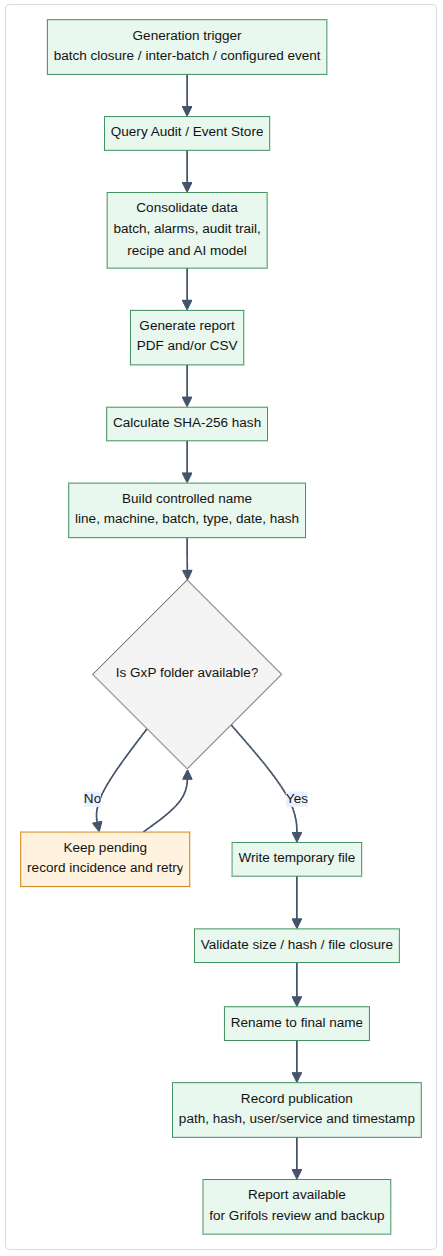
12. Network requirements
| Interface | Use |
|---|---|
| NIC 1 - Client network | LDAP/Active Directory, corporate policies, certificates, shared folder, backup/archive and services approved by IT. |
| NIC 2 - Internal Rosepetal network | Controlled communication with Rosepetal Controller. It does not act as a general router between networks. |
| Source | Destination | Use |
|---|---|---|
| Local browser / user | https://panelpc/rosepetal | Access to the Rosepetal application via Gateway. |
| Panel PC Gateway / Auth Service | Client LDAP/Active Directory | User authentication, attribute search and group reading through LDAPS or an IT-approved mechanism. |
| Panel PC Gateway | Rosepetal Controller | Proxied/controlled access to the Rosepetal software and rst ticket exchange. |
| Rosepetal Controller | Panel PC Audit API | Sending audit events, batch status, alarms, recipe and AI model. |
| Panel PC Report Publisher | Shared GxP directory | Publication of PDF/CSV reports, manifest and hash. |
| Shared GxP directory | Client backup/archive | Backup, restore, retention and archive according to IT/QA policy. |
13. Security and access control
Authentication
- User authentication is performed in the Rosepetal application deployed on the Panel PC.
- Client LDAP/Active Directory is used as the corporate identity source.
- Access to LDAP/AD uses LDAPS or an equivalent mechanism approved by IT.
- The system may use a service account to locate users and query groups/attributes, according to Client policy.
- The corporate password is not stored, not logged, not sent to the controller and not included in audit events.
- The Rosepetal Controller does not store or validate corporate passwords.
- Roles and privileges are derived from LDAP/AD groups or rules approved by Client.
Authorization
- The Panel PC Gateway determines whether the user has access.
- The controller receives only an already validated identity and authorized privileges.
- Actions performed are recorded with the associated individual user.
- Critical GxP actions are blocked if the user does not have a sufficient role.
- The permission matrix covers screens, actions, parameters, recipe, model, operation and administration.
Audit
- The audit trail cannot be disabled from normal operation.
- Audit events are sent to the Panel PC.
- If an event cannot be sent temporarily, the controller keeps it in the local outbox until it can be resent.
- If events cannot be recorded safely, critical GxP operations are blocked or generate an alarm, according to criteria agreed with QA/IT.
- Report generation, failure, retry and publication are also auditable.
- Generated reports include a hash or integrity manifest to support subsequent verification.
14. Key decisions
| Question | Decision |
|---|---|
| Where is the user authenticated? | In the Rosepetal application executed from the Panel PC, validating against Client LDAP/Active Directory. |
| Does the user need to log in individually to Windows? | No. Maintaining individual Windows users on the Panel PC is avoided. |
| Where is the Rosepetal software located? | On the Rosepetal Controller, accessible in a controlled way through the Panel PC Gateway. |
| Does the controller access AD/LDAP? | No. |
| Does the Gateway perform a direct LDAP bind? | Yes, from the Panel PC and as approved by IT, for authentication, user search, groups and attributes. |
| Where is transactional audit stored? | In the Panel PC Audit / Event Store. |
| Where are the official reports stored? | In the shared directory defined by Client. |
| Can the controller have a local database? | Yes, but only as a temporary outbox or technical backup, not as the official repository or final document archive. |
| Where is the audit trail queried/reviewed? | Outside Rosepetal, based on the PDF/CSV reports automatically published to the folder. |
| Where is the audit trail exported? | Export is automatic from the Panel PC to the shared directory. |
| Where is the audit review signed? | Out of project scope. |
| Does the Panel PC route traffic between networks? | No. It acts as an application gateway, not as a router. |
15. Roles and authorization matrix
Four base profiles are defined and mapped to specific LDAP/AD groups provided by Client.
| Profile | Intended use | Example permissions |
|---|---|---|
| Operator | Daily operation. | Login, monitoring, basic operation, batch start/stop if applicable, status visualization and basic acknowledgement of permitted alarms. |
| Supervisor | Production supervision. | Operator permissions, alarm validation, batch status review and controlled actions on batch/recipe according to the matrix. |
| Maintenance / Engineering | Technical support and system adjustment. | Diagnostics, maintenance, limited technical configuration, functional tests, access to technical logs and permitted parameterization. |
| Administrator | System administration. | Configuration management, assignment of permitted parameters, local integration administration, advanced diagnostics and reserved functions. |
The permission matrix lists every screen, action and auditable event. This matrix is an important input for FAT/SAT and validation.
16. Auditable events
| Category | Events | |
|---|---|---|
| Access | Successful login, failed login, logout, expired session, locked user, assigned role, user change. | |
| Session | Batch | Batch start, batch end, batch status change, cancellation, pause, restart, active batch change. |
| Recipe | Selection, activation, modification, import/export, version change and critical parameters. | |
| AI Model | Model load, version change, hash calculation, integrity validation, integrity failure. | |
| Alarms | Incidences, alarms activated, alarm reset, alarm validation/acknowledgement, subsystem failures. | |
| Operation | Machine start/stop, mode changes, relevant inspection events, rejection, critical confirmations. | |
| Reports | Successful generation, failure, retry, publication, hash, file name, folder path. |
Audit trail fields
| Field | Description |
|---|---|
actionId | Immutable identifier. |
actionType | Access, session, alarms, operation, reports |
roleId | Effective profile in the session. |
source | Controller, Gateway, Auth Service, Report Service, Publisher or other component. |
timestamp | Date/time with time zone or synchronized time reference. |
userId | Individual LDAP/AD user / contingency user. |
| Payload | |
batchId | Active batch, if applicable. |
configId | Active recipe identifier, if applicable. |
configName | Active recipe name, if applicable. |
configVersion | Active recipe version, if applicable. |
oldValue | Previous value, if applicable. |
newValue | New value, if applicable. |
diffValue | calculated difference between the previous value and the current value, if applicable. |
comments | Reason for change, if applicable. |
result | Success, failed, rejected, blocked, pending, published, if applicable. |
17. Reports and format
17.1 Report types
| Report | Generation point | Content |
|---|---|---|
| Batch Report | At batch closure. | Batch data, recipe, start/end user, counters, correct/rejected units, critical parameters, AI model and final status. |
| Audit Trail Report | At batch closure and/or inter-batch period. | Auditable events with user, date/time, action, message, batch, result and metadata. |
| Alarm / Incidence Report | At batch closure and/or inter-batch period. | Alarms, incidences, resets, validations, alarm status and associated events. |
| Recipe / Model Integrity Report | On recipe/model load or change and at batch closure. | Recipe, version, critical parameters, AI model, hash, activation date and user. |
| Report Generation Log | For each generation/publication. | File name, path, hash, timestamp, trigger, result, errors and retries. |
17.2 Batch Report
The Batch Report follows the pattern observed in the Client examples and includes at least:
- Report title.
- Machine / line / controller identification.
- Batch code.
- Reference / product / description.
- Recipe name.
- Recipe version.
- Start batch time/date.
- Start batch user.
- End batch time/date.
- End batch user.
- Report generated by.
- Report generation date/time.
- Total units processed/fed.
- Total correct units.
- Total rejected units.
- Rejection counters by category.
- Batch status.
- AI model ID, version and hash.
- Critical recipe/process parameters at batch start and batch end, where applicable.
17.3 Audit Trail Report
The Audit Trail Report includes:
- Service or user generating the report.
- Generation date/time.
- Applied filter: batch, time range or inter-batch period.
- Event table.
- User.
- Date/time.
- Message.
- Event type.
- Result.
- Batch identification.
- Recipe/model reference if applicable.
17.4 Naming convention
<SITE>_<LINE>_<MACHINE>_<BATCH>_<REPORT_TYPE>_<YYYYMMDD_HHMMSS>_<HASH8>.pdfExamples:
Client_IE_ROSEPETAL_A04K150293_BATCH_20260511_111331_A1B2C3D4.pdf
Client_IE_ROSEPETAL_A04K150293_AUDIT_20260511_111302_F9E8D7C6.pdf
Client_IE_ROSEPETAL_A04K150293_ALARMS_20260511_111302_91AB34EF.csv17.5 Publication requirements
- Write access limited to the authorized service.
- Read access according to Client policy.
- Record of each generated file.
- SHA-256 hash per file.
- Atomic write mechanism: generate temporary file, validate hash and rename to final name.
- Controlled retries if the directory is unavailable.
- Alarm/event if a report cannot be published within the agreed time.
- No overwriting of already generated reports.
- Versioning by file name, timestamp and hash.
18. AI model and recipe integrity control
Because Rosepetal uses AI models, explicit evidence of model and recipe integrity is provided.
| Element | Evidence |
|---|---|
| AI Model | Model ID, version, training date, deployment date and SHA-256 hash of the model file. |
| Recipe | Recipe ID, version, critical parameters, user who activates it and date/time. |
| Dataset / training package | Reference to dataset, training package or validated evidence where applicable. |
| Model change | Audited event with user, previous model, new model, previous hash and new hash. |
| Batch closure | The report indicates which model and recipe were active during the batch. |
| Subsequent verification | The hash allows demonstration that the model used has not been modified with respect to the validated version. |
19. Client dependencies
| Dependency | Required detail |
|---|---|
| LDAP/AD server | URL/IP, port, domain, LDAPS and availability. |
| Certificates | Root/intermediate certificate required for LDAPS, if applicable. |
| Base DN | Base DN for user and group search. |
| User filter | LDAP filter to locate and authenticate users. |
| Attributes | Username, display name, email, groups, account status and other required attributes. |
| AD groups | Groups for Operator, Supervisor, Maintenance/Engineering and Administrator. |
| Session policy | Expiry, lockout, login retries and inactivity timeout. |
| Directory path | Shared directory path. |
| Permissions | Write permissions for the service and read/review permissions for Client. |
| Final format | Confirmation of PDF, CSV or both. |
| Hash | Confirmation of whether the hash must be visible in the PDF, in a sidecar manifest or both. |
| Naming | Confirmation of final report naming convention. |
20. Annex 1: Audit Event Catalog
| Action Type | Action ID |
|---|---|
| access | access_login_success ()access_login_failed ()access_logout ()access_session_expired ()access_role_not_assigned (*) |
| actions | bypass_activatebypass_deactivateconveyor_activateconveyor_deactivate |
| log | log_startlog_stoplog_show_errorslog_image_upload |
| capture | capture_startcapture_stopcapture_start_uploadcapture_stop_uploadcapture_remove_images |
| alarms | alarm_detectedalarm_reset |
| operation | operation_machine_startoperation_machine_stopoperation_software_restart |
| reports | report_failure (*) |
| session | session_batch_startsession_batch_stopsession_batch_restart |
session_recipe_creationsession_recipe_deletionsession_recipe_renamesession_recipe_model_changesession_recipe_modificationsession_recipe_importsession_recipe_exportsession_recipe_version_change | |
session_ai_model_loadsession_ai_model_version_changesession_ai_model_hash_calculation |
(*) Generated on Panel PC
21. Annex 2: Permissions Catalog
| Permission Types |
|---|
bypass_activate |
bypass_deactivate |
conveyor_activate |
conveyor_deactivate |
log_start |
log_stop |
log_show_errors |
log_image_upload |
capture_start |
capture_stop |
capture_start_upload |
capture_stop_upload |
capture_remove_images |
alarm_reset |
operation_machine_stop |
operation_software_restart |
session_batch_start |
session_batch_stop |
recipe_creation |
recipe_deletion |
recipe_batch_deletion |
recipe_batch_nok |
recipe_rename |
recipe-read |
recipe_model_change |
recipe_rule_creation |
recipe_rule_deactivation |
recipe_rule_activation |
recipe_element_creation |
recipe_element_removal |
recipe_element_classname_change |
recipe_presence_source_selection |
recipe_rule_rename |
recipe_rule_change |