

IT configuration for remote access
What the client's IT team needs to allow so the Rosepetal system can operate and be supported remotely, without exposing the plant network.
Standard configuration PDF
Download standard remote access (PDF, 5 pages)
Google Cloud, Cloudflare Tunnel, RustDesk and Tailscale: service roles and firewall requirements.
Remote support without exposing the client's network
We do not ask for incoming ports to be opened to the plant. Remote connections are initiated from the installed equipment, with response traffic allowed by the firewall. The cameras remain on their internal network.
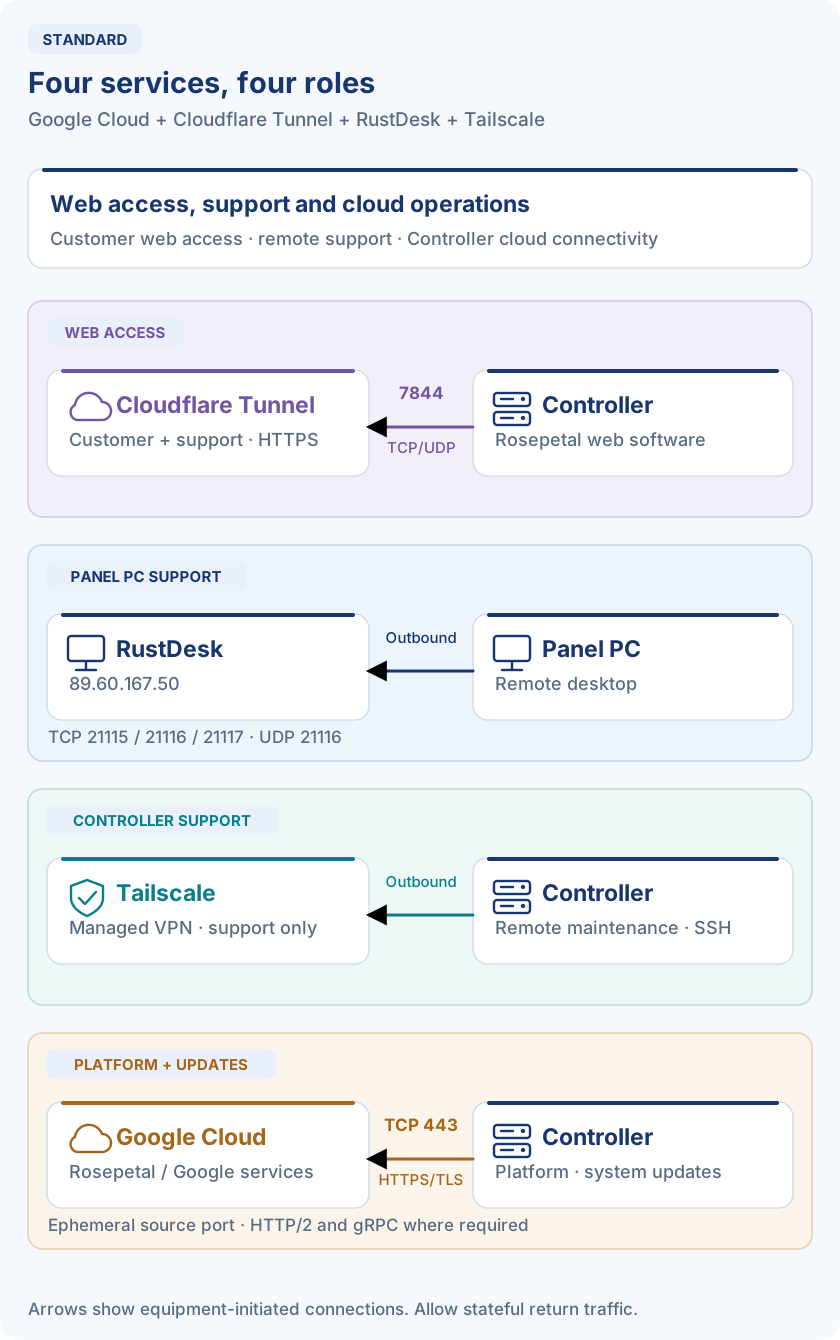
The standard deployment combines Google Cloud + Cloudflare Tunnel + RustDesk + Tailscale:
- Google Cloud: Rosepetal Platform interaction and system updates from the Controller.
- Cloudflare Tunnel: Rosepetal web software for the customer and remote support.
- RustDesk: remote desktop support on the Panel PC.
- Tailscale: remote maintenance of the Controller, including SSH.
AnyDesk is an alternative desktop tool when agreed for the project. These services can be used with the standard and restricted physical network layouts, subject to the customer's IT policy and firewall rules. The offline scenario has no internet access: remote support is performed through the customer's VPN or VDI to the Panel PC, and none of these services apply.
Google Cloud provides outbound application and update connectivity. Its firewall rules are separate from the chosen remote-access method.
Comparison of connection options
| Connection type | Remote access | Security | Local network isolation | Cost | Difficulty: open FW | Difficulty: restrictive FW | Difficulty: NAT |
|---|---|---|---|---|---|---|---|
| No LAN restrictions | Web + SSH + RustDesk/AnyDesk | Low | Low | Low | Very low | Very low | Very low |
| No restrictions in DMZ | Web + SSH + RustDesk/AnyDesk | Medium | High | Low | Very low | Very low | Very low |
| Zero Trust Cloudflare Tunnel | Rosepetal web software only | High | High | Project-dependent | Low | Medium; requires 7844 | Low |
| Managed VPN (Tailscale) | Web + SSH + RustDesk/AnyDesk | High | Medium | Medium | Low | Medium | Low |
| Traditional VPN (WireGuard) | Web + SSH + RustDesk/AnyDesk | High | High | High | Low | High | High |
| Mobile connection 4G | Web + SSH + RustDesk/AnyDesk | High | Very high | Very high | Very low | Very low | Very low |
FW = firewall. Ratings are indicative and depend on the project's configuration and IT policy. LAN, DMZ and 4G describe connectivity; they still require an approved remote-access service. “Web + SSH + RustDesk/AnyDesk” means the complete support scope, subject to installed services and access rules, not unrestricted access to the company LAN.
Internet connection diagrams
Select a diagram to open it at full size. The arrows show connection initiation, not one-way application traffic; responses return through established connections.
Standard — four complementary services
Cloudflare Tunnel — web access
Traditional VPN — WireGuard
Mobile connection — 4G
Standard scenario — Google Cloud + Cloudflare Tunnel + RustDesk + Tailscale
The standard deployment combines Google Cloud + Cloudflare Tunnel + RustDesk + Tailscale, each with a specific role:
| Service | Installed on / scope | Users / purpose |
|---|---|---|
| Google Cloud | Controller — outbound HTTPS/TLS on TCP 443 | Rosepetal Platform interaction and system updates |
| Cloudflare Tunnel | Controller gateway — Rosepetal web software | Customer and remote support |
| RustDesk | Panel PC — remote desktop | Remote support |
| Tailscale | Controller — remote maintenance, including SSH | Remote support |
Allow the outbound requirements for all four services on their respective devices, together with response traffic. The Cloudflare firewall rules apply to the standard scenario too. No public port forwarding to the Controller or Panel PC is required.
Service: Google Cloud — Controller
Google Cloud is a standard service, required for the Controller to interact with Rosepetal Platform and manage system updates, including Docker image downloads. The Controller initiates the connections to the authorized Rosepetal and Google Cloud service destinations below.
| Firewall setting | Required value |
|---|---|
| Direction | Outbound (egress), with connections initiated by the Controller |
| Transport protocol | TCP |
| Destination port | 443 |
| Source port | Dynamic / ephemeral, assigned by the operating system |
| Application protocol | HTTPS/TLS, with HTTP/2 and gRPC support for services that require them |
| Action | Allow the connections and their return traffic through stateful inspection |
Authorized destinations by FQDN:
| FQDN | Service / purpose |
|---|---|
*.rosepetal.ai | Rosepetal services — image uploads and model training |
*.pkg.dev | Artifact Registry — Docker image downloads |
*.googleapis.com | Firestore, Cloud Storage and Google/Firebase authentication |
*.cloudfunctions.net | Firebase Functions |
*.run.app | Functions running on Cloud Run |
These rules apply to the Controller. Google Cloud connectivity is required for these platform and update functions regardless of whether remote support uses a VPN or the web-only Cloudflare Tunnel option.
Service: RustDesk — Panel PC
| Firewall setting | Required value |
|---|---|
| Destination | 89.60.167.50 (rustdesk.rosepetal.ai) |
| Direction | Outbound, allowing response traffic |
| TCP destination ports | 21115, 21116, 21117 |
| UDP destination port | 21116 |
In the standard scenario, apply these rules to the Panel PC. These are destination ports on the Rosepetal RustDesk server, not inbound ports to open on the customer's firewall.
Service: Tailscale — Controller
| Protocol | Outbound rule | Purpose |
|---|---|---|
| TCP | Destination port 443 | Control services and DERP relays |
| UDP | Source port 41641 to peer IPs and ports | Direct WireGuard connections; peer destination ports can vary |
| UDP | Destination port 3478 | STUN for NAT traversal |
| TCP | Destination port 80 | Optional coordination transport and captive-portal checks; not an HTTPS fallback |
Allow DNS resolution and the required service destinations:
- Tailscale services:
*.tailscale.com, includinglogin.tailscale.com,controlplane.tailscale.comandlog.tailscale.com. - DERP relays: allow the current destinations published by Tailscale for TCP
443and STUN. Control-service domains alone are not a complete relay allowlist. - Rosepetal tailnet names:
*.banded-pythagorean.ts.net, including the project'srosepetal-dep-[project].banded-pythagorean.ts.net.
Prefer domain-based rules. If IT requires fixed IP rules, use Tailscale's current service and relay lists; the control-plane range alone does not cover all traffic. UDP enables direct connections; if blocked, DERP can carry traffic over TCP 443 with lower performance.
Reference: Tailscale firewall requirements.
Service: AnyDesk — optional alternative
RustDesk on the Panel PC is the standard desktop-support tool. If AnyDesk is agreed for the project, allow outbound connections to *.net.anydesk.com and response traffic:
| Protocol | Port | Purpose |
|---|---|---|
| TCP | 80, 443 or 6568 | Remote connection; at least one must be available |
| UDP | 50001–50003 | Optional local discovery to multicast 239.255.102.18; not an internet remote-access requirement |
Exclude the service from TLS inspection that interferes with its encrypted connections. No inbound port forwarding is required for the outbound remote-support configuration.
Reference: AnyDesk firewall requirements.
Zero Trust Cloudflare Tunnel
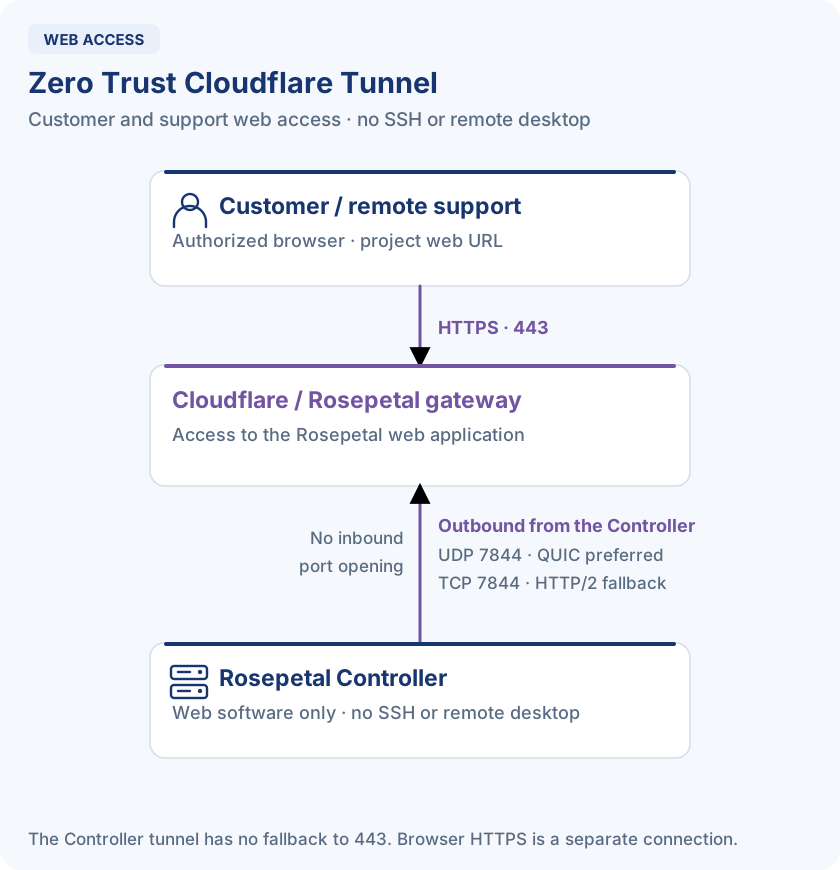
This service provides web access for the customer and remote support in the standard deployment. The Controller establishes an outbound tunnel to Cloudflare; authorized users access the web application through the Rosepetal gateway.
Web-only remote access
In the Rosepetal configuration described here, Cloudflare Tunnel provides no SSH or RustDesk/AnyDesk access. Tasks requiring a shell or remote desktop need an independently approved support method or on-site assistance.
Controller firewall requirements
All rules below are outbound from the Controller, allowing response traffic. No inbound ports are required.
| Destination | IPv4 range | Destination ports |
|---|---|---|
region1.v2.argotunnel.com | 198.41.192.0/24 | TCP 7844 + UDP 7844 |
region2.v2.argotunnel.com | 198.41.200.0/24 | TCP 7844 + UDP 7844 |
- Transport: UDP
7844uses QUIC (preferred); TCP7844uses HTTP/2 (fallback). Request both protocols; either one alone can establish the tunnel. - No fallback to port 443 and no proxy support for the Controller's tunnel connection. The browser's HTTPS connection is a separate path.
- DNS: the configured resolver must resolve the SRV record
_v2-origintunneld._tcp.argotunnel.comand the A records of both destination hostnames. - TLS: do not inspect or intercept this traffic.
- Time: the Controller must have an accurate clock, synchronized through an IT-approved NTP source, or TLS validation can fail.
- SNI filtering: also allow
cftunnel.comand*.cftunnel.comon port7844. These are TLS server names without DNS records, so they cannot be used as firewall address objects. - IPv4 is sufficient: the connector uses IPv4 by default.
For the current Rosepetal connector, which runs with --no-autoupdate, the Controller does not need access to api.cloudflare.com, update.argotunnel.com or *.rpctrl.net to establish the tunnel. Users still need access to the project's web URL from their browser.
These rules cover the tunnel only. Apply the separate Google Cloud requirements for Rosepetal Platform and system updates; the tunnel does not replace those outbound connections. Other features using additional destinations need their own IT approval.
Connection checks
From the Controller or the same permitted network path:
# DNS discovery
nslookup -type=SRV _v2-origintunneld._tcp.argotunnel.com
nslookup region1.v2.argotunnel.com
nslookup region2.v2.argotunnel.com

# TCP fallback connectivity to both regions
nc -vz region1.v2.argotunnel.com 7844
nc -vz region2.v2.argotunnel.com 7844

# Controller-side startup checks: DNS, UDP 7844 and TCP 7844
docker logs cloudflaredThe TCP checks do not validate UDP. Review the connector's startup connectivity checks to confirm the available transport.
Implementation reference: Rosepetal controller gateway — firewall requirements, verified on a Controller on 26 October 2026. See also Cloudflare's tunnel firewall documentation.
Traditional VPN
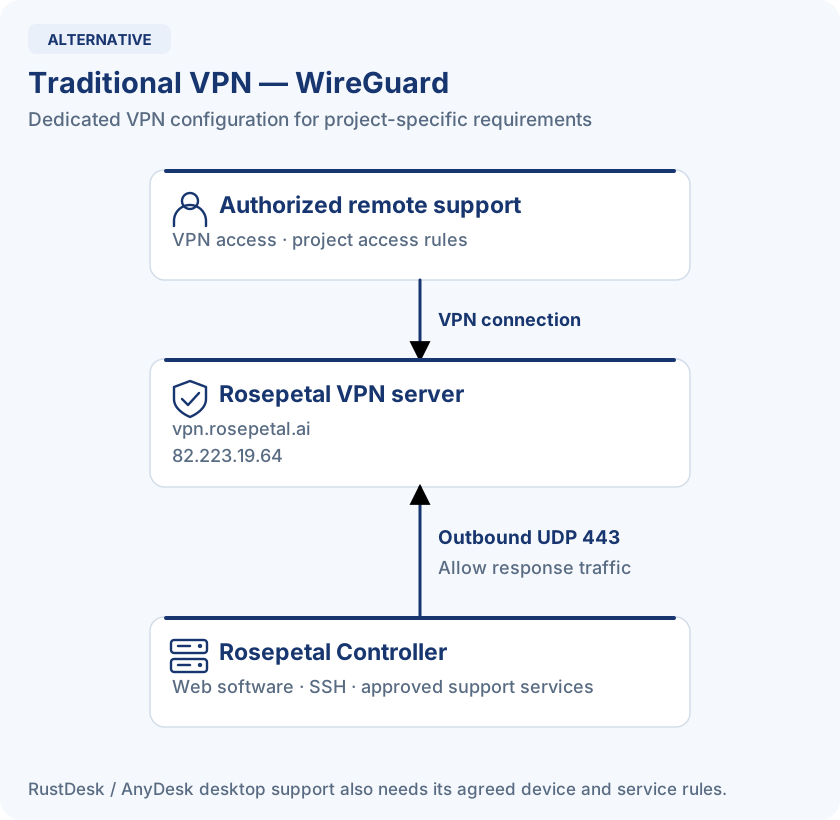
For environments requiring advanced or customized remote access, a dedicated VPN can be used. This option involves more detailed configuration and associated additional costs. It supports Rosepetal web software, SSH and RustDesk/AnyDesk when the corresponding services and access rules are configured.
Service: WireGuard
| Protocol | Destination port | Destination |
|---|---|---|
| UDP | 443 | 82.223.19.64 (vpn.rosepetal.ai, dedicated VPN at United Internet AG) |
WireGuard uses UDP exclusively. Permit the Controller to initiate the connection and allow the corresponding response traffic. Firewalls must preserve the UDP session in their NAT tables; restrictive or symmetric NAT and traffic inspection can prevent establishment or interrupt the connection. This does not require a public inbound port forward to the Controller.
Mobile connection 4G
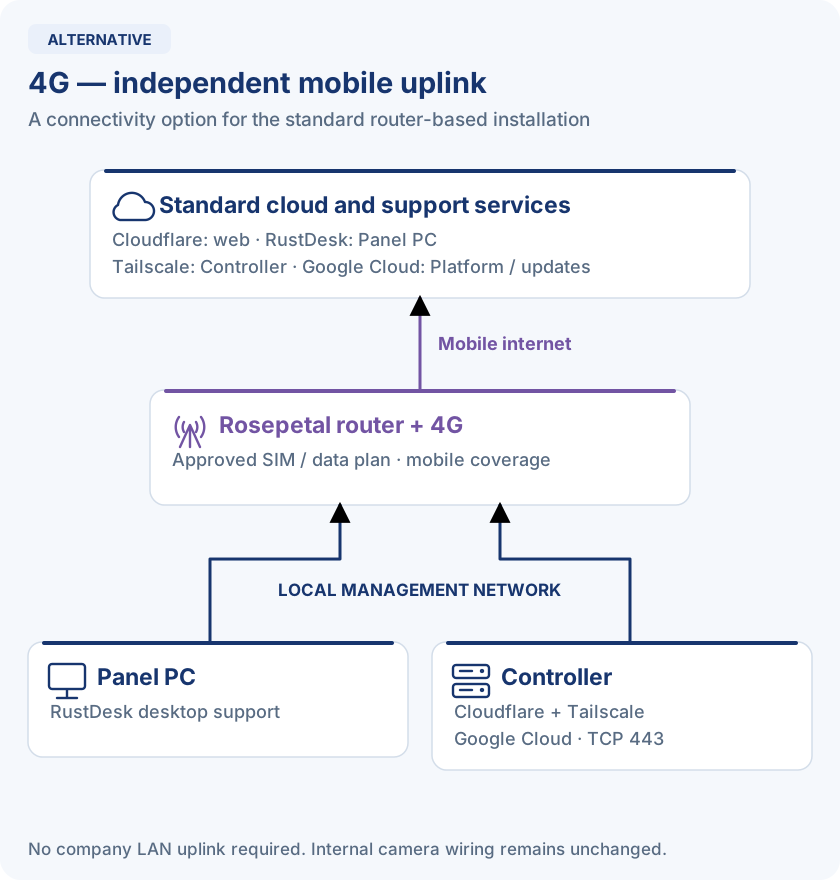
The standard Rosepetal router can provide an independent mobile uplink, including during installation, when approved and provisioned. It supports the same remote-service scope as the standard scenario, using Cloudflare Tunnel for web access, RustDesk for Panel PC support and Tailscale for Controller support, or another agreed method. The Controller also requires the standard Google Cloud connectivity for Rosepetal Platform and system updates over the mobile uplink.
4G is an uplink, not an access-control mechanism. Coverage, a data plan and the selected remote service are still required. This option is not part of the restricted company-switch topology, which has no Rosepetal router.
Security model: Zero-Trust, encryption and identity control
- In transit: Controller↔Cloud communications encrypted with TLS 1.2+, strict certificate validation and additional authentication using secure credentials (OAuth2/JWT).
- At rest: encryption managed by the platform with keys per project/client.
- Software integrity: signed containers and models, with mandatory verification before execution.
Operational governance: OTA, rollback and audit
Rosepetal Meta provides centralized inventory, version visibility, and OTA orchestration by campaigns/batches/windows, with rollback in case of degradation. In addition, we maintain an exportable audit ("who did what, when and where") and a log of critical actions (deployments, rollbacks, access, changes), aligned with compliance needs.
Select any diagram to open it at full size.