

Selective Inspection
Companion code repository for the paper:
Learning When Not to Inspect: Risk-Calibrated Weak Supervision for Efficient Industrial Visual Inspection
1. What this is
Most inline production images are normal. This repository implements the paper's risk-calibrated selective-inspection cascade — the three pieces a line needs to spend compute only where suspicion remains:
- A weak scout (
scout_image_bce): a DETR-lite image scorer over an ImageNet-pretrained ResNet-18, trained with binary cross-entropy from image-level OK/NOK labels only — no boxes, no masks. Image labels are the labels a production line accumulates first. - A risk-calibrated Fast-OK-Exit gate: the exit threshold
tau_exitis the largest threshold that keeps wrongly-exited validation NOK images within an operator-chosen missed-NOK budgetB(e.g. 0% or ≤1%), calibrated on validation only and applied frozen. Images scoring belowtau_exitare admitted OK on the spot and bypass all downstream compute. - A split-conformal accept/review/reject decision layer: thresholds are order statistics of the validation OK scores; the reject rate carries a finite-sample guarantee
P(OK rejected) ≤ alpha_rejectunder exchangeability, certifiable iffalpha ≥ 1/(n_cal+1).
The inspector (the expensive model that examines routed images) is deliberately external: any callable that maps an image to an anomaly score plugs in unchanged (see pipeline.py and section 8 below). The cascade claims none of the inspector's accuracy as its own.
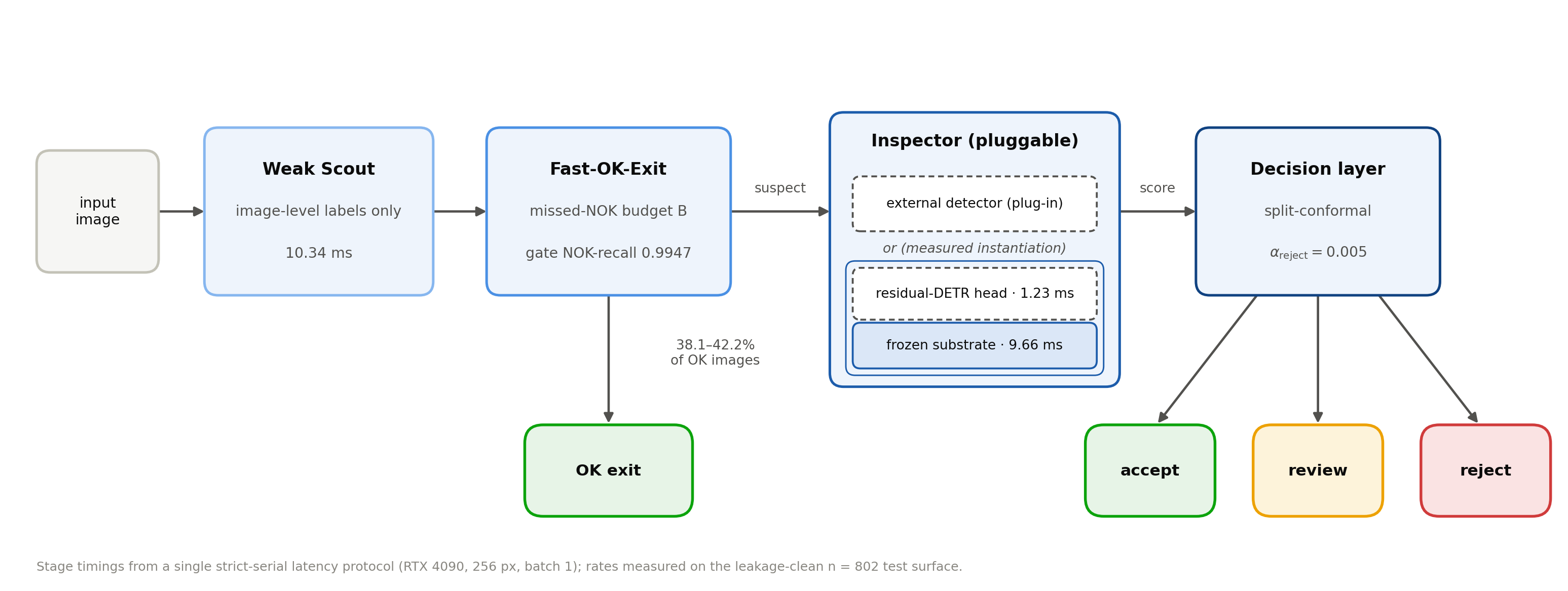
Figure: the cascade (Figure 1 of the paper) — weak scout → Fast-OK-Exit under a missed-NOK budget → pluggable inspector → subordinated conformal accept/review/reject layer.
All deployment knobs — the exit budget B, the decision-layer strictness alpha, the inspector choice — are post-hoc: they reconfigure a deployed line without retraining (calibration is one validation pass).
2. Install
git clone https://github.com/rosepetal-ai/rosepetal-research-selective-inspection.git
cd rosepetal-research-selective-inspection

python -m venv .venv
source .venv/bin/activate        # Windows: .venv\Scripts\activate
pip install -r requirements.txtRequirements: Python ≥ 3.10, torch, timm, numpy, pyyaml, pillow, onnx, onnxruntime (see requirements.txt).
CUDA note. pip install torch pulls a CUDA-enabled build on Linux; check python -c "import torch; print(torch.cuda.is_available())". If you need a specific CUDA toolkit match, follow https://pytorch.org/get-started/locally/.
- Training: GPU strongly recommended (the paper recipe trains in minutes on a single RTX 4090). CPU training works for smoke tests only.
- Inference: CPU works (PyTorch or ONNX Runtime); GPU is faster.
- Device policy:
--device cudaraises if CUDA is unavailable (no silent CPU fallback);--device auto(default) picks CUDA when available and logs the choice.
3. Data: the manifest contract
All tools consume JSONL manifests — one JSON object per line:
{"image_path": "images/train/part_0001.png", "label": "ok"}
{"image_path": "images/train/part_0002.png", "label": "nok", "image_id": "part_0002"}| Field | Required | Meaning |
|---|---|---|
image_path | yes | Absolute path, or relative to the current working directory, or relative to the manifest file's directory (resolved in that order). |
label | yes | "ok" (normal) or "nok" (defective), case-insensitive. Anything else raises. |
image_id | no | Stable identifier (defaults to the file stem). Used to join predictions with labels. |
Images are not included in this repository and are never committed (.gitignore excludes data/).
Building manifests for MVTec-AD
The paper's benchmark dataset is MVTec AD (download from the official page; free for research). Its folder layout is <category>/train/good/*.png, <category>/test/good/*.png, <category>/test/<defect_type>/*.png. A minimal folder→manifest builder:
import json
from pathlib import Path

root = Path("mvtec_anomaly_detection")           # extracted dataset root
rows = []
for img in sorted(root.glob("*/*/*/*.png")):
    category, split, kind = img.parts[-4], img.parts[-3], img.parts[-2]
    label = "ok" if kind == "good" else "nok"
    rows.append({
        "image_id": f"{category}_{kind}_{img.stem}",
        "image_path": str(img.resolve()),
        "label": label,
        "category": category,                     # extra fields are preserved
    })
with open("mvtec_all.jsonl", "w") as f:
f.writelines(json.dumps(r) + "\n" for r in rows)Important: the paper does not use MVTec-AD's official unsupervised split. It re-carves the images into weak-label pools with its own disjoint train/validation/test surfaces (train pools disjoint from the shared n=802 test surface at the image-identifier level; see paper §4.1–4.2). To reproduce the paper's regime, carve your own three disjoint splits from mvtec_all.jsonl (e.g. with a fixed seed) rather than reusing the official folders as splits — the official train/ contains only OK images, so a weak scout cannot be trained from it alone.
Any custom dataset
Any image collection works: write one JSONL row per image with the image-level OK/NOK label. Splits must be disjoint at the image level (see the leakage warning in section 5).
Synthetic smoke dataset
python examples/make_dummy_dataset.py --out data/dummygenerates a tiny synthetic OK/NOK dataset (train/val/test manifests included) so the whole chain runs end-to-end in minutes with no dataset download.
4. Reproducing the paper's training
The paper recipe is frozen in configs/train_default.yaml:
| Knob | Value |
|---|---|
| Backbone | ImageNet-pretrained ResNet-18 (timm), multi-scale features |
| Input | 256×256 aspect-preserving letterbox, [0, 1] scaling (no ImageNet mean/std — see section 7) |
| Steps | 1500 |
| Batch size | 16 |
| Optimizer | AdamW, lr 1e-4, weight decay 1e-4, grad-norm clip 1.0 |
| Loss | image-level BCE on the image head (+ background BCE on the per-query class logits) |
| Seed | 1337 (paper primary; replication seeds 2027 / 4242) |
python -m selective_inspection.train \
    --config configs/train_default.yaml \
    --train-manifest data/my_dataset/train.jsonl \
    --val-manifest data/my_dataset/val.jsonl \
    --device cuda \
--out runs/scout_seed1337Outputs: checkpoint.pt, predictions_val.jsonl (calibration input), metrics_val.json (validation image-AUROC), resolved_config.json.
How many NOK labels do you need? (paper §5.2 / §8)
The paper measured the supervision-budget curve with the OK pool fixed and only the NOK count varied, replicated across three seeds:
- ≤ 50 NOK images → statistically indistinguishable from chance (AUROC 0.512 at 50 NOK, 95% CI [0.464, 0.560] straddling 0.5; replicates).
- 100 NOK → a seed lottery (0.569–0.810 across three seeds; do not plan here).
- ≥ 200 NOK → reliably useful (0.860 at 200, cross-seed range ≤ 0.042; improves smoothly thereafter — 0.911 at 400, 0.9339 at the full 727-NOK pool).
Production guidance: budget for at least 200 image-level NOK labels before trusting a weak scout. train.py prints a warning when the training manifest carries fewer.
Balanced-sampling note (paper §5.3)
The paper's balanced pool holds roughly a 1:1 OK:NOK ratio (729 OK / 727 NOK), vs the natural-prevalence few-NOK pool (2361 OK / 727 NOK). On every surface where both pools were measured, pool balance was worth more than any architectural change measured — when NOK examples are scarce, re-balancing what exists (subsampling OK images in the training pool) rescued weak-label viability on every benchmark tried. If you can curate the retraining pool, balance it.
5. Fine-tuning on a NEW production dataset
Step-by-step, from zero to a calibrated deployed cascade:
1. Collect labels. OK images plus ≥ 200 image-level NOK labels (see the budget guidance above). No boxes or masks are needed — an OK/NOK verdict per image is the entire annotation cost.
2. Build three disjoint manifests — train.jsonl, val.jsonl, test.jsonl — with OK and NOK images in each (validation NOK scores calibrate the gate; validation OK scores calibrate the conformal layer; the paper's validation surface mirrors the test composition).
⚠️ Leakage warning. Splits must be disjoint at the image level, not just the file-name level: renamed or re-exported copies of the same physical image count as overlap. A surface used to evaluate or calibrate any model is contaminated for training and must never appear, in whole or in part, in a training split. Calibrate on
valonly; touchtestexactly once, for the final realised-rate report. A recall guarantee calibrated on images the model trained on is not a guarantee.
3. Train — either from scratch (ImageNet init, train_default.yaml) or from a prior checkpoint with --init-checkpoint (weights AND architecture come from the checkpoint):
python -m selective_inspection.train \
    --config configs/finetune_example.yaml \
    --train-manifest data/my_line/train.jsonl \
    --val-manifest data/my_line/val.jsonl \
    --init-checkpoint checkpoints/scout_prior.pt \
    --device cuda \
--out runs/my_line_ftRecipe adjustments for fine-tuning (see configs/finetune_example.yaml): shorter schedule (e.g. 500 steps) and a lower learning rate (e.g. 5e-5); keep weight decay, clip, and the loss weights unchanged. If the new dataset is large or visually far from the prior one, prefer the full from-scratch recipe (1500 steps, lr 1e-4) — ImageNet init is already a strong prior.
4. Calibrate the gate on validation (choose the missed-NOK budget B — the single number a line manager is asked to choose):
python -m selective_inspection.calibrate_gate \
    --val-predictions runs/my_line_ft/predictions_val.jsonl \
    --budget 0.0 0.01 \
--out runs/my_line_ft/gate.json5. Calibrate the conformal layer on validation OK scores (of whichever scorer's output it will gate — see section 8):
python -m selective_inspection.calibrate_conformal \
    --val-predictions runs/my_line_ft/predictions_val.jsonl \
    --alpha-accept 0.10 --alpha-reject 0.005 \
--out runs/my_line_ft/conformal.jsonMind the certifiable floor: alpha_reject ≥ 1/(n_cal+1). With 614 OK calibration images the floor is 0.001626; a 0.1% false-reject budget needs a ~1000-image OK calibration set, not a better model.
6. Apply frozen + monitor. Deploy tau_exit, tau_accept, tau_reject unchanged; report realised rates on the held-out test set once (--test-predictions), then monitor realised rates in production (section 8).
6. Retraining commands (full worked examples)
# 0) Smoke chain on synthetic data (no dataset download; the first run fetches
#    the ResNet-18 weights, add --no-pretrained to skip them)
python examples/make_dummy_dataset.py --out data/dummy
python -m selective_inspection.train --config configs/train_default.yaml \
    --train-manifest data/dummy/train.jsonl --val-manifest data/dummy/val.jsonl \
    --max-steps 20 --batch-size 4 --device auto --out runs/smoke

# 1) Full paper recipe on your manifests (GPU)
python -m selective_inspection.train --config configs/train_default.yaml \
    --train-manifest data/my_dataset/train.jsonl \
    --val-manifest data/my_dataset/val.jsonl \
    --device cuda --out runs/scout_seed1337

# 2) Seed replication (paper: 1337 primary, 2027 / 4242 replication)
for seed in 1337 2027 4242; do
  python -m selective_inspection.train --config configs/train_default.yaml \
      --train-manifest data/my_dataset/train.jsonl \
      --val-manifest data/my_dataset/val.jsonl \
      --seed $seed --device cuda --out runs/scout_seed$seed
done

# 3) Fine-tune from a prior checkpoint
python -m selective_inspection.train --config configs/finetune_example.yaml \
    --init-checkpoint runs/scout_seed1337/checkpoint.pt \
    --train-manifest data/my_line/train.jsonl \
    --val-manifest data/my_line/val.jsonl \
    --device cuda --out runs/my_line_ft

# 4) Score val + test, calibrate, report realised rates
python -m selective_inspection.infer --checkpoint runs/scout_seed1337/checkpoint.pt \
    --manifest data/my_dataset/test.jsonl --out runs/scout_seed1337/predictions_test.jsonl
python -m selective_inspection.calibrate_gate \
    --val-predictions runs/scout_seed1337/predictions_val.jsonl \
    --budget 0.0 0.01 \
    --test-predictions runs/scout_seed1337/predictions_test.jsonl \
    --out runs/scout_seed1337/gate.json
python -m selective_inspection.calibrate_conformal \
    --val-predictions runs/scout_seed1337/predictions_val.jsonl \
    --test-predictions runs/scout_seed1337/predictions_test.jsonl \
    --out runs/scout_seed1337/conformal.json

# 5) Run the cascade demo end-to-end
python -m selective_inspection.pipeline --checkpoint runs/scout_seed1337/checkpoint.pt \
    --gate-json runs/scout_seed1337/gate.json --budget 0.0 \
    --conformal-json runs/scout_seed1337/conformal.json \
--manifest data/my_dataset/test.jsonl --out runs/scout_seed1337/decisions.jsonl7. Inference
Preprocessing spec (frozen — identical everywhere)
- Load RGB.
- Aspect-preserving bilinear resize so the longest side is 256, centered zero-padding to a 256×256 canvas (letterbox).
- Scale to
[0, 1]float32, channel-first(3, 256, 256).
Note — no ImageNet normalization. The paper's scout was trained on
[0, 1]inputs without ImageNet mean/std normalization; applying mean/std at inference time will silently shift every score and invalidate the calibrated thresholds.selective_inspection.data.preprocessis the single source of truth used by training, PyTorch inference, and the ONNX examples alike.
PyTorch
CLI:
python -m selective_inspection.infer --checkpoint runs/scout_seed1337/checkpoint.pt \
    --images part1.png part2.png                       # loose files
python -m selective_inspection.infer --checkpoint runs/scout_seed1337/checkpoint.pt \
--manifest data/my_dataset/val.jsonl --out predictions_val.jsonl # manifestPython API:
from selective_inspection.infer import load_model, score_images

model, image_size = load_model("runs/scout_seed1337/checkpoint.pt", device="cuda")
scores = score_images(model, ["part1.png", "part2.png"])   # list[float] in [0, 1]
# higher = more anomalous (NOK-like); this is the score the gate and the
# conformal layer were calibrated on.ONNX export
python -m selective_inspection.export_onnx \
    --checkpoint runs/scout_seed1337/checkpoint.pt \
    --out runs/scout_seed1337/scout.onnx \
--verify-images part1.png part2.png part3.png part4.png- Opset 17, dynamic batch axis (input
images: float32[batch, 3, 256, 256], outputscores: float32[batch]). Fixed 256×256 spatial size — the position embeddings are traced at the training resolution; do not feed other sizes. - The graph ends at the sigmoid of the image head: the ONNX
scoresoutput is numerically the same quantity as the PyTorch score, so calibrated thresholds transfer unchanged. --verify-imagesruns both backends through the same preprocessing and asserts per-image|torch − onnx| < 1e-4(exit code 1 on failure). Always verify after export.
ONNX Runtime (Python)
import numpy as np
import onnxruntime as ort
from selective_inspection.data import preprocess_batch

sess = ort.InferenceSession("runs/scout_seed1337/scout.onnx",
                            providers=["CPUExecutionProvider"])
x = preprocess_batch(["part1.png", "part2.png"], image_size=256).numpy()
(scores,) = sess.run(["scores"], {"images": x.astype(np.float32)})⚠️ Preprocessing parity. The exported graph does NOT contain the preprocessing. Any consumer (Python, C++, edge runtime) must reproduce the letterbox +
[0, 1]scaling exactly — including the bilinear resize and the centered zero padding — or the scores will drift away from the calibrated thresholds. When porting, validate by scoring a handful of images in both stacks and comparing (the--verify-imagespattern).
C++ / edge deployment note
ONNX Runtime's C++ API (or any ONNX-compatible edge runtime) consumes the same file: create an Ort::Session, bind images as a float32 NCHW tensor in [0, 1] with the letterbox preprocessing above, and read scores. The gate/conformal layer is then three float comparisons (score < tau_exit, score <= tau_accept, score > tau_reject) — trivially portable to a PLC-side integration. fp32 is the validated precision; if you quantize (fp16/int8), re-run the parity check AND recalibrate the thresholds on validation scores produced by the quantized model, because the score distribution shifts.
8. The gate + conformal layer in production
- Thresholds are post-hoc knobs, not training artifacts.
B(exit budget) andalpha(decision strictness) reconfigure a deployed line without retraining. Recalibrating after drift costs one validation pass over stored scores. - Calibrate on validation only; apply frozen. Never tune
tau_exit,tau_accept,tau_rejecton the test set or on the live stream you report numbers on. The realised-rate report (--test-predictions) is deliberately unclamped so the val→test generalisation gap stays visible. - Choosing
B(paper §6.1/§8):B = 0%is the conservative start (in the paper: 38.1% of OK images exited at 0.9947 exit-stage NOK-recall). Relaxing toB ≤ 1%bought ~4 points of extra exit at no measured test-recall cost on the paper's surface — but that equivalence was established at single-miss resolution; treat the relaxation as a throughput knob to re-validate on your own validation stream, not as a free lunch. - What the exit buys: mean per-image cost and throughput only. Worst-case latency and provisioning must be sized against the full path — every detected defect rides the full path; the exit only thins the normal traffic around it.
- The conformal layer is scorer-agnostic: the same rule calibrates over the scout's or any inspector's scores. Swapping the scorer requires only recalibration on the same validation OK images (one pass, no retraining).
- Monitor realised rates: OK-exit rate, review rate, false-reject rate, and (from whatever labelled audit stream exists) missed-NOK rate. Drift in the OK-score distribution shows up first as a drifting OK-exit / review rate — that is the recalibration trigger. Recalibrate on a fresh validation sample; do not nudge thresholds by hand.
- Sizing the calibration set: the smallest certifiable false-reject level is
1/(n_cal+1). Promise budgets only after counting your OK calibration images.
Plugging in a real inspector
from selective_inspection import SelectiveInspectionPipeline
from selective_inspection.infer import load_model

scout, _ = load_model("runs/scout_seed1337/checkpoint.pt", device="cuda")

def my_inspector(image_rgb_uint8) -> float:
    """Any model: HWC uint8 RGB array in -> float anomaly score out
    (higher = more anomalous). It owns its own preprocessing/resolution."""
    ...

pipe = SelectiveInspectionPipeline(
    scout,
    tau_exit=0.0123,        # from calibrate_gate.py (frozen)
    inspector=my_inspector,
    tau_accept=0.45,        # from calibrate_conformal.py, calibrated on the
    tau_reject=0.91,        #   INSPECTOR's validation scores (frozen)
)
result = pipe.run("part1.png")
# {"scout_score": ..., "exited": bool, "stage": "fast_ok_exit"|"inspector",
# "inspector_score": float|None, "decision": "accept"|"review"|"reject"}If the conformal layer gates the inspector's scores (the deployed configuration), calibrate it on the inspector's validation predictions, not the scout's.
9. Repository layout & troubleshooting
| Path | What it is |
|---|---|
selective_inspection/model.py | WeakScout (DETR-lite scorer) + the weak BCE loss + checkpoint I/O. |
selective_inspection/data.py | Manifest contract, frozen preprocessing (single source of truth), prediction-file helpers. |
selective_inspection/train.py | Paper training recipe (CLI); writes checkpoint + validation predictions. |
selective_inspection/infer.py | PyTorch scoring (CLI + Python API). |
selective_inspection/export_onnx.py | ONNX export (opset 17, dynamic batch) + torch-vs-onnx parity check. |
selective_inspection/calibrate_gate.py | Fast-OK-Exit recall-guarantee calibration (val → tau_exit). |
selective_inspection/calibrate_conformal.py | Split-conformal accept/review/reject calibration (val OK scores → tau_accept, tau_reject). |
selective_inspection/pipeline.py | Scout → gate → inspector-hook cascade (Python API + CLI demo). |
configs/train_default.yaml | The frozen paper recipe. |
configs/finetune_example.yaml | Fine-tuning example (prior checkpoint, shorter schedule). |
examples/make_dummy_dataset.py | Synthetic dataset generator for the smoke chain. |
docs/cascade_schematic.png | Method figure (Figure 1 of the paper). |
Troubleshooting
| Symptom | Cause / fix |
|---|---|
--device cuda raises "no CUDA device is available" | Intentional: no silent CPU fallback. Fix the CUDA install, or pass --device cpu explicitly (smoke/inference only). |
| CPU training is extremely slow / memory-hungry | The multi-scale encoder attends over ~5k tokens; CPU attention materializes the full attention matrix. Use a GPU for training; for CPU smoke runs use --batch-size 4 or less. |
| First run downloads ResNet-18 weights | timm fetches the ImageNet checkpoint once (cached under ~/.cache). Offline? Pass --no-pretrained (smoke only — pretraining matters for real accuracy). |
label must be 'ok' or 'nok' | The manifest contract is strict — map your dataset's labels to ok/nok when building manifests. |
| Calibration raises "no NOK images" / "no OK calibration scores" | The gate needs validation NOK scores; the conformal layer needs validation OK scores. Fix the val split composition. |
| ONNX scores differ from PyTorch beyond 1e-4 | Almost always preprocessing mismatch on the consumer side (interpolation mode, padding, normalization). Re-check against data.preprocess; then re-run --verify-images. |
tau_reject = Infinity / certifiable: false | Requested alpha_reject below the floor 1/(n_cal+1). Collect more OK calibration images or raise alpha_reject. |
| Validation AUROC near 0.5 on a real dataset | Check the NOK budget first (≤50 NOK ≈ chance, ≥200 needed — paper §5.2) and the pool balance (§5.3) before blaming the architecture. |
Documentation
| Page | Contents |
|---|---|
| Overview | Installation, requirements, the full command chain, headline results |
| Data and training | Manifests and splits, the training recipe and options, NOK-label budget, fine-tuning |
| Calibration | Exit gate and conformal layer: rules, options, output files, production use |
| Inference and deployment | PyTorch scoring, ONNX export and parity, the cascade API |
| Paper results | Every measurement of the paper with its protocol and limits |
The same pages are published at https://docs.rosepetal.ai/research/selective-inspection.
License
License: TBD by the authors (see LICENSE).