

Rosepetal — Network
Network configuration of Rosepetal deployments: local production, cloud training and remote support.
Our solution is designed for industrial environments where safety, OT/IT segmentation and continuous operation are essential.
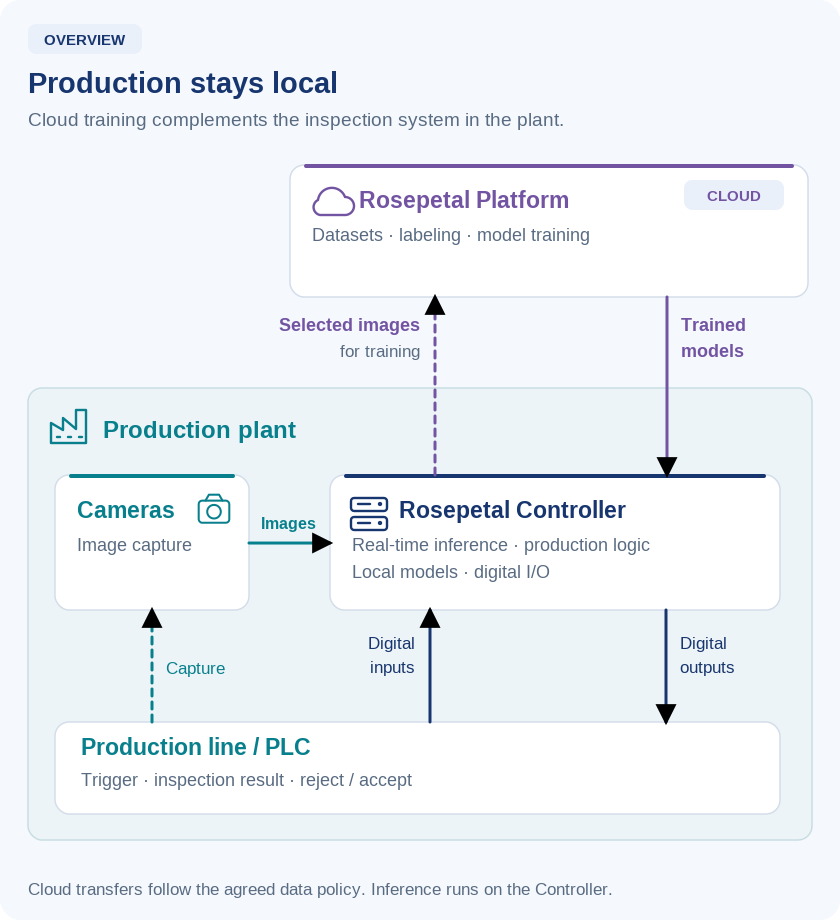
Production decisions stay in the plant. Selected images can be uploaded for training, and trained models are deployed to the Controller.
Three complementary blocks
- Rosepetal Controller (edge): runs image capture, real-time inference, production logic and digital I/O in the plant.
- Rosepetal Platform (cloud): manages datasets, labeling, model training and model analysis.
- Rosepetal Meta (hybrid): provides monitoring, auditing and operational management across deployments, including controller status, software versions and update orchestration.
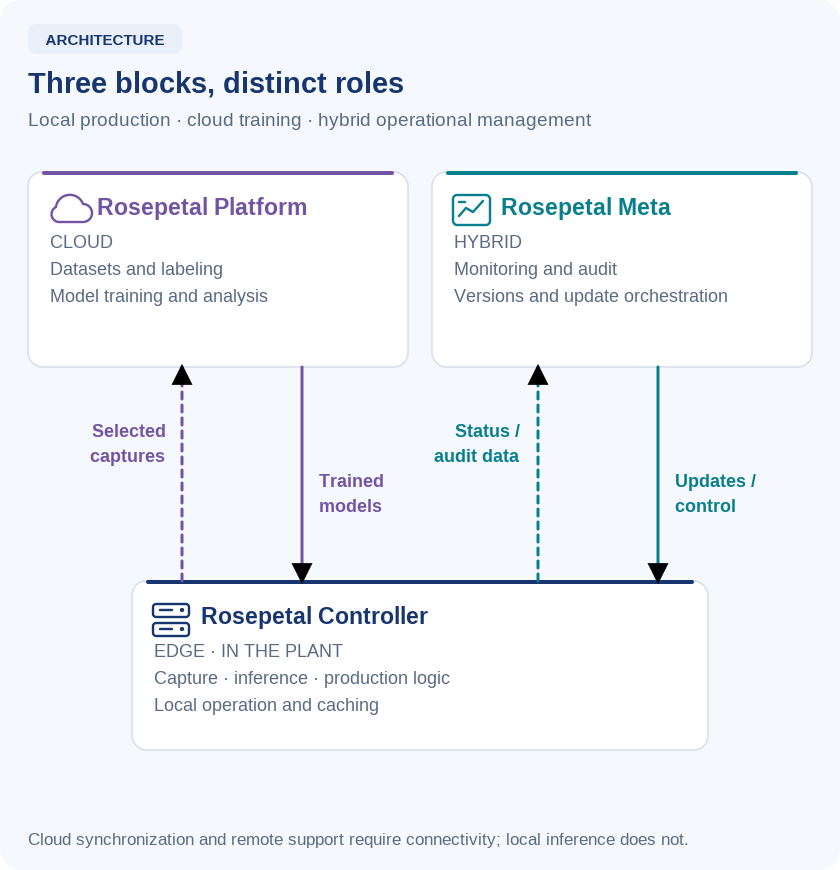
Under normal operation, captured images can remain on-site for real-time inference or be sent to Rosepetal Platform for storage and further training, according to the data policy agreed with the customer.
Production continuity
The Controller runs the deployed models and local decision logic without a constant cloud connection. Local caching supports degraded or offline operation; cloud synchronization and remote support require connectivity.
Requirements
What the customer's site provides depends on the network scenario. Choosing a scenario compares them in detail.
| Scenario | Network connection | Outbound access | Remote support |
|---|---|---|---|
| Standard | Company network on the WAN port of the Rosepetal router (DHCP or fixed IP), or an approved 4G uplink | Controller: Google Cloud (TCP 443), Cloudflare Tunnel (TCP and UDP 7844) and Tailscale. Panel PC: RustDesk | Cloudflare Tunnel, RustDesk and Tailscale |
| Restricted | Company switch for the Panel PC and the Controller's management interface, with DHCP or fixed IPs supplied before shipment | Same as standard, through the company network | Cloudflare Tunnel, RustDesk and Tailscale |
| Offline | Customer-supplied Panel PC with two network interfaces, on a company network without internet | None | Customer VPN or VDI to the Panel PC |
In every scenario the cameras stay on the internal camera switch, the reference camera networks (10.10.1.x, 10.10.2.x) are checked for overlap with company routes before installation, and Rosepetal does not ask for inbound ports to be opened to the plant. The destinations and ports to allow are listed in IT configuration for remote access.
Contents
| Page | What it covers |
|---|---|
| Network setup with standard hardware | AIS rack equipment; standard, restricted and offline network scenarios; reference addressing and design criteria |
| IT configuration for remote access | Google Cloud (Rosepetal Platform and system updates), Cloudflare Tunnel (web), RustDesk (Panel PC) and Tailscale (Controller); alternative connections and firewall requirements |
Each page offers its standard configuration as a PDF to download.
Select any diagram to open it at full size.