

Python Executor for Node-RED
@rosepetal/node-red-contrib-python-executor provides a node that runs Python code on each message, in the way the function node runs JavaScript, and a configuration node that creates the Python virtual environments the code can run in and manages their packages.
Installation
cd ~/.node-red
npm install @rosepetal/node-red-contrib-python-executorOr search @rosepetal/node-red-contrib-python-executor in the Node-RED Palette Manager.
Use the scoped name: node-red-contrib-python-executor, without @rosepetal/, is a different package on npm.
These pages describe version 1.1.0. The Palette Manager installs the version registered in the Node-RED library, which is updated separately from npm: check the installed version if something described here is missing.
Requirements
- Node.js >= 14
- Python 3.6 or later on the machine that runs Node-RED
- The
venvmodule of that Python, to create environments from the editor (on Debian and Ubuntu:sudo apt install python3-venv) - NumPy in the interpreter that runs the code, for the image helpers
rp_to_cvandrp_from_cv(optional; OpenCV is used when it is installed, and is not required)
The package has no npm dependencies and the code it runs in Python uses the standard library only.
The interpreter is, in this order, the one of the environment selected in the node, or the command written in its Python Path field: python3 by default, looked up in the PATH of the Node-RED process.
Nodes
| Node | Purpose |
|---|---|
| python-executor | Run Python code on each message: the code receives msg as a dict and what it returns is merged into the outgoing message |
| python-environment | Configuration node: create a Python virtual environment, install and uninstall its packages with pip from the editor, and make python-executor nodes run in it |
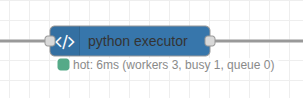
python-executor appears under the function category of the palette, labeled python executor. python-environment is created from the Environment field of a python-executor node.
Quick start
[inject] → [python executor] → [debug]Drop a python executor node into the flow and connect an inject node to its input and a debug node to its output.
Replace the example code the node comes with (it expects an image in
msg.image) with:pythonmsg['payload'] = f"Hello, {msg.get('payload', 'world')}!" return msgDeploy and press the button of the inject node. The debug sidebar shows
Hello,followed by the payload of the message, and the status of the node shows the time the message took, as incold: 25ms.
The code is the body of a function that receives msg. Besides msg it can use flow_ctx and global_ctx (flow and global context), node.warn() and the two image helpers: see The code.
Execution modes
| Cold mode (default) | Hot mode | |
|---|---|---|
| Process | A new Python process for every message | A pool of 1 to 10 Python processes that stay alive |
| Imports | Loaded again on every message | Loaded once in each worker; Preload Imports loads them before the first message |
| State between messages | None | Global variables of each worker persist |
Buffer values | Arrive as a dict with a list of byte values | Arrive as bytes |
| Suited to | Occasional messages, small data | Frequent messages, heavy libraries, images |
See Execution modes for what each one does with queues, timeouts and print().
Images
rp_to_cv and rp_from_cv convert between the image object that the @rosepetal/node-red-contrib-image-tools nodes produce ({data, width, height, channels, colorSpace, dtype}) and a NumPy array in the channel order OpenCV works in:
import cv2

img = rp_to_cv(msg["payload"])          # BGR ndarray, ready for cv2
img = cv2.GaussianBlur(img, (7, 7), 0)
msg["payload"] = rp_from_cv(img, like=msg["payload"])
return msgSee Images.
License
Apache-2.0.
The package is published on npm as @rosepetal/node-red-contrib-python-executor.