

Audit Trail
This page has three parts:
- What the software records: the audit trail of every Rosepetal controller with the Rosepetal dashboard.
- Regulatory requirements: which requirements of 21 CFR Part 11 and EU GMP Annex 11 the software covers, which ones a regulated project adds, and which ones belong to the customer.
- Reference architecture for regulated deployments: the design Rosepetal delivers as a project when the customer manages a Panel PC and an LDAP/Active Directory directory. It is not part of the standard software.
Status used on this page:
| Status | Meaning |
|---|---|
| Available | Part of the standard Rosepetal software. |
| Per project | Designed by Rosepetal; delivered, configured and validated in a regulated project. |
| Customer | Under the customer's procedures or infrastructure. |
| Not included | Outside the scope of Rosepetal. |
What the software records
Audit events
- The Audit Manager node of the Rosepetal dashboard records an audit event each time a flow sends it a message. The flows of each deployment decide which actions are audited: the node goes in the flow of every auditable action (batch start, bypass, recipe change...), with the event type of Annex 1.
- The dashboard login records
access_login_success,access_login_failedandaccess_logout, also when a session is closed for inactivity. - Events are stored on the controller in RethinkDB (database
audit, tableaudit_events) and can also be published to NATS. - The date and time come from the controller when the event is recorded, not from the user's browser.
- If the event cannot be stored, the node reports an error and does not pass the message on: an action wired after the node does not run without its record.
| Field | Content |
|---|---|
actionId | Event type, from the catalog in Annex 1 (for example session_batch_start). |
actionType | Category of the event type (for example session). |
roleId | Profile of the signed-in user (for example client-operator). |
source | node-red-flow for events of the Audit Manager node, dashboard-sso for login and logout. |
timestamp | Date and time of the controller when the event is recorded. |
userId | Email of the user account signed in to the dashboard. |
payload | Fields the flow adds to the event, for example the batch (batchId), the previous and new value or the reason for a change. |
Users, profiles and permissions
- Each person signs in to the dashboard with an individual user account (Firebase Authentication; on an offline controller, the authentication service of the controller).
- Each account has one profile. The software defines four customer profiles, Operator, Supervisor, Maintenance/Engineering and Administrator, with the permissions of Annex 2.
- Every dashboard message carries the signed-in user with its profile and permissions, so the flows of the deployment allow or block each action.
Review
- The audit viewer of the controller lists the recorded events by category, with text search, to signed-in users.
- Review is on screen: the viewer does not export or print events.
- Events cannot be modified from the dashboard or the viewer. Deleting them is reserved to Rosepetal's administration account.
Backup
- The controller backs up its storage every day, including the audit database, with a SHA-256 checksum per backup.
- The last five backups are kept on the controller and in the customer's own cloud storage bucket, and can be restored.
Regulatory requirements
The table maps the technical controls of 21 CFR Part 11 and EU GMP Annex 11 to the software, the reference architecture and the customer. Electronic signature is not included.
| Requirement | Reference | Software today | Regulated project | Customer |
|---|---|---|---|---|
| Individual user identification | §11.10(d), §11.300(a), Annex 11 §12 | Available: one account per person, recorded in every event. | Login against the customer's LDAP/AD; the directory identity is recorded. | Creates, disables and reviews the accounts. |
| Password and account policies | §11.300(b), (d) | Basic password rules of the user accounts. | Inherited from LDAP/AD: expiry, lockout, retries. | Defines the directory policies. |
| Authority checks | §11.10(g) | Available: profiles and permissions of Annex 2, checked by the flows. | Permission matrix of every screen and GxP action, profiles mapped to AD groups, verified in FAT/SAT. | Approves the matrix and the group membership. |
| Audit trail of operator actions | §11.10(e), Annex 11 §9 | Available for the actions the flows audit: user, profile, controller time, event type. | Every action of the permission matrix audited, with previous and new values. | Defines which actions are GxP-relevant. |
| Reason for change | Annex 11 §9 | When the screen asks for it, the flow adds it to the event. | The reason is mandatory for GxP changes. | Defines which changes need a reason. |
| Protection of the audit trail | §11.10(c), (e) | Not editable from the dashboard; deletion reserved to Rosepetal's administration account. No durable queue or tamper evidence. | Transactional store on the Panel PC, outbox on the controller, hash per published report. | Controls access to the Panel PC and the GxP directory. |
| Time reference | §11.10(e) | Clock of the controller. | Synchronization with the customer's time source. | Provides the time source (NTP). |
| Readable and electronic copies | §11.10(b), Annex 11 §8 | On-screen review in the audit viewer; no export. | Automatic PDF and CSV reports published to the GxP directory. | Reviews and archives the reports. |
| Retention and backup | §11.10(c), Annex 11 §7 | Available: daily backup with checksum and off-site copy. Events are kept until deleted. | Reports retained in the GxP directory. | Retention period, backup of the GxP directory. |
| AI model and recipe integrity | Annex 11 §10 | Not recorded as evidence. | Model SHA-256 and recipe version in the audit trail and the reports. | Approves model and recipe changes. |
| Validation | §11.10(a), Annex 11 §4 | Not included in the software. | Validation documentation and FAT/SAT of the delivered configuration. | Validates the system for its intended use. |
| Electronic signature | §11.50, §11.70, §11.100–§11.300, Annex 11 §14 | Not included | Not included | Review signatures outside Rosepetal. |
Reference architecture for regulated deployments
NOTE
This architecture is designed by Rosepetal for regulated deployments (e.g. 21 CFR Part 11) in which the customer manages the Panel PC. It is delivered, configured and validated in each project; the standard software is described in What the software records.
Overview
- Users log in to the Rosepetal application on the Panel PC against the customer's LDAP/Active Directory: no individual Windows users on the Panel PC.
- The Panel PC Gateway / Auth Service validates the credentials, reads the user's corporate groups and assigns the Rosepetal profiles defined by the customer.
- The Rosepetal Controller does not store or validate corporate passwords and does not access LDAP/AD or the customer network, except through the controlled channel with the Panel PC.
- The Audit / Event Store on the Panel PC stores the audit events transactionally, for traceability, report generation and retries.
- An Audit & Batch Report Generator without user interface generates PDF and/or CSV reports automatically and publishes them to a shared GxP directory defined by the customer, which the customer's infrastructure backs up and retains.
- The official review is done on the published reports; the audit viewer of the controller remains for on-screen checks.
Architecture
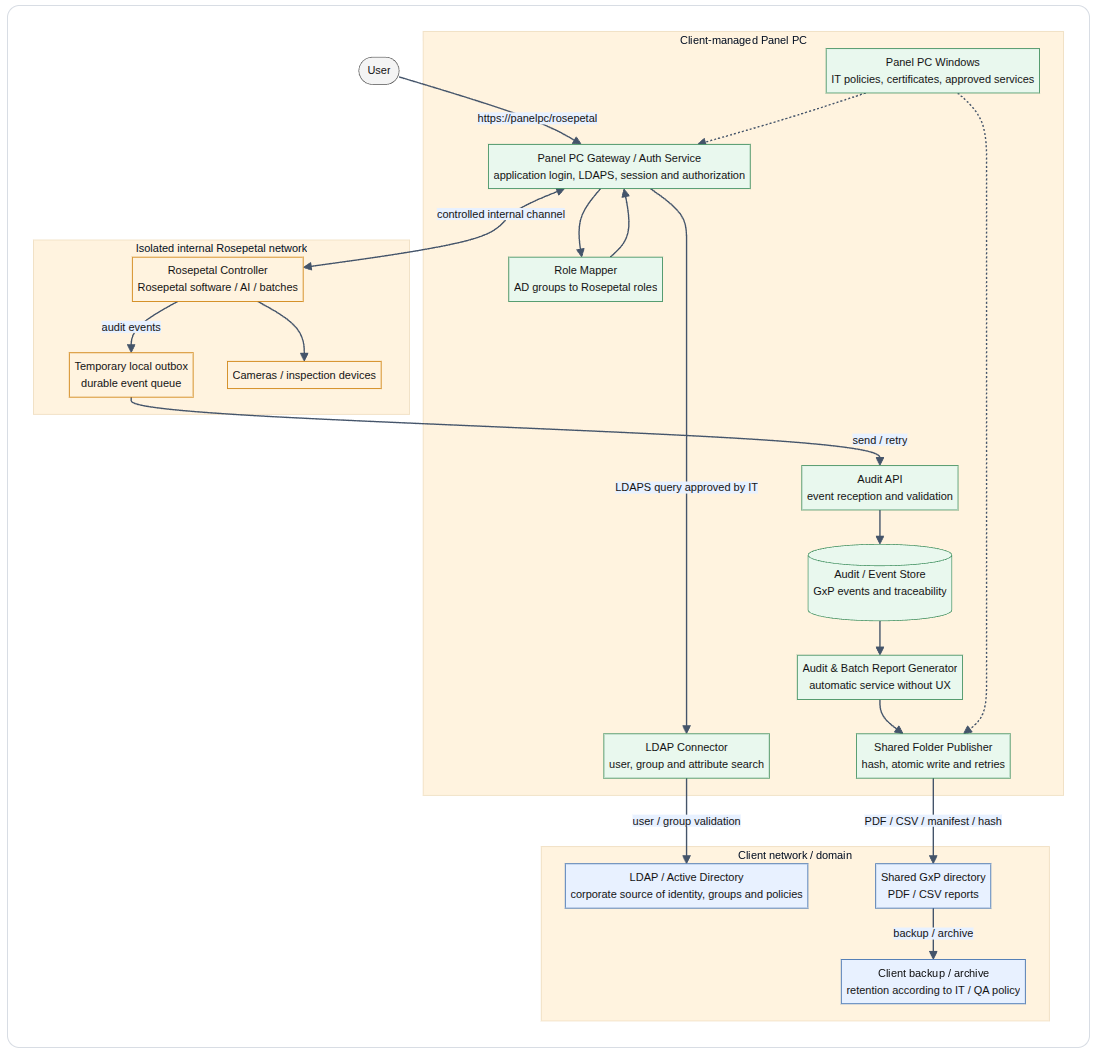
| Element | Responsibility |
|---|---|
| Panel PC | Application authentication, authorization, audit reception, transactional storage, report generation, publication to the folder and integration control. |
| Panel PC Windows | Customer-managed equipment under IT policies. Provides secure environment, certificates, network permissions, service execution and controlled access to approved resources. |
| Panel PC Gateway / Auth Service | Manages the application login, validates against LDAP/AD, creates the Rosepetal session, generates access tickets and authorizes access to the controller. |
| LDAP / Active Directory | Corporate source of identity, account status, users, groups, profiles and authentication policies. |
| Role Mapper | Converts LDAP/AD groups approved by the customer into Rosepetal profiles. |
| Rosepetal Controller | Runs the Rosepetal software, batches, recipes, AI model and communication with cameras/devices. It does not directly access LDAP/AD. |
| Audit / Event Store | Transactional store of audit events used for traceability, integrity control, report generation and retries. |
| Audit & Batch Report Generator | Automatic service without user interface that generates PDF/CSV reports by batch, inter-batch period, alarms, audit and model/recipe. |
| Shared directory | Final repository of the generated reports, managed by the customer for backup, retention, access and review. |
Components
On the Panel PC:
| Component | Function |
|---|---|
| Panel PC Gateway / Auth Service | Receives https://panelpc/rosepetal, manages the application login, validates against LDAP/AD and authorizes access to the Rosepetal Controller. |
| LDAP Connector | LDAPS connector for user searches, credential validation, group queries and retrieval of attributes approved by IT. |
| Role Mapper | Maps Active Directory groups to the Rosepetal profiles: Operator, Supervisor, Maintenance/Engineering and Administrator. |
| Audit API | Receives the audit events sent by the controller; validates origin, session, integrity and format. |
| Audit / Event Store | Protected local database with the audit events, original payload, normalized event, hashes and publication status. |
| Audit & Batch Report Generator Service | Automatic service without user interface that generates batch, audit trail, alarm/incidence and model/recipe reports. |
| Shared Folder Publisher | Publishes files to the shared folder with controlled writing, hash, manifest, retries and result logging. |
On the Rosepetal Controller:
| Component | Function |
|---|---|
| Rosepetal Controller Software | Rosepetal software for operation, inspection, batch management, recipes, AI and communication with cameras/devices. |
| Session client | Exchanges the access ticket with the Panel PC Gateway and receives the authorized identity and privileges. |
| Audit client | Sends the audit events to the Panel PC. |
| Temporary local outbox | Durable local queue, so no event is lost while the connection with the Panel PC is interrupted. |
| Model / Recipe Integrity Client | Reports the AI model version and hash, the active recipe and their changes, for the audit trail and the reports. |
The outbox of the controller is not the official audit repository: it keeps the events pending delivery and resends them to the Panel PC when communication is restored.
User access
The user accesses through the Panel PC, and the individual identity is validated against LDAP/AD from the application. The controller does not authenticate against LDAP and does not receive corporate credentials.
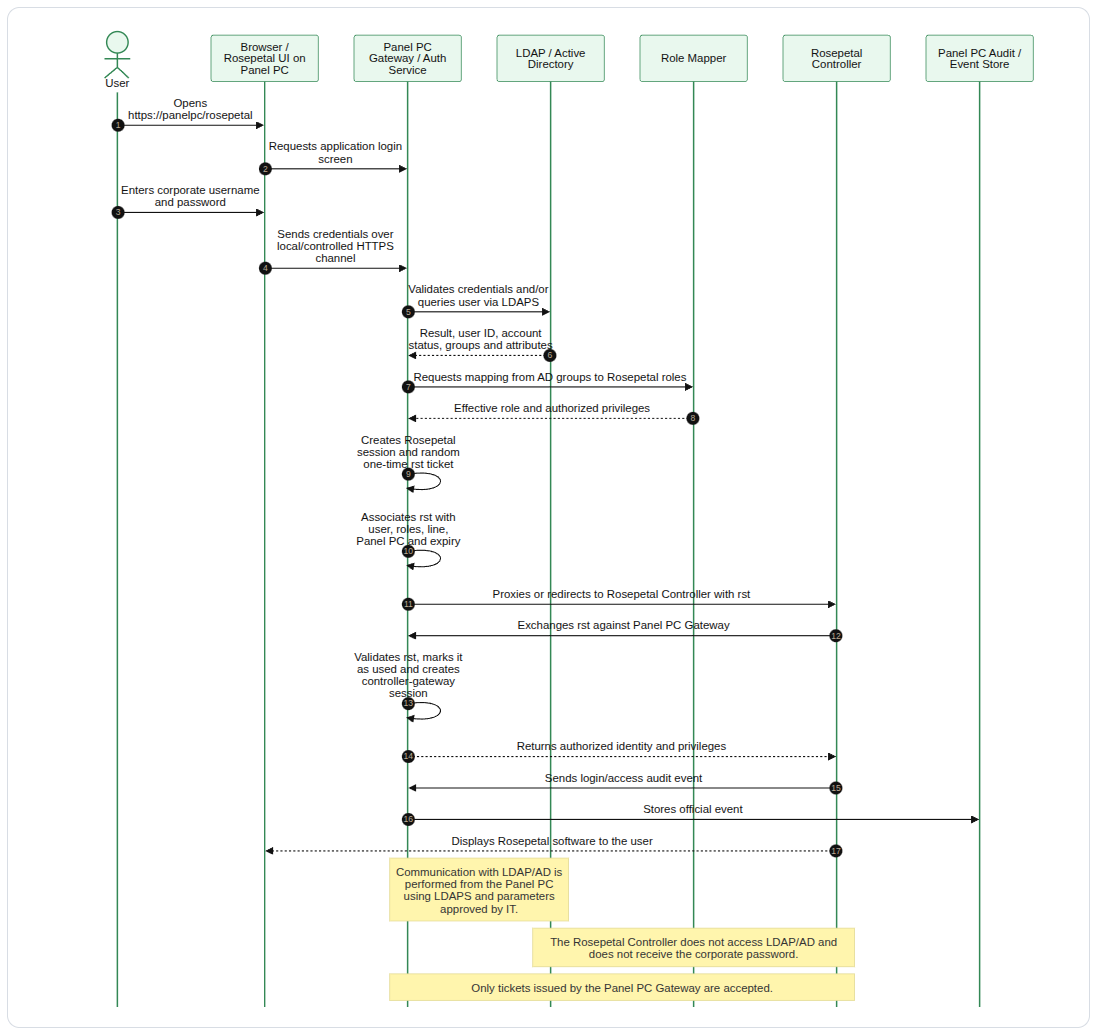
The access ticket rst separates the corporate authentication from the technical session between controller and gateway. The Panel PC Gateway generates it after validating the user in LDAP/AD.
| Property | Description |
|---|---|
| Randomness | 128 or 256 cryptographically generated bits. |
| One-time use | Once exchanged by the controller, it is marked as used. |
| Short expiry | Valid for 30 to 120 seconds. |
| Not reusable | A used or expired ticket is rejected. |
| Not a password | It only starts the controller-gateway session. It does not contain or replace the corporate password. |
| Associated with identity | The gateway associates it with the LDAP/AD user, profiles, line, Panel PC, session and expiry. |
| Auditable | Ticket issuance, exchange, expiry or rejection are recorded as technical audit events. |
Audit generation and storage
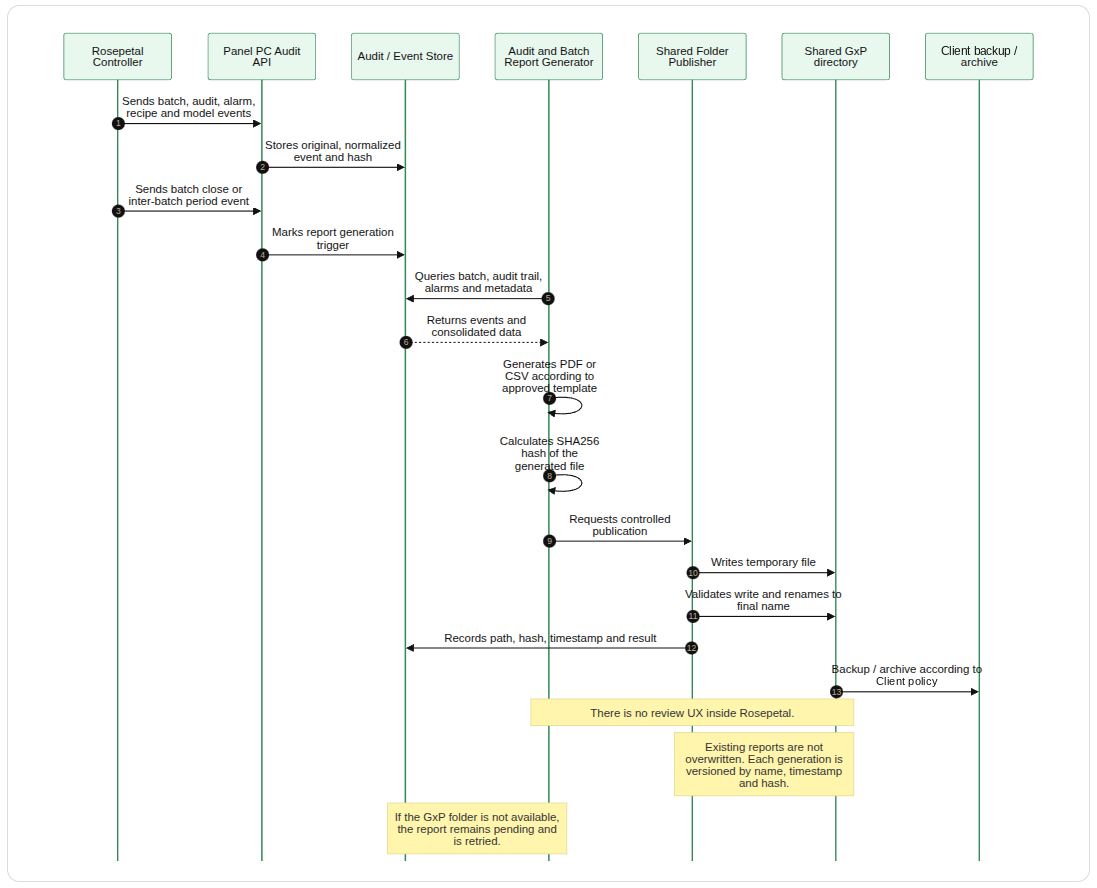
Audit events are generated in the Rosepetal Controller, where the Rosepetal software runs and the operational actions occur. Reception, normalization, transactional storage and report generation take place on the Panel PC.

| Data | Responsible party |
|---|---|
| User identity | Panel PC Gateway / Auth Service, from LDAP/Active Directory. |
| Effective profile | Panel PC Role Mapper, from the LDAP/AD groups approved by the customer. |
| Action performed in the Rosepetal software | Rosepetal Controller. |
| Previous value / new value | Rosepetal Controller, from the controlled system state. |
| Reason for change | User, captured by the Rosepetal software where applicable. |
| Transactional record | Panel PC Audit / Event Store. |
| Document report | Panel PC Audit & Batch Report Generator. |
| Final GxP archive | Shared GxP directory managed by the customer. |
The Audit / Event Store of the Panel PC is the transactional repository and the source of the reports; the shared directory keeps the reports as documentary evidence for review, backup and retention under the customer's infrastructure. The Panel PC is under the customer's IT control and its backup mechanisms, and the controller stays isolated from the customer network.
Automatic reports
| Function | Description |
|---|---|
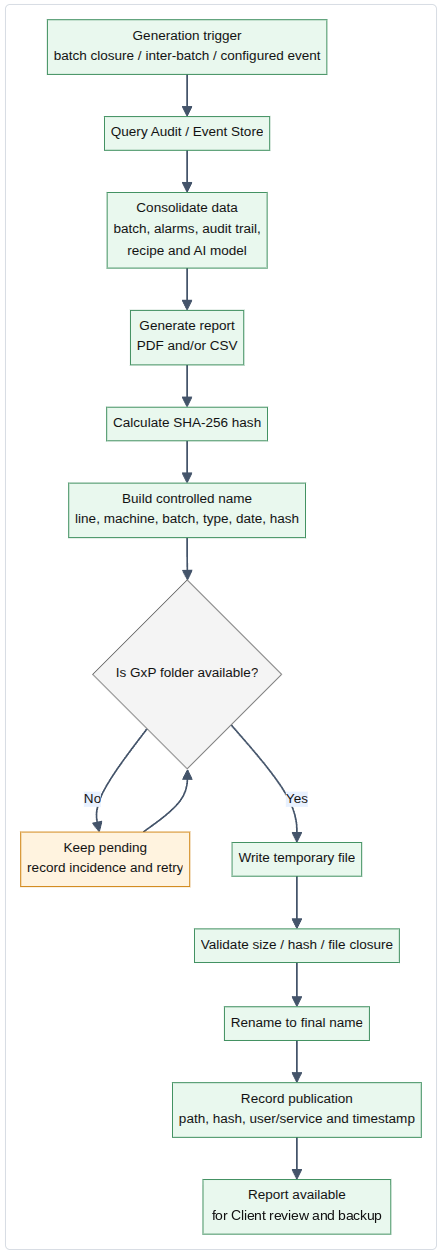
| Automatic generation | Generates reports without manual intervention at batch closure, during inter-batch periods or on configured events. |
| Batch Report | Batch data, recipe, users, counters, correct units, rejected units, status and critical parameters. |
| Audit Trail Report | Audit events with user, date/time, message, batch, event, result and metadata. |
| Alarm / Incidence Report | Alarms, incidences, resets, validations and relevant states. |
| Recipe / Model Integrity Report | Active recipe, AI model version, hash and version changes. |
| PDF export | Readable copies for human review and audit. |
| Optional CSV export | Structured data for analysis, filtering or electronic review, if the customer requires it. |
| Document publication | Writes the reports to the shared folder atomically, without overwriting existing files. |
| Retries | If the shared folder is unavailable, keeps the report pending and retries the publication. |
| Generation audit | Records generation, failure, retry, publication, hash and final location. |
Manual queries, interactive filters and electronic review signatures are not part of the generator: the reports are reviewed outside Rosepetal, from the files published to the customer's folder.
| Report | Generation point | Content |
|---|---|---|
| Batch Report | At batch closure. | Batch data, recipe, start/end user, counters, correct/rejected units, critical parameters, AI model and final status. |
| Audit Trail Report | At batch closure and/or inter-batch period. | Audit events with user, date/time, action, message, batch, result and metadata. |
| Alarm / Incidence Report | At batch closure and/or inter-batch period. | Alarms, incidences, resets, validations, alarm status and associated events. |
| Recipe / Model Integrity Report | On recipe/model load or change and at batch closure. | Recipe, version, critical parameters, AI model, hash, activation date and user. |
| Report Generation Log | For each generation/publication. | File name, path, hash, timestamp, trigger, result, errors and retries. |
The Batch Report follows the customer's existing batch reports and includes at least: report title; machine, line and controller; batch code; reference, product and description; recipe name and version; start and end date/time and user of the batch; who generated the report and when; units processed, correct and rejected; rejection counters by category; batch status; AI model ID, version and hash; critical recipe and process parameters at batch start and end, where applicable.
The Audit Trail Report includes the service or user that generates it, the generation date/time, the applied filter (batch, time range or inter-batch period) and a table of events with user, date/time, message, event type, result, batch and recipe/model reference.
File names follow this convention:
<SITE>_<LINE>_<MACHINE>_<BATCH>_<REPORT_TYPE>_<YYYYMMDD_HHMMSS>_<HASH8>.pdfClient_LINE1_ROSEPETAL_B0001234_BATCH_20260511_111331_A1B2C3D4.pdf
Client_LINE1_ROSEPETAL_B0001234_AUDIT_20260511_111302_F9E8D7C6.pdf
Client_LINE1_ROSEPETAL_B0001234_ALARMS_20260511_111302_91AB34EF.csvPublication requirements:
- Write access limited to the authorized service; read access according to the customer's policy.
- A record and a SHA-256 hash of each generated file.
- Atomic write: temporary file, hash validation, rename to the final name.
- Controlled retries if the directory is unavailable, and an alarm if a report cannot be published within the agreed time.
- No overwriting of generated reports; versioning by file name, timestamp and hash.
Security and access control
- The corporate password is not stored, not logged, not sent to the controller and not included in audit events.
- LDAP/AD is accessed through LDAPS or an equivalent mechanism approved by IT, optionally with a service account for user and group searches.
- The Panel PC Gateway decides whether the user has access; the controller receives only the validated identity and the authorized privileges.
- Critical GxP actions are blocked if the user's profile does not allow them. The permission matrix covers screens, actions, parameters, recipe, model, operation and administration, and is an input to FAT/SAT and validation.
- The audit trail cannot be disabled from normal operation. If an event cannot be recorded safely, critical GxP operations are blocked or raise an alarm, according to criteria agreed with QA/IT.
- Report generation, failure, retry and publication are audited too, and every report carries a hash or integrity manifest.
- The Panel PC acts as an application gateway, not as a router between the networks.
| Interface | Use |
|---|---|
| NIC 1 - Customer network | LDAP/Active Directory, corporate policies, certificates, shared folder, backup/archive and services approved by IT. |
| NIC 2 - Internal Rosepetal network | Controlled communication with the Rosepetal Controller. It does not route between the networks. |
| Source | Destination | Use |
|---|---|---|
| Local browser / user | https://panelpc/rosepetal | Access to the Rosepetal application through the gateway. |
| Panel PC Gateway / Auth Service | Customer LDAP/Active Directory | Authentication, attribute search and group reading through LDAPS or an IT-approved mechanism. |
| Panel PC Gateway | Rosepetal Controller | Proxied access to the Rosepetal software and rst ticket exchange. |
| Rosepetal Controller | Panel PC Audit API | Audit events, batch status, alarms, recipe and AI model. |
| Panel PC Report Publisher | Shared GxP directory | PDF/CSV reports, manifest and hash. |
| Shared GxP directory | Customer backup/archive | Backup, restore, retention and archive according to IT/QA policy. |
Profiles
The four profiles of the software are mapped to LDAP/AD groups provided by the customer.
| Profile | Intended use | Example permissions |
|---|---|---|
| Operator | Daily operation. | Login, monitoring, basic operation, batch start/stop if applicable, status visualization and basic acknowledgement of permitted alarms. |
| Supervisor | Production supervision. | Operator permissions, alarm validation, batch status review and controlled actions on batch/recipe according to the matrix. |
| Maintenance / Engineering | Technical support and system adjustment. | Diagnostics, maintenance, limited technical configuration, functional tests, access to technical logs and permitted parameterization. |
| Administrator | System administration. | Configuration management, assignment of permitted parameters, local integration administration, advanced diagnostics and reserved functions. |
Audit events and fields
| Category | Events |
|---|---|
| Access | Successful login, failed login, logout, expired session, locked user, assigned profile, user change. |
| Batch | Batch start, batch end, batch status change, cancellation, pause, restart, active batch change. |
| Recipe | Selection, activation, modification, import/export, version change and critical parameters. |
| AI model | Model load, version change, hash calculation, integrity validation, integrity failure. |
| Alarms | Incidences, alarms activated, alarm reset, alarm validation/acknowledgement, subsystem failures. |
| Operation | Machine start/stop, mode changes, relevant inspection events, rejection, critical confirmations. |
| Reports | Successful generation, failure, retry, publication, hash, file name, folder path. |
The events keep the fields of the software, with the LDAP/AD user in userId, the component (Controller, Gateway, Auth Service, Report Service, Publisher...) in source, and these payload fields where applicable:
| Payload field | Description |
|---|---|
batchId | Active batch. |
configId, configName, configVersion | Identifier, name and version of the active recipe. |
oldValue, newValue | Previous and new value. |
diffValue | Difference between the previous and the new value. |
comments | Reason for the change. |
result | Success, failed, rejected, blocked, pending, published. |
AI model and recipe integrity
| Element | Evidence |
|---|---|
| AI model | Model ID, version, training date, deployment date and SHA-256 hash of the model file. |
| Recipe | Recipe ID, version, critical parameters, user who activates it and date/time. |
| Dataset / training package | Reference to the dataset, training package or validated evidence where applicable. |
| Model change | Audit event with user, previous and new model, previous and new hash. |
| Batch closure | The report states which model and recipe were active during the batch. |
| Later verification | The hash shows that the model used is the validated version. |
Customer dependencies
| Dependency | Required detail |
|---|---|
| LDAP/AD server | URL/IP, port, domain, LDAPS and availability. |
| Certificates | Root/intermediate certificate for LDAPS, if applicable. |
| Base DN | Base DN for user and group search. |
| User filter | LDAP filter to locate and authenticate users. |
| Attributes | Username, display name, email, groups, account status and other required attributes. |
| AD groups | Groups for Operator, Supervisor, Maintenance/Engineering and Administrator. |
| Session policy | Expiry, lockout, login retries and inactivity timeout. |
| Time source | NTP server for the Panel PC and the controller. |
| Directory path | Shared directory path. |
| Permissions | Write permissions for the service and read/review permissions for the customer. |
| Final format | PDF, CSV or both. |
| Hash | Visible in the PDF, in a sidecar manifest or both. |
| Naming | Final report naming convention. |
Annex 1: Audit event catalog
The Audit Manager node offers these event types; the flows of each deployment decide which ones they record.
| Action Type | Action ID |
|---|---|
| access | access_login_success, access_login_failed, access_logout, access_session_expired, access_role_not_assigned (*) |
| actions | bypass_activate, bypass_deactivate, conveyor_activate, conveyor_deactivate |
| log | log_start, log_stop, log_show_errors, log_image_upload, log_stop_upload, log_clear |
| capture | capture_start, capture_stop, capture_start_upload, capture_stop_upload, capture_remove_images |
| alarms | alarm_detected, alarm_reset |
| operation | operation_software_start, operation_software_stop |
| reports | report_failure (*) |
| session | session_batch_start, session_batch_stop |
session_recipe_creation, session_recipe_deletion, session_recipe_rename, session_recipe_model_change, session_recipe_modification, session_recipe_import, session_recipe_export, session_recipe_version_change | |
session_ai_model_load, session_ai_model_version_change, session_ai_model_hash_calculation | |
| backup | backup_creation, backup_creation_error, backup_recovery, backup_recovery_error |
(*) Reference architecture only, generated on the Panel PC. In the reference architecture the Panel PC also generates the access_* events.
Annex 2: Permissions catalog
| Permission Types |
|---|
bypass_activate |
bypass_deactivate |
conveyor_activate |
conveyor_deactivate |
log_start |
log_stop |
log_show_errors |
log_image_upload |
capture_start |
capture_stop |
capture_start_upload |
capture_stop_upload |
capture_remove_images |
alarm_reset |
operation_software_start |
operation_software_stop |
session_batch_start |
session_batch_stop |
recipe_creation |
recipe_deletion |
recipe_batch_deletion |
recipe_batch_nok |
recipe_rename |
recipe_read |
recipe_model_change |
recipe_rule_creation |
recipe_rule_deactivation |
recipe_rule_activation |
recipe_element_creation |
recipe_element_removal |
recipe_element_classname_change |
recipe_presence_source_selection |
recipe_rule_rename |
recipe_rule_change |
backup_recovery |