

Pizza Bytes #1
25 September 2026, at lunchtime, at the Rosepetal offices. This page sums up what changed for users from 1 July to 25 September 2026.
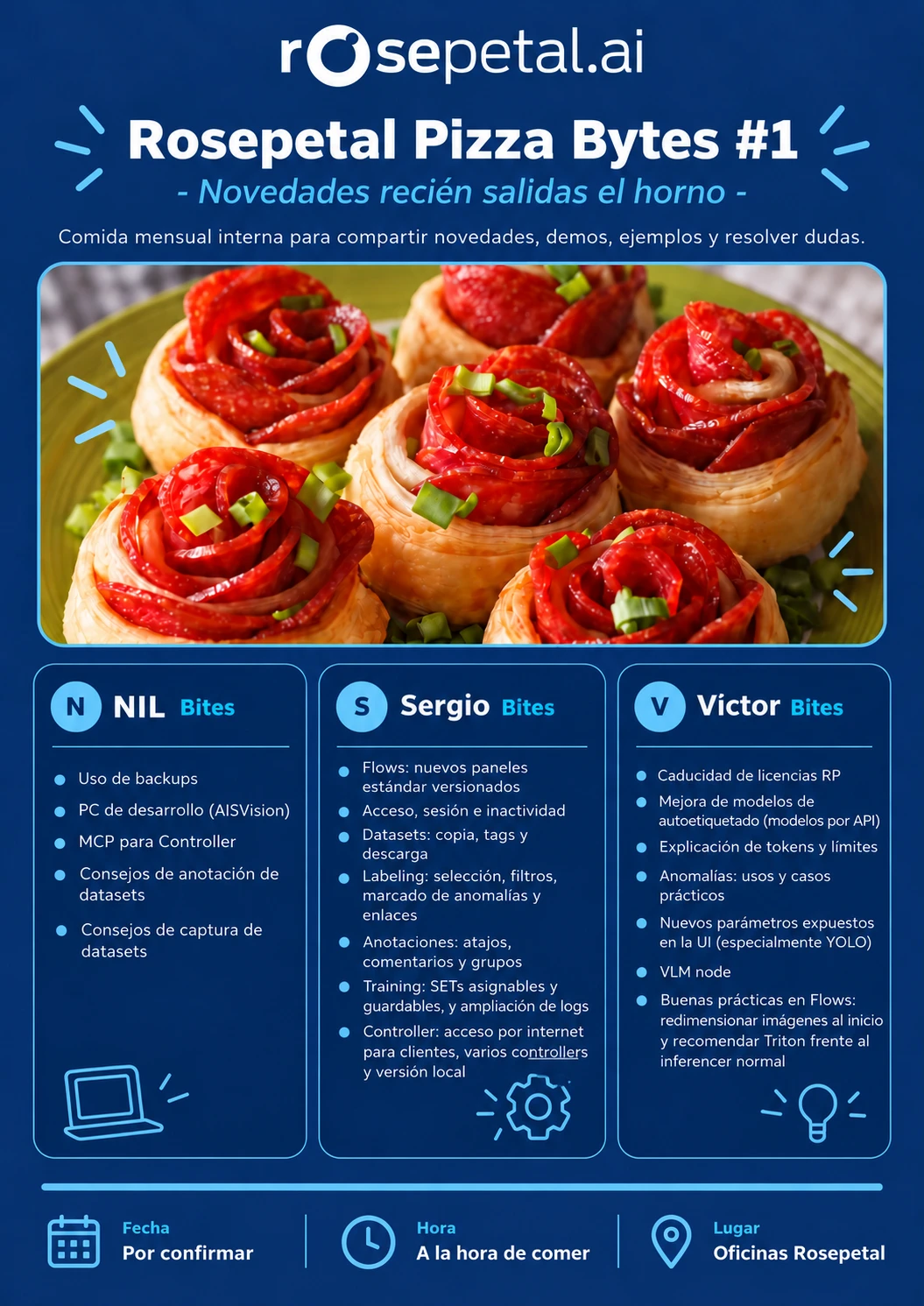
Topics
| Presenter | Topics |
|---|---|
| Nil | Using backups · the development PC · MCP for the controller · tips for annotating and for capturing datasets |
| Sergio | Standard versioned panels · access, session and inactivity · datasets: copy, tags and download · labeling: selection, filters, anomaly marking and links · annotations: shortcuts, comments and groups · training: train/validation/test sets and longer logs · controller: internet access, several controllers, local version |
| Víctor | Licence expiry · better automatic labeling with models through an API · tokens and limits · anomalies in practice · new training parameters, especially YOLO · the VLM node · good practices in flows: resize images first, prefer Triton |
The summary below covers what was released in this period. Some topics of the meeting are not in it: standard versioned panels, saved train/validation/test sets and the local version of the controller.
Platform
Datasets
- Copy and move images. Copy or move a whole dataset or a selection to another dataset, also to a new one, optionally keeping the creation dates. Large copies no longer fail, and a copy no longer shares its masks with the original.
- Tags and groups. New tags get distinct colours, with a colour picker. Uploads match tags without regard to upper or lower case. An image can belong to several groups, shown with their colour.
- Download what you need. A download can be limited by status, tag, group and set.
- Select and filter. Select images by dragging, keep the selection when you change page, show up to 500 images per page, and filter by a tag the images do not have. Anomaly and Normal buttons mark the selected images directly, links open them in Labeling or in the editor, and the grid updates by itself.
Labeling and annotations
- Keyboard shortcuts. In the editor, A and D move to the previous and next image, S saves the Smart Labeling mask, and holding X (not D) deletes a Smart Labeling point.
- Comments on the image. A comment can be pinned to a point of the image.
- Instances. Overlapping objects with the same tag stay separate instances.
- Clear errors. When an AI tool fails, the editor shows the actual reason.
- Automatic labeling with models through an API. A new Generic API option labels object detection datasets with vision-language models (Qwen, Gemini, Claude, GPT); reading the text of OCR datasets with these models comes next. PP-OCRv5 is the default OCR model, at about 0.2 s per read. The editor now reads its list of models from a central catalogue.
Training
- Parameters in the form. The advanced parameters of YOLO and RF-DETR are grouped in sections with help texts, Disable all turns off YOLO augmentation, and a chip shows the GPU the training will get.
- More models. RF-DETR trains segmentation, and short DEIMv2 trainings fine-tune properly.
- Sets and groups. When new images arrive with a set already assigned, automatic assignment can split only the new images or the whole dataset again. A training can use only the groups you choose.
- Why a training ended. A failed training shows the real cause, for example running out of GPU memory, instead of staying in "training".
- Reliability. Trainings on L4, A100 and H100 GPUs no longer stop after one hour, very large images no longer fill the disk, and a training that reuses a model name gets a suffix instead of overwriting the model. Training times are now quoted so that the time you set is met about 9 times out of 10.
- RF-DETR learning rate. RF-DETR trainings from mid-September used too low a learning rate for the encoder; the fix was merged on 25 September.
Anomaly detection
- How to label. Mark good images as Normal and paint the defect with a single defect tag; with masks, the model scores defects pixel by pixel.
- New model families. Dinomaly, AnomalyDINO and SuperADD, wider PaDiM backbones, and ONNX export to run anomaly models with the Triton inferencer.
- Fixes. Normal images are used even when the normal tag is not called exactly "OK", and the confusion matrix no longer swaps OK and NOK.
Licences, tokens and sign-in
- Licence expiry. The licence indicator turns amber 29 days before expiry, red at 10 days, and shows a red "Invalid" when the licence fails, which stops the flows. Client operators and projects without the device agent see the date too.
- Licences renew themselves. Controllers check their licence every 2 minutes: when a project's licence is extended, all its controllers renew without anyone pasting a token. New controllers are licensed at installation, and a token made for another project is refused.
- Tokens. The dashboard shows the month's token balance, broken down by service (OCR included), and the storage used, each against the plan. Since 21 August a token is 100 times smaller, so the figures are 100 times larger while every plan is worth the same. The AI tools of the editor spend tokens and stop when the allowance runs out. From late September trainings also cost tokens: Train shows the price before you launch, and a training that fails, or is cancelled before it starts, gets its tokens back.
- Sign-in. The login accepts Rosepetal accounts first and local accounts after them. Inactive users are signed out, and signing out also closes the Rosepetal account session.
Flows and panels
The vision-platform nodes went from version 1.3.0 to 1.4.10 in this period.
- New VLM node. The VLM Online inferencer finds objects you describe: a free prompt, or a list of tags with an optional description each. The model runs on the Rosepetal platform, so the controller needs no GPU; the platform side was being rolled out at the time of the meeting. Results have the same format as the inferencer, so
add-bbs,cropBBanddrawtake them as they are, and the node says so when the project has no tokens left. - Triton runs more models. The Triton inferencer runs RF-DETR segmentation, DEIMv2 detection and anomaly models (OK/NOK plus the outline of the defect), and models over 2 GB. Models built on another machine or trained at unusual sizes no longer stay unavailable, and RF-DETR results with a wrong or missing tag are fixed. If you installed a default RF-DETR detection model before, install it again to get the right labels.
- OCR on Triton. The new OCR Triton node does what the OCR node does (full OCR, detection only, recognition only, page rotation) with PP-OCRv5 server or mobile models, and can turn rotated pages and lines upright. In tests it took 23–27 ms against 49 ms for the OCR node, and 74 ms against 186 ms on large images.
- Inferencer and model manager. The normal inferencer shares one server per machine, stops idle servers to free memory, and reconnects by itself. The new Model manager node preloads models, shows what is in memory and frees it.
- Same debug image on every node. The inferencer, OCR, Triton and VLM nodes draw the same preview (boxes, masks, anomaly maps, text), with the same colour for a class on every node.
- Panels: inspection sessions. New widgets build a sessions page: a header with the image-saving mode, session details with CSV/JSON download and delete, a player and an images dialog that draws the detections on the image and the thumbnails. The image log loads older history, the image grid keeps its content after a Node-RED restart, and the last-error, image-queue and image-log widgets get a Show annotations button.
- Panels: clear from the flow. Sending
clear,resetor{ action: "clear" }empties the image canvas, the charts, the image queue and the last-error widget. - Panels: sign in with your Rosepetal account. Single sign-on in panels works again, and the panel receives the permissions and views of the user's profile (Audit Manager).
- Image tools. Heat diff returns statistics (changed area, SSIM, PSNR, changed regions with boxes), ignores black borders and runs about 7 times faster with SSIM off. Image align adds the ORB and SIFT detectors. Both accept lists of image pairs, and
image-inandfolder-inread BMP files. - Python. The Python executor adds
rp_to_cvandrp_from_cvto convert images to OpenCV arrays and back, hot mode is about twice as fast with images, and a timeout or aprint()no longer breaks the node. - Barcodes. A new Rosepetal Projection decoder in the barcode reader reads noisy, low-resolution 1D codes: 14 of 14 test crops, where the node read 1 before.
Good practices, measured
- Resize large images at the start of the flow: drawing on a 2576 px frame took 574 ms, and 44 ms after shrinking it.
- Halving the size of OCR crops gave the same readings, faster.
- In the barcode reader, the Quagga2 decoder blocked Node-RED for 200–500 ms per inspection; ZBar and ZXing do not.
- A panel widget sends its last message again to every browser that opens the panel, so send it only what it shows: one forgotten image made every load of a monitor page download 35 MB.
Controller
- Internet access. Each controller gets its own secure access from the internet when it is enrolled, open only to users signed in to the project. See Remote access.
- Several controllers. The management console follows your organisation from partner to project to controller, with a switcher and a dashboard at each level, and shows usage and licence, with up to five months of usage history.
- MCP for the controller. A controller's MCP server can be added as a connector in claude.ai or Claude Code after signing in on a Rosepetal page; only accounts with access to the project can connect, and their access can be revoked. The assistant can read the controller's resources, see a flow tab as an image, and search the history of messages and resources to find out what happened when a part took too long.
- Pilot. A new module gathers the controller's tools: resource monitor with GPU use per process, system and container logs, message history, file transfer with its own users, and container management.
- Development PC without hardware. Pilot's emulator imitates Irayple, Omron and Basler cameras and the serial I/O board, so flows with the camera and serial nodes run unchanged on a PC without that hardware.
- Modules. The upgrade dialog of the management console can remove installed modules (device agent 1.5.0 or later); required modules show a padlock.
- Backups. A restore no longer reinstalls modules retired from the catalogue. See Backups.
- Installation. The USB installer erases a disk only when you choose to install, needs no network, asks for the keyboard layout and sets up every wired port, including one connected straight to a camera.
rosepetal-clican create the enrollment from your Rosepetal account, and an installation over SSH goes on if the connection drops. See Installation. - Fixes. Installing nodes from the Node-RED palette no longer fails after installing a Rosepetal package, and the controller's Node-RED images 2.3.0 and 2.3.1 came without the Rosepetal nodes: 2.3.2 and later include them again.
Coming next
In development during this period and not released yet: a print-inspection package for label templates with barcode, text and blemish checks, a camera package for GigE Vision line-scan cameras, and a barcode verifier that grades 1D codes to ISO/IEC 15416 and GS1.