

Array-In Node
Purpose & Use Cases
The array-in node collects data from various sources and tags it with position information for ordered array assembly. It works in partnership with the array-out node to create structured arrays from multiple parallel data streams.
Real-World Applications:
- Batch Image Processing: Collect multiple images for simultaneous processing
- Data Aggregation: Combine results from parallel processing pipelines
- Multi-Source Analysis: Merge data from different sensors or inputs
- Synchronized Processing: Ensure data maintains order through parallel workflows
- Multi-Camera Systems: Collect images from multiple cameras in correct sequence
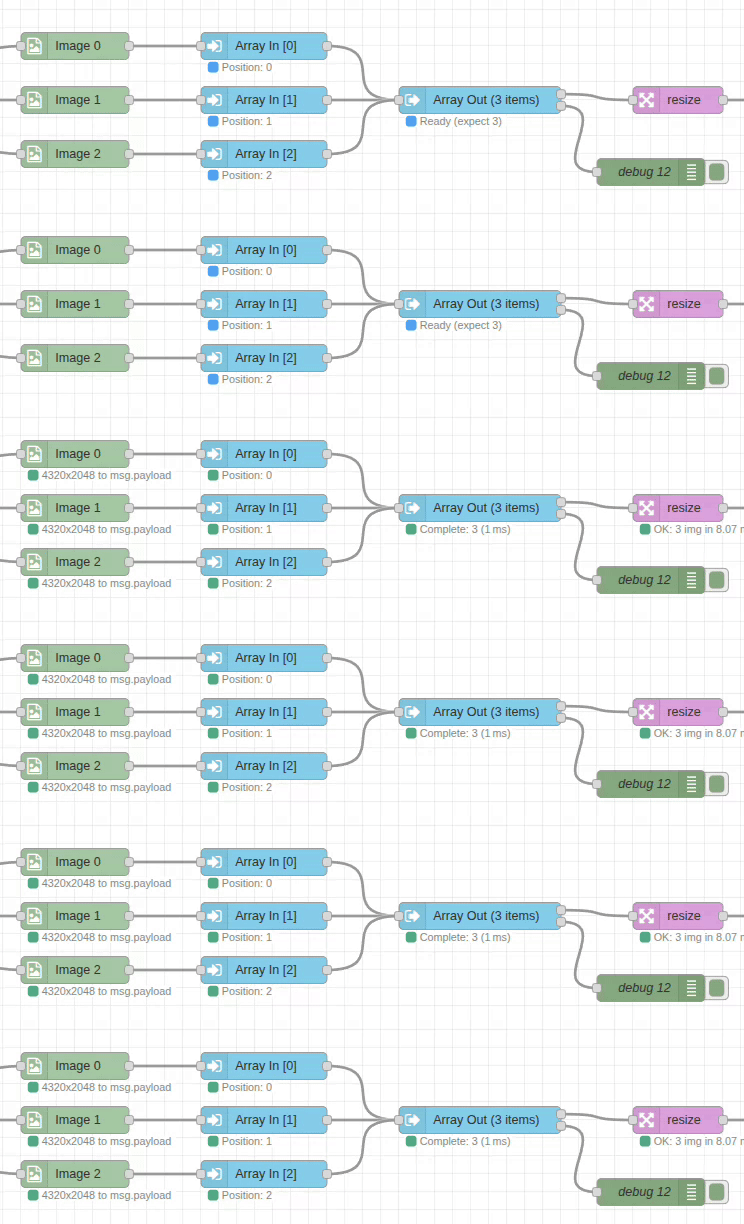
Input/Output Specification
Inputs
- Input Message: Message containing data at the configured input path
- Dynamic Position: Array position can be resolved from a message property or from flow or global context
Outputs
One output. The node sends the incoming message on with msg.meta added (created when the message has none). It copies the value into msg.payload only when Input from is msg.payload; for any other input the payload is left as it was and the value travels in msg.meta.arrayData:
javascript
{
  ...originalMessage,
  payload: any,           // Unchanged unless input is msg.payload; when mirrored matches meta.arrayData
  meta: {
    arrayPosition: number,  // Index where this data belongs in array
    arrayData: any         // The extracted data from input path
  }
}Configuration Options
Input From
- Default:
msg.payload - Options:
msg.*- Read from message propertyflow.*- Read from flow contextglobal.*- Read from global context
- Purpose: Specifies where to extract the data to be included in the array
Array Position
- Default:
0(fixed number) - Options:
- Fixed Number: Static position (0, 1, 2, ...)
- msg.*: Dynamic position from message property
- flow.*: Position from flow context
- global.*: Position from global context
- Range: Non-negative integers (0-based indexing). The value is read with
parseInt, so2.7and"2"both give2; an empty field means0. - Purpose: Determines where this data appears in the final array
Performance Notes
Array Assembly Strategy
- Position Tagging: Lightweight metadata addition with minimal processing overhead
- No Copies:
msg.meta.arrayDataholds a reference to the value, not a copy - Parallel Collection: Multiple array-in nodes can operate simultaneously
- Order Preservation: The position, not the arrival order, decides where the value ends up in the array
Status Display
- Blue dot
Position: 0(orPosition: msg.indexfor a dynamic position) after deploy - Green dot
Position: <n>with the position used for the last message - Red ring
Invalid positionwhen the position cannot be resolved,Erroron any other failure
Real-World Examples
Basic Multi-Image Collection
[Image-In: photo1.jpg] → [Array-In: pos=0] ┐
[Image-In: photo2.jpg] → [Array-In: pos=1] ├→ [Array-Out] → [Resize All]
[Image-In: photo3.jpg] → [Array-In: pos=2] ┘Collect three images into an ordered array for batch processing.
Dynamic Position Assignment
[Process Data] → [Set msg.index] → [Array-In: pos=msg.index] → [Array-Out]Use dynamic positioning based on processing results.
Mixed Data Sources
[msg.image1] → [Array-In: pos=0] ┐
[flow.image2] → [Array-In: pos=1] ├→ [Array-Out] → [Concat Images]
[global.image3] → [Array-In: pos=2] ┘Combine data from different context levels.
Conditional Assembly
[Switch] → [Array-In: pos=flow.nextIndex] → [Array-Out]Dynamic array building based on conditions.
Common Issues & Troubleshooting
Position Conflicts
- Issue: Multiple nodes using same position
- Solution: Ensure each array-in node has unique position when feeding same array-out
- Best Practice: Use sequential positions starting from 0
Missing Data
- Issue: Input path contains no data
- Result: The warning
No data found at msg.payload(with the configured path) is logged,meta.arrayDatais set tonulland the message is still sent - Solution: Verify data exists at specified input path before processing
Dynamic Position Errors
- Issue: Position resolves to a value that is not a number, or to a negative number
- Result: The warning
Failed to resolve array position: ...is logged, the status showsInvalid positionand the message is dropped - Solution: Validate dynamic position sources return valid array indices
- Check: Use debug node to verify position values
Array Gaps
- Issue: Positions skip numbers, or some positions never arrive
- Result:
array-outonly accepts positions0to Expected Count - 1 and completes an array only when all of them arrive. If one is missing, its timeout sends the partial array, withnullat the missing positions, to its second output - Solution: Use sequential positions starting from 0 and set Expected Count in
array-outto their number