

Array-Out Node
Purpose & Use Cases
The array-out node serves as the collection point for multiple array-in nodes, assembling ordered arrays from parallel data streams. It provides timeout protection and ensures data integrity during the assembly process.
Real-World Applications:
- Batch Image Processing: Assemble multiple images for simultaneous operations
- Multi-Camera Synchronization: Collect frames from multiple cameras in sequence
- Parallel Pipeline Merging: Combine results from parallel processing workflows
- Data Aggregation: Merge processed data from multiple sources
- Quality Control: Collect inspection results from multiple checkpoints
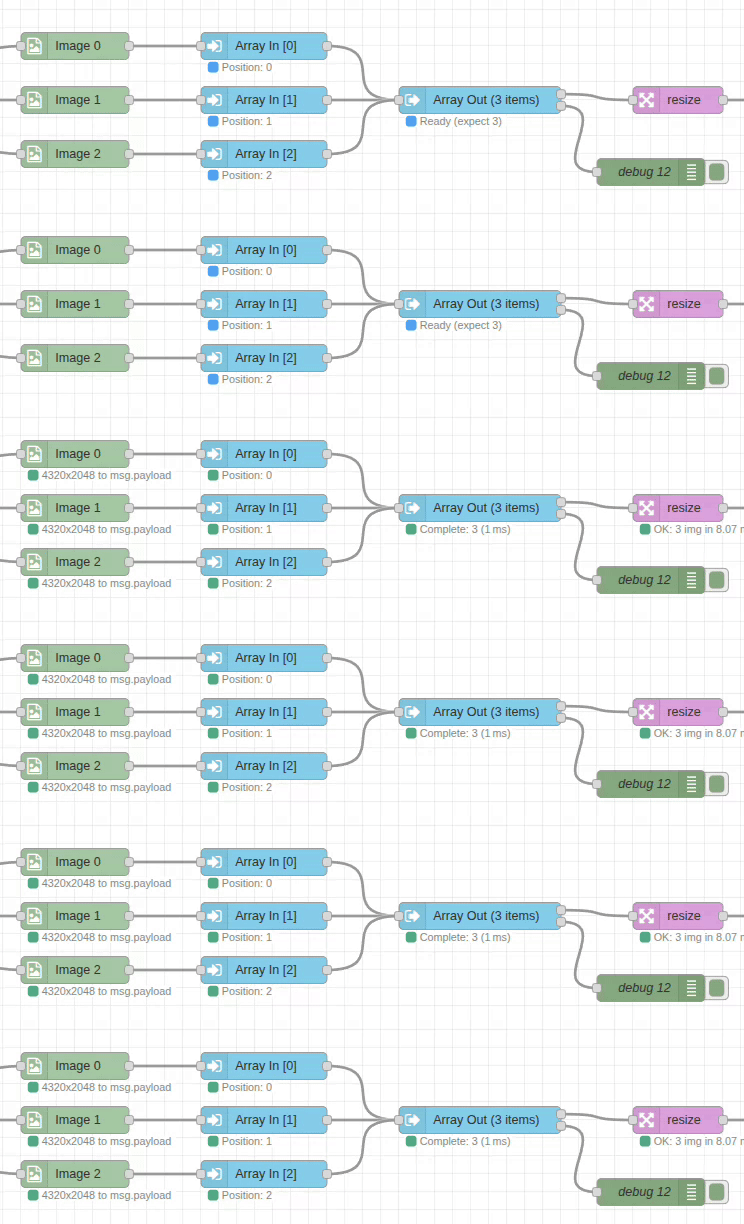
Input/Output Specification
Inputs
Messages from array-in nodes containing:
{
  ...originalMessage,
  payload: any,           // Fallback data source
  meta: {
    arrayPosition: number,  // Position index (0, 1, 2, ...)
    arrayData: any         // Preferred data source (takes priority over payload)
  }
}Data Extraction Priority: The node prefers msg.meta.arrayData but falls back to msg.payload if arrayData is undefined.
Accepted positions: 0 to Expected Count - 1. A message without a numeric msg.meta.arrayPosition is ignored with the warning Message missing array metadata. Expected msg.meta.arrayPosition (number) from rp-array-in node; a position outside the range is ignored with the warning Position 5 out of range 0‑2 (for an Expected Count of 3).
Outputs
Output 1 - Complete Array (Success)
Sent when the last missing position arrives. The message is a shallow copy of that last message, with the ordered array written to Output to (msg.payload by default); its other properties, meta included, are those of the last message:
{
  ...lastMessage,
  payload: [data0, data1, data2, ...]  // Ordered array of collected data
}Output 2 - Timeout Data (Error)
Sent when Timeout expires first. It is a new message: it carries only meta and the partial array, with null at the missing positions. No property of the collected messages is copied into it.
{
  [outputPath]: [data0, null, data2, ...],  // Partial array in configured location
  meta: {
    timeout: true,                     // Timeout flag
    missingPositions: [1, 4],         // Positions that didn't arrive
    collectedPositions: [0, 2, 3],    // Positions that were collected
    expectedCount: 5,                 // Number expected
    collectedCount: 3,                // Number actually collected
    elapsed: 5000                     // Time elapsed in milliseconds
  }
}Configuration Options
Expected Count
- Type: Number (required)
- Default:
2 - Range: Minimum 1. The value is read with
parseInt(2.5gives2); a value that gives no integer of 1 or more logs the errorInvalid expectedCount. Must be a positive integer.at deploy and the node uses2 - Purpose: Number of array elements required before output
- Validation: Should equal the number of positions sent by the connected array-in nodes (
0to Expected Count - 1); the node does not check the wiring - Impact: Array assembly completes when this many different positions are collected
Timeout
- Type: Number (milliseconds)
- Default: 5000ms (5 seconds)
- Range: The editor field has a minimum of 100ms; an empty or
0value means 5000ms - Purpose: Maximum wait time for all elements after first message. The timer starts with the first message of a set and is not restarted by the following ones
- Behavior: Sends partial data to output 2 on timeout
Output to
- Default:
msg.payload - Options:
msg.*- Store in message propertyflow.*- Store in flow contextglobal.*- Store in global context
- Purpose: Where to store the assembled array. With
floworglobalthe array goes to the context and the message sent on output 1 is the last message unchanged; on output 2 it carries onlymeta
Performance Notes
Assembly Strategy
- Efficient Collection: Uses position-based indexing for O(1) insertion
- Memory Management: Minimal overhead during collection
- Timeout Protection: Prevents indefinite waiting for missing data
- State Reset: Automatic cleanup between collection cycles
Status Display
- Ready: Blue dot
Ready (expect 3)while waiting for the first message of a set - Collection Progress: Yellow dot
Collecting… (2/3) - Success Timing: Green dot
Complete: 3 (12 ms), with the time since the first message of the set; back toReadyafter 2 seconds - Timeout Warning: Yellow ring
Timeout: sent 2/3 to output 2; back toReadyafter 3 seconds - Error: Red ring
Error; the set being collected is discarded
Real-World Examples
Basic Image Array Assembly
[Image-In: img1.jpg] → [Array-In: pos=0] ┐
[Image-In: img2.jpg] → [Array-In: pos=1] ├→ [Array-Out: count=3, timeout=500] → [Resize: All Images]
[Image-In: img3.jpg] → [Array-In: pos=2] ┘Collect three images for batch resizing.
Multi-Camera Frame Collection
[Camera 1] → [Array-In: pos=0] ┐
[Camera 2] → [Array-In: pos=1] ├→ [Array-Out: count=4, timeout=100] → [Sync Analysis]
[Camera 3] → [Array-In: pos=2] │
[Camera 4] → [Array-In: pos=3] ┘Synchronize frames from multiple cameras with tight timing.
Parallel Processing Merge
→ [Process A] → [Array-In: pos=0] ┐
→ [Process B] → [Array-In: pos=1] ├→ [Array-Out: count=3, timeout=500] → [Combine Results]
→ [Process C] → [Array-In: pos=2] ┘Merge results from parallel processing pipelines.
Quality Control Assembly
[Inspection A] → [Array-In: pos=0] ┐
[Inspection B] → [Array-In: pos=1] ├→ [Array-Out: count=3, timeout=10000] → [Final Report]
[Inspection C] → [Array-In: pos=2] ┘Collect quality control results with extended timeout.
Common Issues & Troubleshooting
Timeout Issues
- Issue: Frequent timeouts preventing array completion
- Causes: Slow upstream processing, network delays, missing data
- Solutions:
- Increase timeout value for slow processes
- Add debug nodes to identify bottlenecks
- Implement fallback logic using output 2
Count Mismatch
- Issue: Expected count doesn't match number of array-in nodes
- Result: If it is higher, every set ends in a timeout on output 2. If it is lower, the positions at or above Expected Count are ignored with a warning and the array is shorter than intended
- Solution: Verify expected count equals number of connected array-in nodes
Position Conflicts
- Issue: Multiple array-in nodes using same position
- Result: The later message replaces the earlier one and the position is counted once, so the set waits for a position that never comes and ends in a timeout
- Solution: Ensure each array-in node has unique position
Missing Metadata
- Issue: Messages arriving without proper meta.arrayPosition
- Result: Messages ignored with a warning, incomplete arrays
- Solution: Verify all input messages come from array-in nodes