

Chart Pie
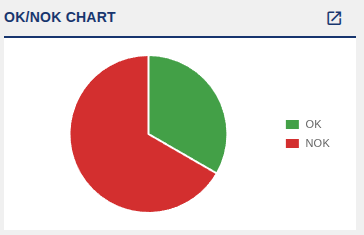
The ui-chart-pie widget draws a pie chart from three arrays in msg.payload: labels, values and, optionally, colors. Each message replaces the chart. The tooltip of a slice shows its label, its value and its percentage of the total. Without colors, each slice gets a color from a 10-color palette, picked from its label, so a label keeps the same color from one message to the next (two labels can share a color).
The header holds the title, a settings button and an expand button. Settings lets the viewer show or hide the title and the legend and place the legend on the right, at the top or at the bottom; the expand button opens the chart in a larger dialog with a legend switch. These choices are saved per widget in the browser and, once a viewer changes one, override the editor values in that browser. The widget shows No data available until it has at least one label and one value greater than 0.
Palette: category Charts, label pie chart. 1 input, 1 output.
Configuration
| Property | Description | Default |
|---|---|---|
| Name | Node name shown in the editor. | "" |
| Group | Dashboard group where the chart is displayed. | (required) |
| Size | Widget width and height; 0 means automatic. | 0 x 0 |
| Title | Text in the chart header. When empty, PIE CHART. | PIE CHART |
| Show Title | Shows the title in the header. | true |
| Legend Position | Position of the legend: Right, Top or Bottom. The legend is shown by default; viewers can hide it from the settings dialog. | right |
Input
| Property | Type | Description |
|---|---|---|
msg.payload.labels | array of strings | Name of each slice. |
msg.payload.values | array of numbers | Value of each slice, in the same order as labels. |
msg.payload.colors | array of strings | Optional. CSS color of each slice, in the same order, for example #FF6384 or rgb(54,162,235). |
msg.payload = "reset", "clear" or { action: "clear" } empties the chart.
The node keeps the last message: a browser that opens the page shows the current chart.
Output
This node does not send messages. Input messages are not passed on.
Usage example
A function node that shows the share of good and rejected parts of the current batch:
const batch = flow.get("batch") || { ok: 0, nok: 0, rework: 0 };
msg.payload = {
    labels: ["OK", "NOK", "Rework"],
    values: [batch.ok, batch.nok, batch.rework],
    colors: ["#59A14F", "#E15759", "#EDC948"]
};
return msg;