

Last Error
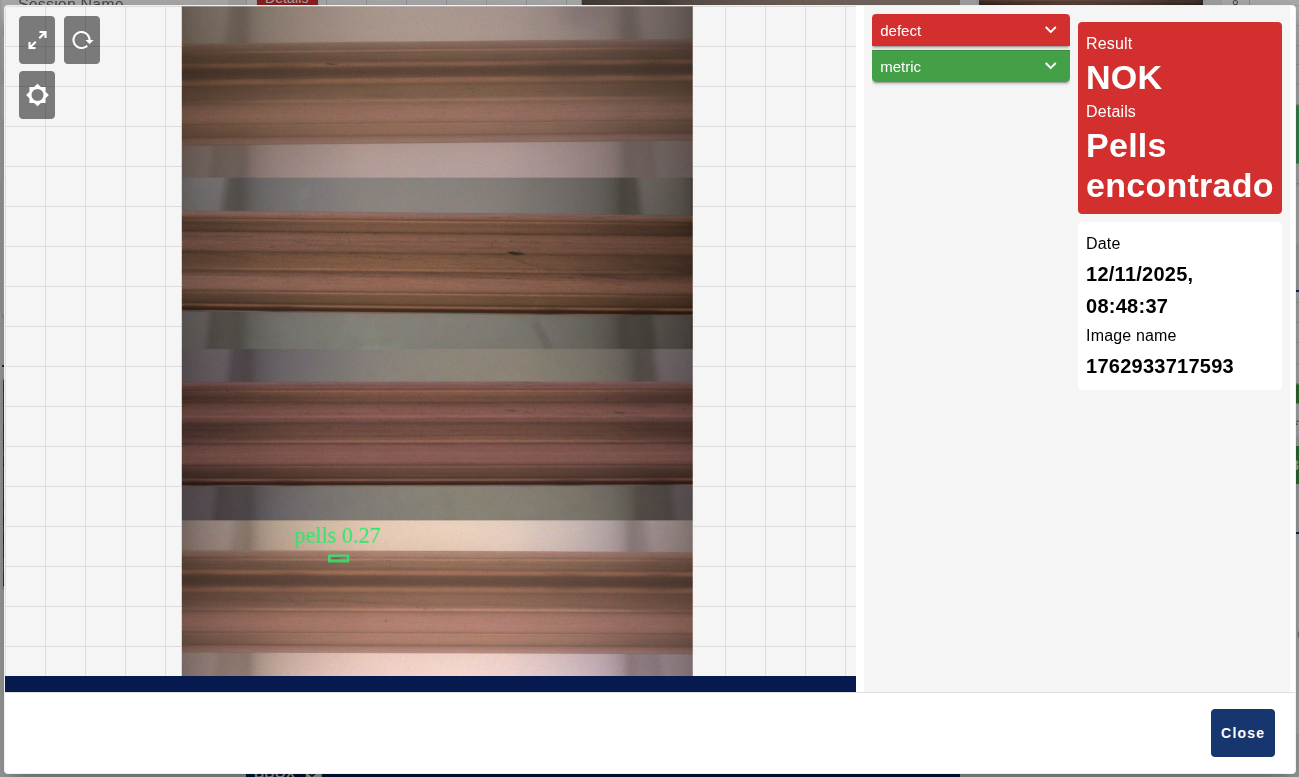
The Last Error widget shows one card with the thumbnail of the last image it received, a chip with its result, and the bounding boxes and polygons drawn over the thumbnail. A button at the top right of the card turns those drawings on or off. Clicking the card opens the same image dialog as Image Queue, with this single image. The node does not look at the result: it shows any image it receives, so send it only the failed inspections.
Palette: category Renders, label last error. 1 input, 1 output.
Configuration
| Property | Description | Default |
|---|---|---|
| Name | Node name shown in the editor. | "" |
| Group | Dashboard group that holds the widget. Required. | — |
| Locale | Optional Locale Config: format and time zone of the date in the dialog, and footbar texts for the fields below left empty. | none |
| Size | Width and height of the widget (0 = automatic). | 0 x 0 |
| Close button text | Text of the dialog's close button. | Close |
| Show mask checkbox | Shows the MASK toggle in the dialog footbar. The mask version is shown first; with the toggle hidden it is always shown when the image has one. | on |
| Show bbox checkbox | Shows the BBOX toggle (bounding boxes). | on |
| Show polygon checkbox | Shows the POLYGONS toggle (polygons and their labels). | on |
| Mask checkbox text | Label of the MASK toggle. Empty: the Locale Config text, else MASK. | empty |
| Bbox checkbox text | Label of the BBOX toggle. Empty: the Locale Config text, else BBOX. | empty |
| Polygon checkbox text | Label of the POLYGONS toggle. Empty: the Locale Config text, else POLYGONS. | empty |
| Hover label text | Title of the Labels on hover option of the footbar menu. Empty: the Locale Config text, else Labels on hover. | empty |
| Hover label hint | Hint under that option. Empty: the Locale Config text, else Show a label only while pointing at its detection. | empty |
| Box fill text | Title of the Bounding box fill option. Empty: the Locale Config text, else Bounding box fill. | empty |
| Box fill hint | Hint under that option. Empty: the Locale Config text, else Tint the inside of each bounding box. | empty |
| Annotations on thumbnails | Initial state of the button that draws boxes and polygons on the thumbnail. Each viewer's choice is then remembered in the browser. | on |
| Annotation text size (px) | Size of the detection labels in the dialog, 0 to 200. 0 uses each detection's fontSize, or 16. | 16 |
| Image types | Number of Type name fields, 0 to 9. | 0 |
| Type name 1…N | Keys of imageShow offered in the dialog's type list. Type name 1 is the imageShow entry used for the card thumbnail (see Input). Empty names are dropped on save. | none |
Input
msg.payload | Effect |
|---|---|
object with at least one of imageShow, imageData, videoShow, videoData or polygons | Replaces the image shown. The message is stored, so dashboards opened later show it too. |
"clear", "reset" or { action: "clear" } | Removes the image; the card shows a placeholder icon. |
Other messages are ignored.
The payload uses the fields of the Image Queue image object and its detections. Differences on the card:
- Thumbnail: with
imageShow, theimageDataThumbnailMaskor elseimageDataThumbnailof the entry named in Type name 1. There is no fallback to another entry: without a matching Type name 1, the card shows no thumbnail (unlessimageShowitself holds those fields). WithoutimageShow, the same fields at the top level of the payload. - Boxes and polygons on the thumbnail: those of the Type name 1 entry, else those at the top level.
- Chip colour from
isAnomalous: red fortrue,1,"true"or"1"; green forfalse,0,"false"or"0"; blue otherwise. Withoutresult, the chip is empty and grey.
In the dialog, the previous and next buttons are disabled, since the widget holds one image.
Output
This node does not send messages.
Usage example
With Type name 1 set to raw, a function node in front of the widget forwards only the failed inspections:
// msg.payload as produced by the inspection, for example:
// {
//     name: "1732270000000_cam1.jpg",
//     date: "2026-11-22T10:30:00Z",
//     result: "NOK",
//     isAnomalous: true,
//     imageShow: {
//         raw: {
//             imageData: "data:image/jpeg;base64,...",
//             imageDataThumbnail: "data:image/jpeg;base64,...",
//             bbox: [{ x_rel: 0.1, y_rel: 0.2, w_rel: 0.3, h_rel: 0.4, tag: "defect", score: 0.95 }]
//         }
//     },
//     resume: { detector: { result: "NOK", score: 0.95 } }
// }
if (msg.payload.isAnomalous !== true) return null;
return msg;To empty the card, send msg.payload = "clear".