

Dataset Save Menu
The Dataset Save Menu widget shows a card titled CONFIGURATION with one section per image source. Each section has a Suffix text field and a Dataset list. The flow fills the list of datasets and can preset the values; the operator changes them and presses the confirm button, and the widget sends the configuration of every source to the flow.
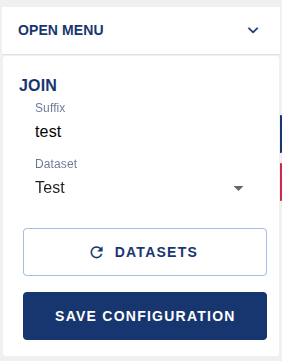
Palette: category Utils, label dataset save menu. 1 input, 1 output.
Configuration
| Property | Description | Default |
|---|---|---|
| Name | Node name shown in the editor. | '' |
| Group | Dashboard group where the widget is displayed. | — (required) |
| Size | Widget width and height (0 = fit to the group). | 0 x 0 |
| Confirm button text | Text of the button that sends the configuration. | CONFIRM |
| Images path | Training or Log. It selects the key of the output (configTraining or configLog) and the folder sent with each source. | Training |
| Fill height | Stretch the card down to the bottom of the window (at least 240 px); the list of sources scrolls inside it. | off |
| Subtitle header | Show a light CONFIGURATION subtitle instead of the coloured title bar, so the card reads as part of the card above it. | off |
| Image sources | Number of sources, with one field per source (Source name 1, Source name 2, ...). With two or more, a trash button next to each removes it. | 1 (one empty name) |
Source names are saved in lower case and trimmed; with more than one source, empty names are dropped. The sources appear in the widget in this order. A single source left empty is kept: the widget then shows a section without a name, sent as sourceName: "".
Input
| Property | Type | Effect |
|---|---|---|
msg.options | array | Entries of the Dataset lists, as { label, value }: label is shown, value is sent. |
msg.payload.configTraining or msg.payload.configLog | array | Values to show: one { sourceName, suffix, dataset } per source. sourceName is matched in lower case; sources not in the array are cleared. |
msg.options = [
    { label: "Scratches", value: "rp-class-scratches" },
    { label: "Training Set 1", value: "train_dataset_1" }
];
msg.payload = {
    configTraining: [
        { sourceName: "camera1", suffix: "_defect", dataset: "train_dataset_1" }
    ]
};Options and configuration can arrive in separate messages: the node keeps the last of each, in memory, and a browser that opens the page later receives both. A deploy or a restart forgets them.
Output
One message for each button:
- DATASETS sends
msg.payload = "refreshDatasets", so the flow can reload the list and sendmsg.optionsagain. - The confirm button sends the value of every source, under
configLogwhen Images path isLogand underconfigTrainingotherwise:
msg.payload = {
    configTraining: [
        {
            sourceName: "camera1",
            suffix: "_defect",
            dataset: "train_dataset_1",
            folder: "/opt/storage/images/training/imageSaveDir"
        }
    ]
};suffix and dataset are null when left empty. folder is /opt/storage/images/<images path>/imageSaveDir, with training or log.
Usage example
Two cameras, camera1 and camera2, saving to training datasets:
- Set Image sources to
2, with source namescamera1andcamera2, and Confirm button text toSAVE CONFIGURATION. - When the dashboard loads, and when the output carries
"refreshDatasets", read the dataset list and send it:
msg.options = flow.get("datasets").map(d => ({ label: d.name, value: d.id }));
return msg;- Send the saved configuration, if any, so the widget shows it:
msg.payload = { configTraining: flow.get("configTraining") || [] };
return msg;- When the operator presses SAVE CONFIGURATION, store
msg.payload.configTraining(for example withflow.set("configTraining", msg.payload.configTraining)) and use it where images are saved.