

Notification Overlay
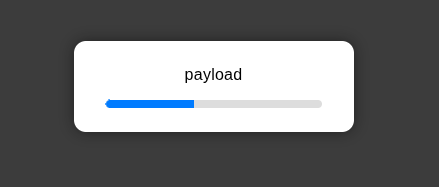
The ui-notification-overlay widget covers the whole browser window with a dark layer and a centred white box with a text when a message arrives. When a timeout applies, a progress bar under the text fills up and the overlay closes when it is full. Without a timeout the overlay stays until the page is reloaded: it has no close button, does not close on click, and blocks the dashboard underneath.
A new message while the overlay is open replaces it and restarts the timer. The overlay appears only in browsers that are showing the page of the widget's group, and only for messages that arrive while the page is open: reloading the page does not show it again.
Palette: category Utils, label notification overlay. 1 input, 1 output.
Configuration
| Property | Description | Default |
|---|---|---|
| Name | Node name shown in the editor. | "" |
| Group | Dashboard group of the widget; the overlay shows on the page of this group. | (required) |
| Size | Widget width and height; 0 means automatic. | 0 x 0 |
| Message | Name of the top-level msg property that opens the overlay, and also the text the overlay shows. When empty, payload. | msg |
| Timeout | Milliseconds before the overlay closes. When empty, msg.timeout is used if it is a positive number, and 5000 otherwise. A value that is not a positive number, such as the default msg or 0, keeps the overlay open with no progress bar. | msg |
Input
| Property | Type | Effect |
|---|---|---|
msg[<Message>] | any | Opens the overlay unless it is missing, null or a blank string. With the default Message this is msg.msg; with an empty Message, msg.payload. Its value is not displayed. |
msg.timeout | number | Milliseconds before the overlay closes, used only when Timeout is empty. |
Message is a property name, not a path: payload.text looks for a property literally called payload.text. The overlay text is always the text of the Message field.
Output
This node does not send messages. Input messages are not passed on.
Usage example
With Message set to Saving and Timeout set to 3000, a function node shows an overlay with the text "Saving" and a progress bar for 3 seconds while a recipe is stored:
msg.Saving = true;
return msg;