

Session Info
The ui-session-info widget shows a card with up to three figures taken from msg.payload: the last result, the total count (titled Total) and the error count. A button under them opens a dialog titled Session with a table of the error breakdown. Each message replaces everything shown: the widget does not add up values between messages.
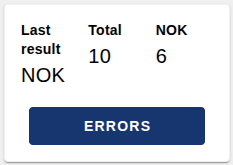
Palette: category Monitor, label session info. 1 input, 1 output.
Configuration
| Property | Description | Default |
|---|---|---|
| Name | Node name shown in the editor. | "" |
| Group | Dashboard group where the card is displayed. | (required) |
| Size | Widget width and height; 0 means automatic. | 0 x 0 |
| No Class Label | Title of the error count figure. | Errors |
| Param Label | Text of the button that opens the error dialog, and header of the first column (error name) of its table. | Errors |
| Counter Label | Header of the count column of the error table, used when every entry is a plain number. | Count |
| Last Result Label | Title of the last result figure. | Last result |
Input
msg.payload is an object with these properties, all optional:
| Property | Type | Shown as |
|---|---|---|
isAnomalous | boolean | Last result: NOK when true, OK when false. |
tag | string | Last result, when isAnomalous is not a boolean. |
totalCounter | number | The Total figure; 0 when missing. |
anomalyCounter | number | The error count figure; 0 when missing. |
noClassCounter | number | The error count figure, when anomalyCounter is missing. |
errorCounter | object | The error table: one row per key. |
The last result figure is shown only when isAnomalous is true or tag is not empty, so a payload with isAnomalous: false and no tag hides it.
msg.payload = "reset" clears the card: both counts back to 0, the last result hidden and the table empty.
The node keeps the last message: a browser that opens the page shows it.
Error table
Each key of errorCounter is a row, and its value is a number or an object of numbers:
- When every value is a number, the table has two columns: Param Label and Counter Label.
- When at least one value is an object, the columns after the first are the keys found in those objects, in order of appearance. A plain number in such a table goes under the
countcolumn (or the first column when there is nocount), with-in the others.
Entries that have not happened are left out: a number 0, an object whose count is 0, or an object without count whose values are all 0. Numbers are shown with up to two decimals in the browser's number format; missing or non-numeric cells show -.
Output
This node does not send messages. Input messages are not passed on.
Usage example
A function node that sends the figures of the current session after each inspection:
const s = flow.get("session") || { total: 0, nok: 0, scratches: 0, scratchArea: 0, dents: 0 };
msg.payload = {
    isAnomalous: msg.payload.isAnomalous,
    totalCounter: s.total,
    anomalyCounter: s.nok,
    errorCounter: {
        "Scratch": { count: s.scratches, area: s.scratchArea },
        "Dent": s.dents
    }
};
return msg;The dialog then has the columns Param Label, count and area; the Dent row shows its number under count and - under area. A row whose count is 0 is not shown. When the session ends, msg.payload = "reset" clears the card.