

Concat Node
Purpose & Use Cases
The concat node joins the images of an array side by side or one above the other into a single image. Images of different height (or width) are padded with a colour or scaled to match.
Real-World Applications:
- Before/After Comparisons: Side-by-side image comparisons for treatments, edits, or changes
- Product Catalogs: Create product strips showing multiple views or variations
- Social Media Content: Combine multiple images for Instagram carousels or stories
- Progress Documentation: Show step-by-step processes or time-lapse sequences
- Report Generation: Combine charts, photos, and diagrams into unified layouts
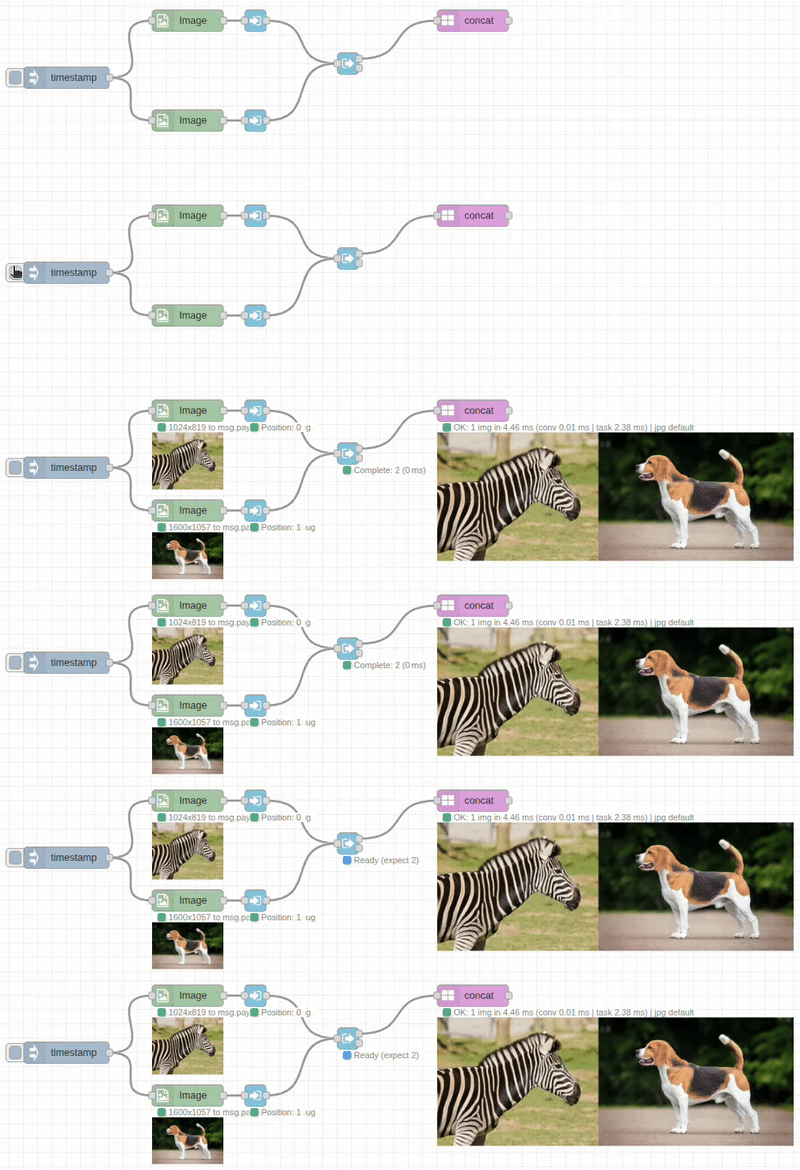
Input/Output Specification
Inputs
- Image Array: an array of raw image objects or encoded JPEG/PNG/WebP/BMP
Buffers, read from Input (msg.payloadby default). A single image is treated as an array of one. - The images may have different sizes and color spaces. They are all converted to one color space before joining: RGBA if any image is RGBA, else BGRA, RGB, BGR and GRAY, in that order.
Outputs
One output:
- Combined Image: one image, written to Output (
msg.payloadby default), as a raw image object or an encodedBuffer(JPEG/PNG/WebP) - Dimensions: joining to the right or left, the width is the sum of the widths (the scaled widths with Resize to max) and the height the largest height; joining down or up, the other way round
msg.performance.rpimage.<key>:{ conversion, task, total }in milliseconds
Configuration Options
| Property | Default | Meaning |
|---|---|---|
| Input | msg.payload | Where the array is read (msg, flow or global) |
| Output | msg.payload | Where the joined image is written (msg, flow or global) |
| Output Format | Raw (fastest) | Raw (fastest), JPEG, PNG or WebP, with Quality (90), PNG Optimize and the WebP options as in resize |
| Debug / Debug Width | off / 200 | Show processed image under the node in the editor |
| Direction | → Right | → Right, ← Left, ↓ Down or ↑ Up |
| Strategy | Pad at start | How images of a different height (or width) are matched: Pad at start, Pad at end, Pad both sides or Resize to max |
| Pad colour | #000000 | Colour of the padding |
| Inference | off | Under Advanced options: Transform inference coordinates, with Inf. Input and Inf. Output (both msg.inference) |
The editor has no Name field for this node, so its timings are recorded under msg.performance.rpimage.rp_concat.
Direction Options
- → Right: Images arranged left-to-right in array order
- ← Left: the → Right result mirrored horizontally: the first image ends up on the right, and every image is mirrored too
- ↓ Down: Images stacked top-to-bottom in array order
- ↑ Up: Images stacked bottom-to-top (the first image at the bottom), not mirrored
Strategy Options
For a horizontal join the strategies act on the height; for a vertical join, on the width.
- Pad at start: padding above (or to the left of) the smaller images
- Pad at end: padding below (or to the right of) the smaller images
- Pad both sides: the smaller images centred, with padding on both sides
- Resize to max: every image scaled, keeping its aspect ratio, to the largest height (or width)
Color Configuration
- Pad colour: picked with the editor's colour picker (
#RRGGBB); default black - When the joined image has alpha (RGBA, BGRA), the padding is transparent
Inference
With Transform inference coordinates checked, Inf. Input must hold an array with one entry per input image, each the inference array of that image. The node maps every detection (with raw_boxes) and segmentation polygon into the joined image and writes a single flat array to Inf. Output; other entries are copied unchanged and bitmap masks are not transformed. The image sizes are read from the raw image objects: with encoded Buffer inputs the coordinates come out as NaN.
Status and Errors
- Success: green dot
OK: 1 img in <t> ms (conv <c> ms | task <k> ms)(one joined image), plus the preview format with Debug on - Failure:
msg.erroris set, the first input image is written to Output, a warning is logged, the status shows a red ringError: <first 30 characters>and the message is still sent. An invalid array givesInvalid image list
Performance Notes
- The images are converted, padded or scaled and joined in one call to the native OpenCV addon, on the libuv thread pool
Real-World Examples
Before/After Comparison
[Original Image] → [Array-In: pos=0] ┐
[Processed Image] → [Array-In: pos=1] ├→ [Array-Out] → [Concat: Direction=Right, Strategy=Pad both sides] → [Comparison Strip]Create side-by-side before/after comparisons with centered alignment. Array-In and Array-Out, used in these examples to build the array, are part of @rosepetal/node-red-contrib-utils.
Product Catalog Strip
[Product Photos Array] → [Concat: Direction=Right, Strategy=Resize to max] → [Catalog Strip]Combine multiple product views, resizing to uniform height.
Progress Timeline
[Step 1 Image] → [Array-In: pos=0] ┐
[Step 2 Image] → [Array-In: pos=1] ├→ [Array-Out] → [Concat: Direction=Down, Strategy=Pad both sides] → [Process Timeline]
[Step 3 Image] → [Array-In: pos=2] ┘Document multi-step processes vertically with centered alignment.
Social Media Carousel
[Image Array] → [Resize: Height=Set to 600, Width empty] → [Concat: Direction=Right, Strategy=Pad at start] → [Carousel Image]Create horizontal image strips for social media.
Report Layout
[Chart Image] → [Array-In: pos=0] ┐
[Photo Evidence] → [Array-In: pos=1] ├→ [Array-Out] → [Concat: Direction=Down] → [Report Section]
[Data Table] → [Array-In: pos=2] ┘Combine different types of visual content into reports (Direction ↓ Down).
Common Issues & Troubleshooting
Dimension Mismatches
- Issue: Images with different sizes leave padded bands
- Solution: Choose Resize to max, or use a resize node to standardize dimensions before concat
Mirrored Images
- Issue: With ← Left the images come out mirrored
- Cause: The node mirrors the whole joined image to reverse the order
- Solution: Reverse the array before the node and use → Right
Memory Usage with Large Images
- Issue: Concatenating many large images uses significant memory
- Solution: Resize images to appropriate sizes before concatenation
Unexpected Transparency
- Issue: Padding is transparent instead of the pad colour
- Cause: One RGBA image makes the whole result RGBA, and padding on an image with alpha is transparent
- Solution: Convert the images to RGB first with color-convert