

Filter Node
Purpose & Use Cases
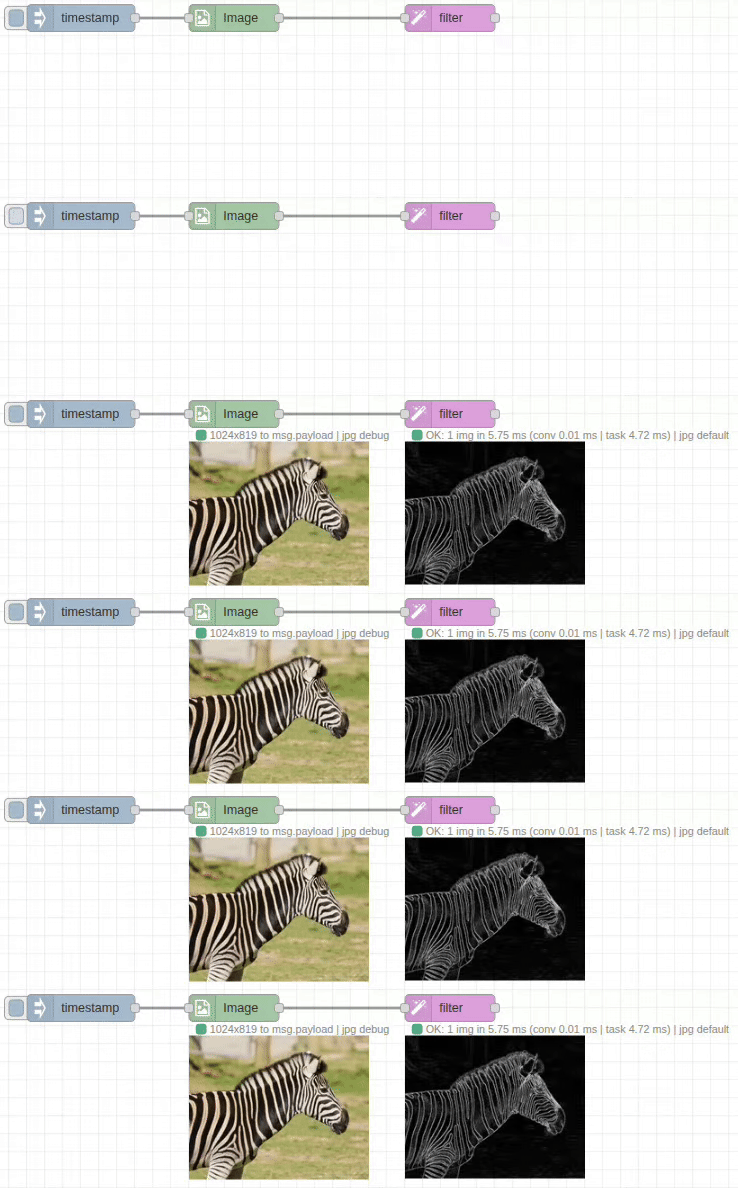
The filter node applies one filter to an image, or to every image of an array: box blur, sharpening, Sobel edge detection, emboss, Gaussian blur, Otsu threshold, histogram equalization or CLAHE. The filters run in the native OpenCV addon.
Real-World Applications:
- Photo Enhancement: Sharpen portraits and improve image quality
- Artistic Effects: Create stylized images with emboss and edge effects
- Quality Control: Use edge detection to analyze product shapes and boundaries
- Medical Imaging: Enhance contrast and details in diagnostic images
- Preprocessing: Prepare images for AI analysis with noise reduction and enhancement
Input/Output Specification
Inputs
- Single Image: a raw image object, or an encoded JPEG/PNG/WebP/BMP
Buffer(decoded by the addon) - Image Array: an array of images, filtered in parallel with the same settings; the output is an array in the same order
- Dynamic Parameters: Kernel Size, Intensity, Pre-blur and Strength can be read from
msg,floworglobal
Outputs
One output, written to Output to (msg.payload by default):
- Filtered Image: same size, channels and color space as the input, as a raw image object or an encoded
Buffer(JPEG/PNG/WebP) msg.performance.rpimage.<key>:{ conversion, task, total }in milliseconds
Configuration Options
| Property | Default | Meaning |
|---|---|---|
| Name | empty | Label of the node; also the key of its timings in msg.performance.rpimage |
| Input from | msg.payload | Where the image or array is read (msg, flow or global) |
| Output to | msg.payload | Where the result is written (msg, flow or global) |
| Output Format | Raw (fastest) | Raw (fastest), JPEG, PNG or WebP, with Quality (90), PNG Optimize and the WebP options as in resize |
| Debug / Debug Width | off / 200 | Show processed image under the node in the editor (the first image of an array) |
| Filter Type | Blur | One of the filters below |
| Kernel Size | 3 | Size of the filter window: odd, 3 to 15 (an even value is raised by one, other values are clamped). Shown for Blur, Sharpening, Edge Detection, Gaussian Blur and CLAHE |
| Intensity | 1.0 | Strength, 0.0 to 2.0 (clamped). The editor names it after the filter: Intensity, Sharpness, Edge Strength, Emboss Depth, Blur Radius or Clip Limit |
| Invert | off | Otsu Threshold. Invert binary output (white background, black foreground) |
| Pre-blur | 0 | Otsu Threshold. Gaussian blur before thresholding, odd 3 to 15 (see the note under Otsu Threshold) |
| Strength | 100 | Histogram Equalization. 0-100: mix of the equalized and the original image |
Filter Types
Blur
- Operation: box blur (mean of the Kernel Size × Kernel Size window)
- Intensity: below 1.0 the result is mixed with the original (0 gives the original); 1.0 and above give the full blur
Sharpening
- Operation: convolution with a sharpening kernel of Kernel Size; Sharpness scales the effect (0 leaves the image unchanged). Kernel Size 3 weights the 4 nearest neighbours; any larger Kernel Size weights only the 8 nearest neighbours, so 5 to 15 give the same result
Edge Detection
- Operation: Sobel gradients in x and y on the grayscale image, averaged; Edge Strength multiplies the result
- Output: a grayscale edge map, returned with the channel count of the input (the alpha channel of a 4-channel image becomes opaque)
Emboss
- Operation: 3×3 relief kernel from top-left to bottom-right, then 128 is added to every channel (clipped at 255). The kernel weights add up to 1, so a flat area keeps its value plus 128 rather than becoming mid-gray (only black areas end up mid-gray); Emboss Depth scales every weight except the centre. Kernel Size is not used
Gaussian Blur
- Operation: Gaussian blur with a Kernel Size window and sigma = Kernel Size / 6 × Blur Radius. A Blur Radius of 0 lets OpenCV derive sigma from the window size
Otsu Threshold
- Operation: converts to grayscale, picks the threshold with Otsu's method and returns a black and white image with the channel count of the input
- Invert: white background and black foreground
- Pre-blur: a value from 1 to 15 is made odd and at least 3. Note: the native addon raises every kernel size to at least 3, so a 3×3 Gaussian pre-blur is applied even when Pre-blur is 0
Histogram Equalization
- Operation: equalizes the histogram of a grayscale image, or of the luminance (Y of YCrCb) of a color image, which keeps the colors
- Strength: 100 gives the equalized image, 0 the original, values between mix the two
CLAHE (Adaptive Hist. Eq.)
- Operation: contrast-limited adaptive histogram equalization on the grayscale image or on the luminance of a color image
- Kernel Size: the tile grid (Kernel Size × Kernel Size tiles)
- Clip Limit: Intensity × 4, at least 1 (so 0.25 to 2.0 maps to a clip limit of 1 to 8)
Filter Strength/Parameters
- Sources: Number,
msg.*,flow.*,global.*. A value that is not a number fails withValue "..." from property "..." is not a valid number.
Output Format Options
- Raw: Standard image object (fastest between image nodes)
- JPEG: Compressed with quality control; the alpha channel is dropped
- PNG: Lossless
- WebP: Lossy or lossless
Status and Errors
- Success: green dot
OK: <n> img in <t> ms (conv. <c> ms | task <k> ms); with Debug on it reads(conv <c> ms | task <k> ms)followed by the preview format - Failure:
msg.erroris set, the input is written back to Output to, a warning is logged, the status shows a red ringError: <first 30 characters>and the message is still sent
Performance Notes
- Filtering and encoding run in the native OpenCV addon on the libuv thread pool, not on the Node-RED event loop
- The images of an array are filtered concurrently
Real-World Examples
Binarize for Inspection
[Camera] → [Filter: Otsu Threshold, Pre-blur 5] → [Blob analysis]Separate dark parts from a light background before measuring them.
Contrast for Dark Images
[Image-In] → [Filter: CLAHE, Kernel Size 7, Clip Limit 0.5] → [Inference]Raise local contrast of under-exposed images before a model.
Edge Map
[Image-In] → [Filter: Edge Detection, Kernel Size 3, Edge Strength 1.5] → [Image-Out]Save an edge map of a part to check its outline.
Common Issues & Troubleshooting
The Image Does Not Change
- Issue: Blur or Sharpening seems to do nothing
- Cause: Intensity (Sharpness) is 0, or Kernel Size is 3 on a large image
- Solution: Raise the intensity (up to 2.0), or for Blur the kernel size (up to 15)
Otsu Output Is Inverted
- Issue: Objects come out black on white instead of white on black
- Solution: Toggle Invert
Dynamic Parameter Errors
- Issue:
Value "..." from property "..." is not a valid number.inmsg.error - Solution: Make sure the
msg,floworglobalproperty exists and holds a number
See Also
- draw: overlay points and lines
- color-convert: convert between color spaces before or after filtering