

Padding Node
Purpose & Use Cases
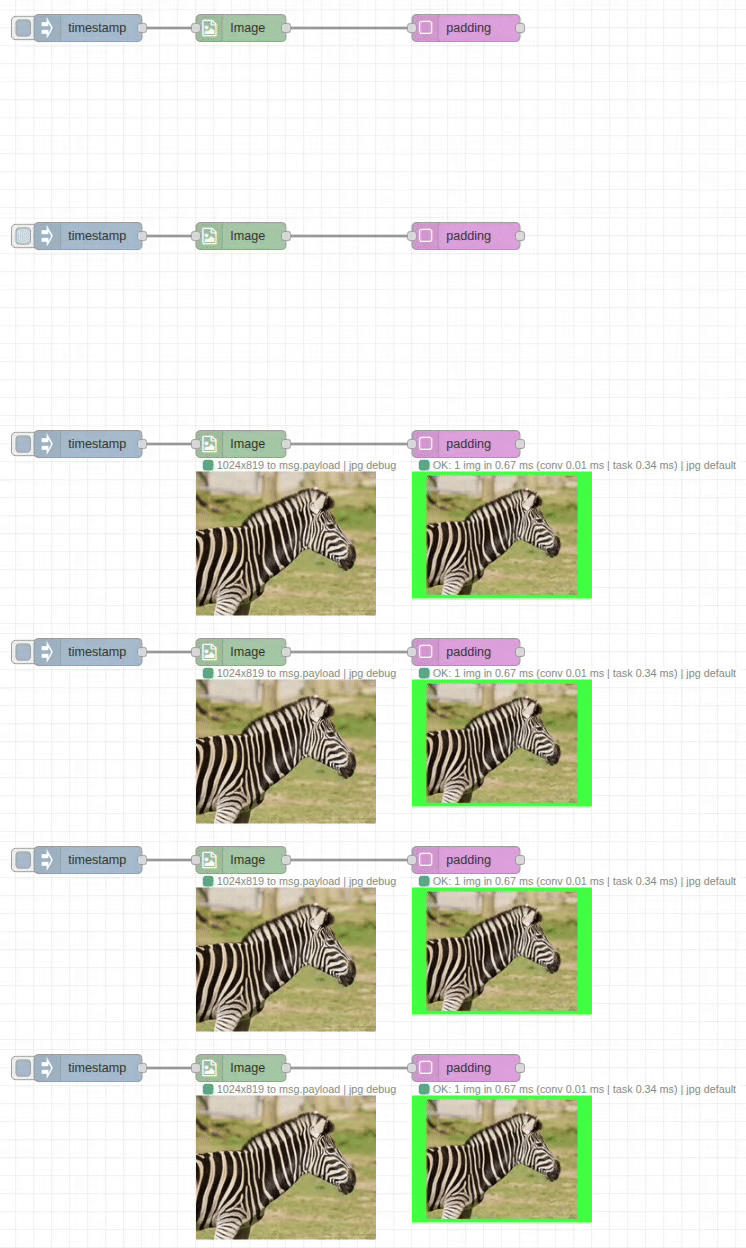
The padding node adds a margin of a solid colour on each side of an image, or of every image of an array. The canvas grows by the margins and the original pixels are kept as they are.
Real-World Applications:
- Social Media Formatting: Add borders for consistent post dimensions
- Print Preparation: Add bleed areas and margins for professional printing
- Gallery Display: Create uniform frames for image collections
- Logo Branding: Add branded borders around product images
- Document Layout: Add margins for text overlay or annotations
Input/Output Specification
Inputs
- Single Image: a raw image object, or an encoded JPEG/PNG/WebP/BMP
Buffer(decoded by the addon) - Image Array: an array of images, padded in parallel with the same margins; the output is an array in the same order
- Dynamic Values: each margin can be read from
msg,floworglobal
Outputs
One output, written to Output (msg.payload by default):
- Padded Image: a raw image object of
width + left + rightbyheight + top + bottompixels, or an encodedBuffer(JPEG/PNG/WebP) msg.performance.rpimage.<key>:{ conversion, task, total }in milliseconds
Configuration Options
| Property | Default | Meaning |
|---|---|---|
| Name | empty | Label of the node; also the key of its timings in msg.performance.rpimage |
| Input | msg.payload | Where the image or array is read (msg, flow or global) |
| Output | msg.payload | Where the result is written (msg, flow or global) |
| Output Format | Raw (fastest) | Raw (fastest), JPEG, PNG or WebP, with Quality (90), PNG Optimize and the WebP options as in resize |
| Debug / Debug Width | off / 200 | Show processed image under the node in the editor (the first image of an array) |
| Top | 0 | Margin above the image, in pixels |
| Bottom | 0 | Margin below the image, in pixels |
| Left | 0 | Margin on the left, in pixels |
| Right | 0 | Margin on the right, in pixels |
| Colour | #000000 | Colour of the margins |
| Inference | off | Under Advanced options: Transform inference coordinates, with Inf. Input and Inf. Output (both msg.inference) |
Padding Dimensions
- Values: whole pixels; decimals are truncated and an empty value means 0. Negative values are not supported (OpenCV rejects them and the node reports the error)
- Sources: Number,
msg.*,flow.*,global.*. A value that is not a number fails withValue "..." from property "..." is not a valid number.
Color Configuration
- Colour: picked with the editor's colour picker (
#RRGGBB); default black - Images with alpha (RGBA, BGRA): the margins are transparent; their colour channels hold the pad colour
Output Format Options
- Raw: Standard image object (fastest between image nodes)
- JPEG: Compressed; the alpha channel is dropped, so transparent margins show the pad colour
- PNG: Lossless, keeps the alpha channel
- WebP: Keeps the alpha channel
Inference
With Transform inference coordinates checked, the normalized coordinates of the detections and segmentations read from Inf. Input are recomputed for the larger canvas (measured on the first input image) and written to Inf. Output. Bitmap masks are padded too.
Status and Errors
- Success: green dot
OK: <n> img in <t> ms (conv <c> | task <k> ms)(nomsafter the conversion time); with Debug on it reads(conv <c> ms | task <k> ms)followed by the preview format - Failure:
msg.erroris set, the input is written back to Output, a warning is logged, the status shows a red ringError: <first 30 characters>and the message is still sent
Performance Notes
- The margins are added with
cv::copyMakeBorderin the native addon, on the libuv thread pool; the images of an array are processed concurrently - New Width: Original width + left padding + right padding
- New Height: Original height + top padding + bottom padding
Real-World Examples
Social Media Post Creation
[Image-In: product.jpg] → [Padding: 50px all sides, Brand color] → [Social Post]Add branded borders for consistent social media appearance.
Print Preparation
[Photo] → [Padding: Top=100, Right=50, Bottom=100, Left=50, White] → [Print Ready]Add margins for professional printing with bleed areas.
Gallery Standardization
[Image Array] → [Padding: Equal margins, White] → [Uniform Gallery]Create consistent framing for image galleries.
Logo Watermarking Prep
[Product Image] → [Padding: Bottom=80, White] → [Ready for Logo Overlay]Add space for logo placement with white background.
Document Border Creation
[Document Scan] → [Padding: 20px all sides, Light gray] → [Bordered Document]Add subtle borders to scanned documents.
Common Issues & Troubleshooting
Transparency Issues
- Issue: Margins of an RGBA image are transparent instead of coloured
- Cause: For images with alpha the margins get alpha 0
- Solution: Convert the image to RGB first (color-convert), or save as JPEG, which drops the alpha channel
Large File Sizes
- Issue: Padding significantly increases file size
- Cause: Expanded canvas dimensions
- Solution: Use appropriate compression settings, consider if padding is necessary
Dynamic Dimension Errors
- Issue: Invalid padding values from message properties
- Solution: Make sure the dynamic sources hold zero or positive numbers