

Mosaic Node
Purpose & Use Cases
The mosaic node places the images of an array on a canvas of a fixed size, each at a position set in the node, in pixels or normalized (0-1) coordinates. The images keep their own size; to scale or rotate them, use advanced-mosaic.
Real-World Applications:
- Custom Layouts: Create precise image arrangements with exact positioning
- Template-Based Designs: Position images according to predefined layout templates
- Overlay Compositions: Layer images at specific positions for complex compositions
- Dashboard Assembly: Position charts and data visualizations with pixel precision
- Print Design: Create exact layouts for brochures, posters, and marketing materials
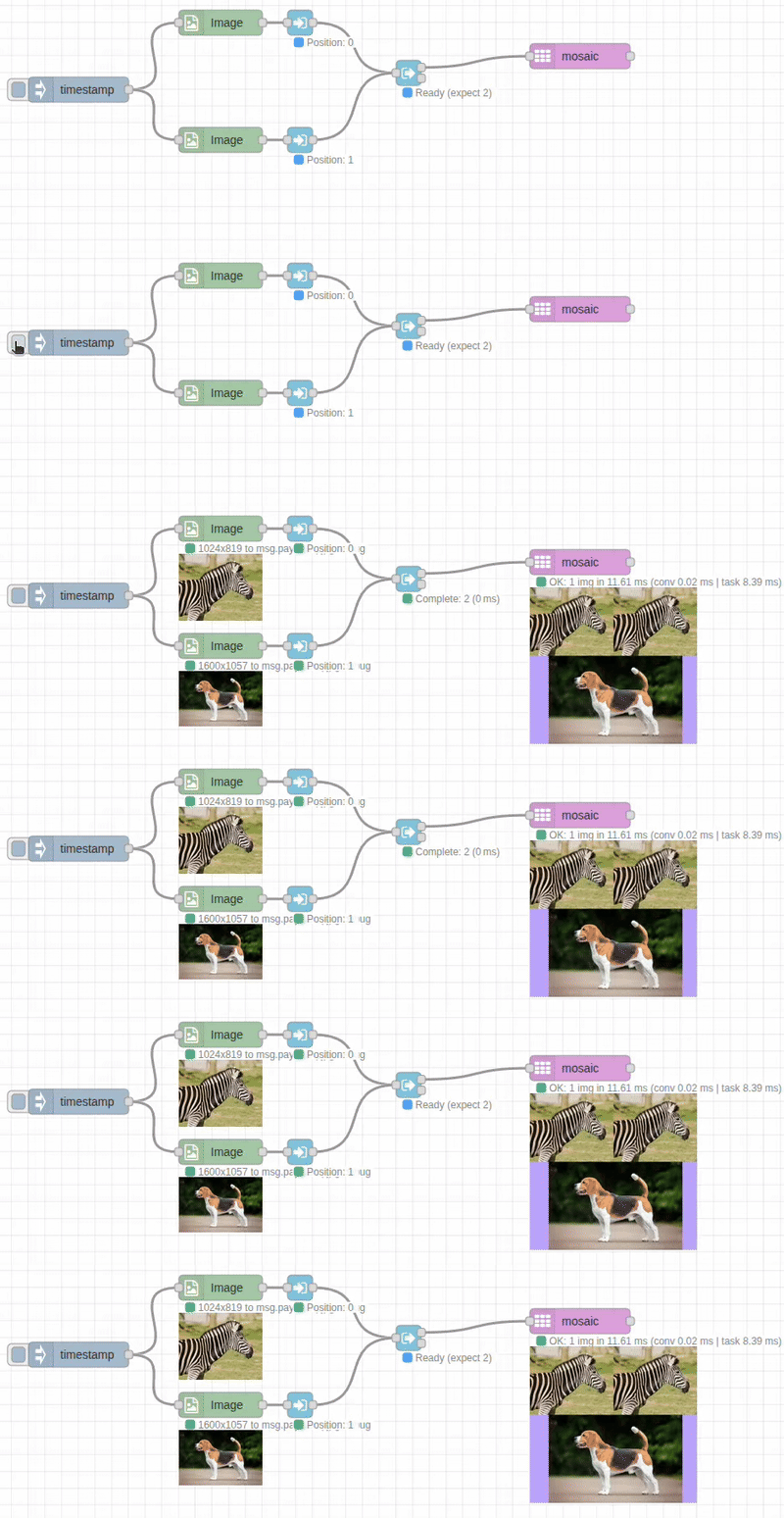
Input/Output Specification
Inputs
- Image Array: an array of raw image objects or encoded JPEG/PNG/WebP/BMP
Buffers, read from Input from (msg.payloadby default). A single image is treated as an array of one. - Positions: set in the node's Image Positions table, not taken from the message.
- Canvas Width / Canvas Height: a number, or read from
msg,floworglobalfor each message.
Outputs
One output:
- Composite Image: one image of Canvas Width × Canvas Height, written to Output to (
msg.payloadby default), as a raw image object or an encodedBuffer(JPEG/PNG/WebP) msg.performance.rpimage.<key>:{ conversion, task, total }in milliseconds
The canvas takes the color space of the inputs: RGBA if any image is RGBA, else BGRA, RGB, BGR and GRAY, in that order. Every image is converted to it.
Configuration Options
| Property | Default | Meaning |
|---|---|---|
| Name | empty | Label of the node; also the key of its timings in msg.performance.rpimage |
| Input from | msg.payload | Where the array is read (msg, flow or global) |
| Output to | msg.payload | Where the composite is written (msg, flow or global) |
| Output Format | Raw (fastest) | Raw (fastest), JPEG, PNG or WebP, with Quality (90), PNG Optimize and the WebP options as in resize |
| Debug / Debug Width | off / 200 | Show processed image under the node in the editor |
| Canvas Width | 800 | Width of the canvas in pixels |
| Canvas Height | 600 | Height of the canvas in pixels |
| Background Color | #000000 | Colour of the canvas where no image is placed (opaque, also on canvases with alpha) |
| Normalized Coords | off | X and Y as fractions of the canvas size (0-1); off, in pixels |
| Image Positions | empty; opening the editor adds one row: image 0 at 0, 0 | Table of Array Index, X Position, Y Position; Add Position and Remove manage the rows |
| Inference | off | Under Advanced options: Transform inference coordinates, with Inf. Input and Inf. Output (both msg.inference) |
Positioning System
Coordinate System
- Normalized Coords off: X and Y in pixels, rounded to whole pixels
- Normalized Coords on: X and Y multiplied by the canvas width and height
Image Positions
- Array Index: which image of the input array to place (0 = first). The same image can be placed in several rows; a row whose index is outside the array is ignored without a warning
- X Position / Y Position: where the top-left corner of the image goes. The image is placed at its own size; the part that falls outside the canvas is cut off
- Overlaps: the pixels of an image replace what is below them; alpha is not blended. With up to 4 rows, later rows are drawn over earlier ones; with more than 4 rows an addon built with OpenMP places the rows in parallel, and the order of overlapping images is then not guaranteed
Inference
With Transform inference coordinates checked, Inf. Input must hold an array with one entry per input image, each the inference array of that image. Every detection (with raw_boxes) and segmentation polygon is mapped to each place its image was put on the canvas (clipped to the canvas) and the node writes a single flat array to Inf. Output; other entries are copied unchanged. Bitmap masks are not transformed. The image sizes are read from the raw image objects: with encoded Buffer inputs the coordinates come out as NaN.
Status and Errors
- Success: green dot
OK: <n> pos in <t> ms (conv <c> ms | task <k> ms), where n is the number of rows whose Array Index is inside the array, orOK: empty canvas in <t> mswhen there is none. With Debug on the status readsOK: 1 img in <t> ms (conv <c> ms | task <k> ms) | <format> (<n> pos), or(empty canvas)at the end - Failure:
msg.erroris set, the first input image is written to Output to, a warning is logged, the status shows a red ringError: <first 30 characters>and the message is still sent. An invalid array givesInvalid image list; a canvas size of 0 or less givesCanvas dimensions must be positive numbers
Performance Notes
- The canvas is composed in one call to the native OpenCV addon, on the libuv thread pool
Real-World Examples
Four-Panel Layout
Image Positions (pixels, canvas 800 × 600, four 400 × 300 images):
| Array Index | X Position | Y Position |
|---|---|---|
| 0 | 0 | 0 |
| 1 | 400 | 0 |
| 2 | 0 | 300 |
| 3 | 400 | 300 |
[Four images] → [Array-Out] → [Mosaic: 800x600 canvas] → [Image-Out]Template-Based Layout
Image Positions with Normalized Coords on:
| Array Index | X Position | Y Position |
|---|---|---|
| 0 | 0.1 | 0.1 |
| 1 | 0.6 | 0.1 |
| 2 | 0.1 | 0.6 |
The images keep their size, so they must fit the cells of the template; resize them first if needed.
Logo Overlay
[Base Image] → [Array-In: pos=0] ┐
[Logo] → [Array-In: pos=1] ├→ [Array-Out] → [Mosaic: rows 0 at 0,0 and 1 at 20,20] → [Branded Image]Place a logo over the top-left corner of a photo; the canvas has the size of the photo. Array-In and Array-Out are part of @rosepetal/node-red-contrib-utils.
Common Issues & Troubleshooting
Images Missing from the Canvas
- Issue: An image does not appear
- Solution: Check that its Array Index is smaller than the length of the input array, and that its position is inside the canvas
Coordinate System Confusion
- Issue: Images appearing in wrong locations
- Solution: Check Normalized Coords against your values
- Normalized: Use 0-1 values for relative positioning
- Pixel: Use absolute coordinates within canvas bounds
Canvas Size Problems
- Issue: Images clipped at the edges
- Solution: Make the canvas large enough for the images at their own size, or resize them first
Dynamic Positions
- Issue: The positions must change per message
- Cause: Positions are fixed in the node configuration; only the canvas size can come from the message